Project Zomboid Early Access
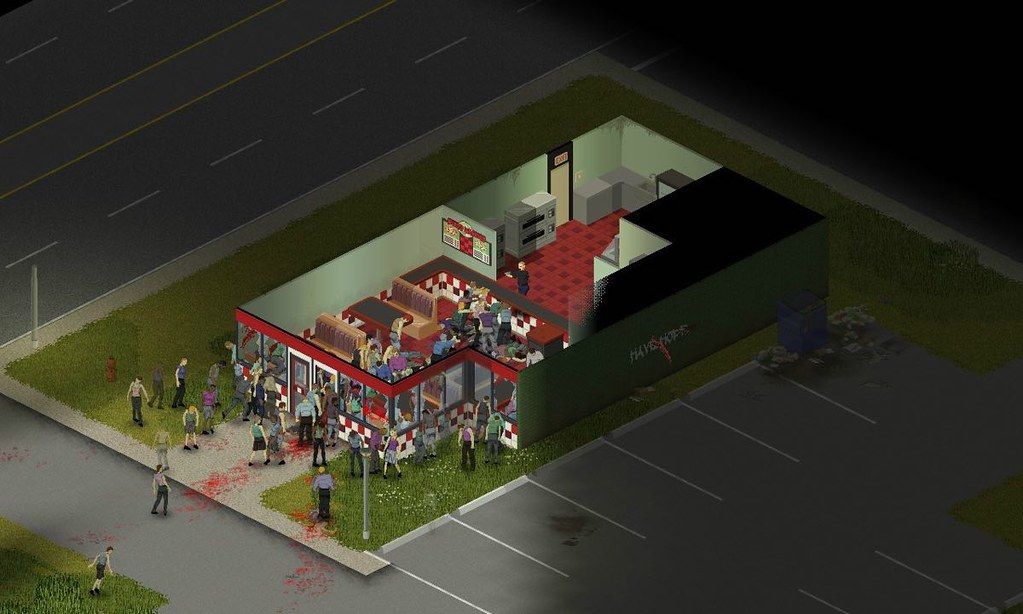
Project Zomboid is an open-ended zombie-infested sandbox. It asks one simple question – how will you die?In the towns of Muldraugh...
- Intel, 64-bit processor
- OS X 10.7.3 or later
Description
Project Zomboid is an open-ended zombie-infested sandbox. It asks one simple question – how will you die?
In the towns of Muldraugh and West Point, survivors must loot houses, build defences and do their utmost to delay their inevitable death day by day. No help is coming – their continued survival relies on their own cunning, luck and ability to evade a relentless horde.
Current Features
• Hardcore Sandbox Zombie Survival Game with a focus on realistic survival.
• Online multiplayer survival with persistent player run servers.
• Local 4 player split-screen co-op
• Hundreds of zombies with swarm mechanics and in-depth visual and hearing systems.
• Full line of sight system and real-time lighting, sound and visibility mechanics. Hide in the shadows, keep quiet and keep the lights off at night, or at least hang sheets over the windows.
• Vast and growing map (loosely based on a real world location) for you to explore, loot and set up your fortress. Check out Blindcoder’s map project: https://map.projectzomboid.com/
• Vehicles with full physics and deep and realistic gameplay mechanics.
• Use tools and items to craft weapons, barricade and cook. You can even build zombie proof forts by chopping trees, sawing wood and scavenging supplies.
• Deal with depression, boredom, hunger, thirst and illness while trying to survive.
• Day turns to night. The electricity falters. Hordes migrate. Winter draws in. Nature gradually starts to take over.
• Farming, trapping, fishing, carpentry, cooking, trapping, character customization, skills and perks that develop based on what you do in-game.
• Proper zombies that don’t run. (Unless you tell them to in the sandbox menu).
• A ton of amazing atmospheric music tracks by the prodigy that is Zach Beever.
• Imaginative Challenge scenarios and instant action ‘Last Stand’ mode, on top of regular Sandbox and Survival
• Full, open and powerful Lua modding support.
• Xbox Controller Gamepad support on Windows. [Others pads
Editor-checked details
Recommended for players who set their own goals, accept stories of failure and gradually master layered survival. In the first world, lower zombie population/infection and enable target outlines, then practice “check behind, pull one, shove, stand on it, strike the head.” For the first two days prioritize water containers, food, a basic weapon, hammer/saw/nails, backpack and a safe sleep point rather than hoarding everything. Vehicles and guns amplify risk, so establish a second retreat location. Copy the entire world and record load order before adding mods. Safe order: verify Intel/non-NVIDIA; dual backup; 41.78.19/SHA-256; fresh mod-free world; combat/barricade; reload; old save.
Pros
- Survival is not one hunger bar: sound, sight, light, fatigue, load, mood, illness, weather, utility failure and horde migration interact, so one broken window or loud vehicle can alter several days of risk. Sandbox finely tunes zombie count/speed, infection, loot, time and events, supporting both permadeath and learning worlds. Maps, vehicles, carpentry, cooking, farming, fishing and mods create long self-directed goals. A new character can continue in the same world after death, leaving tangible stories of failure. It supports persistent servers, local split screen and extensive Lua modding; all five target languages have official interface support.
Cons
- Permadeath, bite infection and skill rebuilding can erase dozens of hours through one off-screen ambush; newcomers who do not tune Sandbox may confuse learning cost with arbitrary punishment. Controls involve layered context menus, container transfers, stances and ground attacks, and combat animation is unforgiving. Corpses, vehicles, items and large mod sets increase memory, loading and save risk in long worlds, while servers must maintain identical mod order. Functional visuals demand status reading rather than spectacle. Official Mac support is Intel x86 with AMD/Intel graphics; M1/M2 and NVIDIA Macs are explicitly incompatible, so Apple Silicon users cannot treat it as an ordinary Rosetta app.
Installation steps
- This page strictly covers stable Project Zomboid 41.78.19. Official Mac requirements are macOS 10.15+, Intel x86 64-bit, 8 GB RAM and 5 GB storage, using AMD or Intel integrated graphics; NVIDIA on Mac is incompatible, and M1/M2 are explicitly unsupported. Back up characters, worlds, Sandbox rules, skills, inventory, vehicles, bases, map marks, mod list/order, server configuration and Cloud, then record 41.78.19/SHA-256. With mods off in a fresh Sandbox, create a character and validate looting, doors/windows, knockdown/finishing combat, bandaging, eating, sleep/time progression, one barricade and save reload. Compare carried weight, moodles, sound and map position before restoring old data.
Uninstallation steps
- Before uninstalling, enter a safe interior, clear nearby zombies and let the current action/autosave finish. Do not force-quit during high-speed driving, map-cell streaming, multiplayer server save or mod update. Keep two rotating world backups and record character, date/time, coordinates, health/infection, load, vehicle, base, generator and 41.78.19/SHA-256; separately preserve Sandbox settings, mod IDs/order and server configuration. Reinstall with Cloud/mods off and save/load one fresh world. After map cells, sound, input and combat work, copy the old world and restore the exact mod order before launching it.
Common errors and fixes
- If an old world fails or map cells are missing, copy the backup before doing anything and never save it with required mods absent. Match 41.78.19, map mods, dependencies, load order and server Workshop IDs. Whiffed attacks often come from disabled ground attack, wrong facing/range, exhaustion or overload; knock down one zombie, stand on it to prevent rising and target the head. A bite is not an ordinary wound under default Sandbox rules, so isolate supplies and prepare a successor. For a vehicle, inspect key, fuel, battery, engine and noise risk. For black screen/crash, launch without mods and inspect logs. Mac must be Intel x86; NVIDIA Macs and M1/M2 are unsupported. Client/server must both use 41.78.19 and not mix branches.
What changed in this version
- The site version is official stable branch 41.78.19. The official forum still labels this exact number Stable; no higher testing-branch number is shown or discussed here. The complete itemized body matching this stable hotfix was not obtained, so individual fixes are not invented. Verifiable scope includes open-world survival, visual/hearing hordes, hunger/thirst/illness/moodles, day/night and utility failure, vehicles, construction, farming/fishing/trapping/cooking, skills, Sandbox, challenges, Lua mods, online servers and local four-player split screen. Acceptance covers displayed 41.78.19, a mod-free fresh world, one fight, one barricade and reload.
File verification






Alternatives



Screenshots