Dying Light
Dying Light is a first-person, action survival game set in a vast open world. Roam a city devastated by a mysterious epidemic, scavenging...
- Intel, 64-bit processor
- macOS 10.12.1 or later
Description
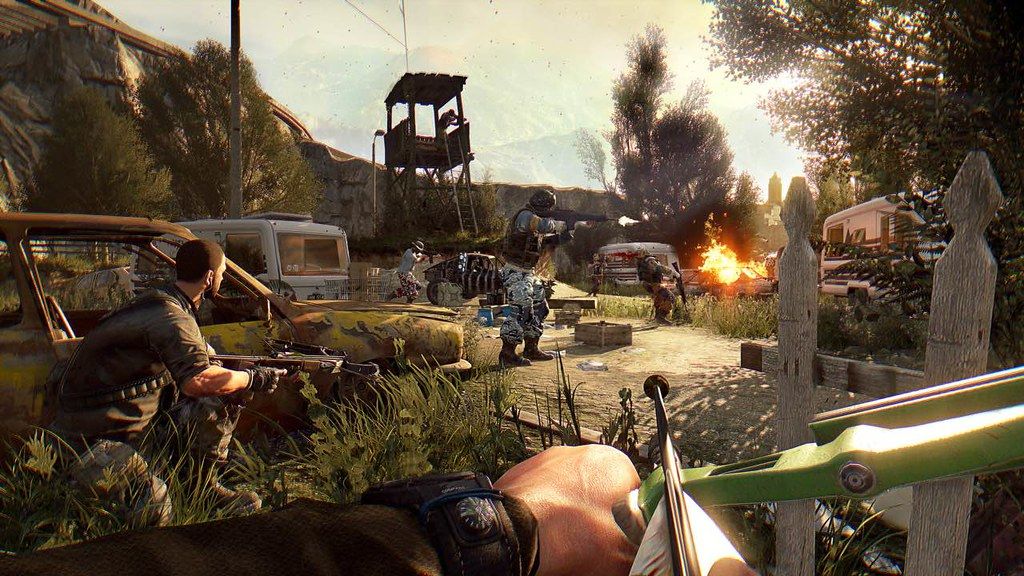
Dying Light is a first-person, action survival game set in a vast open world. Roam a city devastated by a mysterious epidemic, scavenging for supplies and crafting weapons to help defeat the hordes of flesh-hungry enemies the plague has created. At night, beware the Infected as they grow in strength and even more lethal nocturnal predators leave their nests to feed on their prey.
Good Night. Good Luck.
Welcome to the Quarantine – Experience an original and intense story set in an infected city cut off from the outside world. Only the fittest have any hope of survival.
Vast Open World – Dying Light lets you traverse an extensive world plunged into chaos and destruction. In this diverse environment, you fight for survival against many kinds of enemies since the infected are not the only threat: facing down other desperate humans is often the only way to get precious supplies.
Night Changes the Rules – In daylight you explore the city searching for supplies and weapons. After nightfall, though, this infected world undergoes a dramatic transformation that gives the gameplay a new dimension. You, a hunter by day, become prey. The infected grow in strength, but something even more sinister looms in the darkness to begin its hunt.
Parkour-Style Movement – Whether you hunt or escape the hunters, you can move around the city with ease and speed. Jump between rooftops, climb walls, and attack your foes from above. Dying Light gives players a freedom of movement never seen in open world games before.
Brutal, Visceral Combat – Fight face to face using a diverse selection of melee weapons: knives, bats, axes, or more unusual tools of destruction. Strike down your enemies, cut off their limbs, save your own life!
Firearms – Powerful but noisy. Use pistols, shotguns, and rifles to gain an advantage over enemies, but remember that gunfire can and will attract unwanted attention.
Craft Your Weapons – Why use an ordinary cleaver when you can attach a lighter for burni
Editor-checked details
Recommended for owners of a supported Intel/AMD Radeon Mac who enjoy first-person parkour, survival horror, melee crafting and co-op campaigns. Apple-silicon owners should not treat Rosetta as a stable solution. Workflow: reserve 55 GB; back up campaign/The Following; record 1.55.1, DLC, mods and SHA-256; test a clean profile for 30 minutes; verify a night chase, saving and co-op; load copies of both modes and check spawn points; restore mods individually. Compare Left 4 Dead 2 for co-op shooting, Days Gone for open-world narrative, or the series sequel for newer parkour, only after confirming Mac availability.
Pros
- First-person parkour tightly links rooftop routes, climbing, jumping and escape with open-world exploration, while the day/night cycle turns daytime scavenging into high-pressure nocturnal pursuit. Visceral melee, weapon crafting, skill trees, co-op campaign and The Following’s buggy/countryside provide long progression for solo or up to four players. Definitive Edition consolidates extensive DLC, and character progression, challenges and community events add replay value.
Cons
- The Mac technology stack is old and officially covers only Intel processors with AMD Radeon; Apple silicon, Intel integrated graphics and NVIDIA lack assurance, making newer-macOS launch/render compatibility risky. The 4-GB minimum is only for low settings, and open zones, night hordes and co-op increase load. Camera motion, severe gore/dismemberment, horror chases and flashing effects are unsuitable for some players. Repeated scavenging, durability and late skill grinding can fatigue. Mods, DLC and campaign/The Following saves interact in complex ways, so an unbacked update can lose location or progress.
Installation steps
- This page covers Dying Light 1.55.1. Techland’s official Mac minimum is macOS 10.12.1, Intel Core i5 3.2 GHz, 4 GB RAM, AMD Radeon R9 M370X 2 GB and 40 GB storage; recommended is Core i7 4 GHz, 8 GB and R9 M395X 4 GB. Only AMD Radeon graphics are officially supported. This legacy Mac client has no native Apple-silicon commitment, so Rosetta on an M-series Mac is only a compatibility attempt, not official support. Keep 55 GB free, back up campaign and The Following saves, and record 1.55.1, DLC, mods and installer SHA-256. Start without mods and test movement, parkour, melee, a night chase, controller, save/load, then verify quests, skills, inventory and The Following access on a copied save.
Uninstallation steps
- Quit from a safe zone after the save indicator disappears. Copy campaign and The Following saves, settings, mod manifest and crash logs, labelled with 1.55.1, quest, skill trees, level, last location/time and SHA-256. Load the copy offline, complete combat, sleep and another save, and confirm that campaign and The Following open in the correct locations. For diagnosis, disable mods and rename configuration/cache rather than deleting the only save. During a cloud conflict, preserve both the newer local and cloud copies first. After reinstalling, verify input, parkour and saving on a new profile before restoring the old one; keep two generations.
Common errors and fixes
- For launch failure, black screen or rendering faults, confirm Intel/AMD Radeon, macOS 10.12.1+, free space and SHA-256, disable overlays/mods and rebuild configuration. NVIDIA, Intel integrated graphics and Apple silicon are outside Techland’s official Mac support scope. There is no dependable official fix for an M-series Rosetta crash; use a supported Intel/AMD Mac. If a The Following save opens in the Slums, official 1.55 specifically fixes that fault; confirm channel 1.55.1 and retry a pre-fault copy. Reduce resolution, view distance, shadows and foliage for low FPS; 4 GB is minimum. For co-op, match version, DLC and mods and test a clean session. Remove remappers/duplicate devices for controller double input.
What changed in this version
- The site channel is 1.55.1. Techland’s adjacent public official note is titled 1.55 and fixes The Following saves incorrectly launching in the Slums. No additional itemised official log could be reliably matched to the “.1” suffix, so unrelated update content is not attributed to 1.55.1. After updating, load copied campaign and The Following saves separately and check spawn location, quests, inventory, skills, buggy and saving. If a save still opens on the wrong map, stop saving and restore the pre-update copy.
File verification






Screenshots