Pixelmator
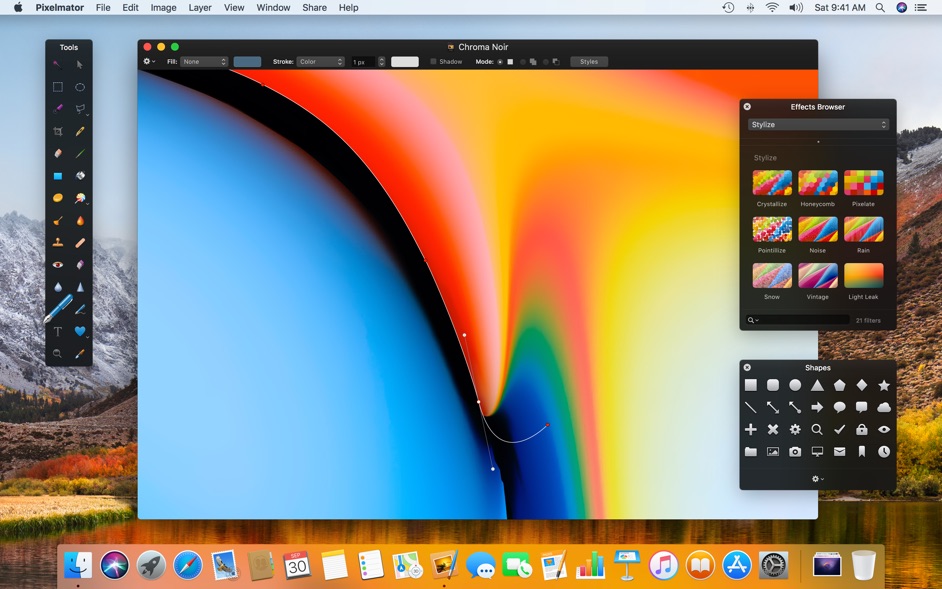
Pixelmator is a beautifully designed, easy-to-use, fast, and powerful image editor for OS X. It has everything you need to create...
Description
Pixelmator is a beautifully designed, easy-to-use, fast, and powerful image editor for OS X. It has everything you need to create, edit, and enhance your images.
Pixelmator is a layer-based image editor. You can quickly create layers from your photos, other pictures, from selections, or even your iSight. Yes, Pixelmator can add a layer to your composition directly from your Mac’s little camera.
Not only can you link and arrange added layers, but Pixelmator also allows you to blend layers, change their opacity, create clipping masks, or even add layer masks to hide some portions of a layer.
WHAT’S NEW
Version 3.9.11:
• Pixelmator Classic 3.9.11 adds a few small fixes.
REQUIREMENTS
• Intel, 64-bit processor
• macOS 10.14.4 or later
ScreenShots
:
If you are using Adblocker!! Please support this website by adding us to your whitelist. Ads are what helps us bring you premium content! Or read this to know how you can support us. Thank you!
Size
– 121.7MB
Previous Versions
Editor-checked details
Recommended for maintaining legacy PXD projects, working on an Intel Mac, or deliberately preserving a familiar Classic workflow through Rosetta on Apple silicon. Use this gate: copy originals and PXD; record OS, fonts and assets; validate brushes and colour in a test file; group source, retouch, text and effects; use masks to preserve reversibility; inspect repair edges and noise at 100%; create separate sRGB web and ICC-managed print outputs; export PXD, PSD, TIFF/PNG/JPEG; cross-check in another app; record approval, size, SHA-256 and date. For new projects needing long-term platform support, nondestructive editing or modern formats, compare Pixelmator Pro or Affinity Photo. Adobe Photoshop better fits complex PSD collaboration and mature plug-in chains.
Pros
- Classic combines layers, groups, blend modes, clipping/layer masks, selections, painting, repair, clone, colour adjustments and filters in a compact Mac interface. It suits photo retouching, web graphics, compositing, simple painting and maintenance of legacy PXD projects. PXD preserves editable structure, PSD provides a Photoshop exchange route, and JPEG/PNG/TIFF cover common delivery. It is lighter than large professional suites and has a relatively approachable layer and local-retouch workflow. Colour management, GPU processing and macOS/Automator integration were useful desktop strengths. For users with many Classic documents and a fixed legacy workflow, keeping the same build can reduce migration risk.
Cons
- Version 3.9.11 is an Intel-oriented legacy Classic build and depends on Rosetta on Apple silicon; stability with future macOS releases and old system interfaces is uncertain. It is not Pixelmator Pro, so do not expect Pro’s machine learning, modern nondestructive adjustment, video or newer document capabilities. Complex PSD smart objects, adjustment layers, text, masks and blends may not round-trip exactly, while proprietary PXD creates an archival dependency. Many layers, high-resolution filters and older GPU paths may hang or crash. It lacks Lightroom-style catalogue management, a complete RAW workflow, spot-colour/bleed/PDF-X prepress, multi-user review, version control and cloud asset management. Legacy camera, iSight, sharing and Photos interfaces can fail as permissions change.
Installation steps
- The site build is Pixelmator Classic 3.9.11, whose channel requirement is an Intel 64-bit processor and macOS 10.14.4 or later. On Apple silicon, confirm Rosetta availability and test with copies rather than opening the only legacy PXD. Build a test document with photos, text, shapes, linked layers, clipping masks, layer masks, blend modes and opacity. Validate selection, crop, transform, paint, repair, clone, levels/curves and filters. Preserve original photos, save a PXD master, then export delivery copies as JPEG, PNG, TIFF and PSD. Inspect dimensions, alpha, ICC profile, text, masks, blends and layer structure in Preview, Photoshop or another editor. For print, calculate effective DPI at final dimensions, bleed and safe area and order a proof. For web, check sRGB, pixel size, compression, EXIF/GPS and weight. Create a versioned copy before overwriting and record asset licences, fonts, export settings, file size and SHA-256.
Uninstallation steps
- Before uninstalling, Save As every editable PXD and export a flattened TIFF/PNG, delivery JPEG and, where possible, layered PSD for each project. Archive originals, linked assets, fonts and licences, brushes/gradients/presets, colour profiles, layer/mask notes, client approval, export settings and SHA-256. Prove key PSD, TIFF and PNG files open on another machine or in another app with acceptable colour and alpha edges. Quit the app before removal. Inspect containers, preferences, autosaves and caches for unique projects, recovery data or custom presets before cleanup. Uninstalling does not remove copies from Photos, iCloud/cloud drives, mail, servers, social platforms or print vendors and cannot restore overwritten images; handle those separately under the retention plan.
Common errors and fixes
- If it will not launch or crashes on Apple silicon, confirm Rosetta and test a small new file; 3.9.11 is Intel software, so do not apply Pixelmator Pro native-support claims to Classic. For missing layers or effects in PXD, preserve the original, restore the same fonts/assets and try autosave or a versioned copy without overwriting the last good file. If PSD round-trips alter masks, text or blends, duplicate and rasterise complex effects and deliver PXD, PSD and flattened proof separately. For colour shifts, embed the intended ICC, convert web output to sRGB and inspect in both managed and ordinary viewers. For dark/light halos in transparent PNG, inspect semitransparent pixels, premultiplied alpha, mask feather and background. For large-image or filter slowdowns, group, merge a copy, reduce proof size, close memory-heavy apps and free disk. Restore user resources for missing brushes/fonts/presets. If camera or Photos import fails, export a local copy and check permissions rather than relying on legacy iSight/share interfaces.
What changed in this version
- The public Pixelmator Classic 3.9.11 note says only that it adds a few small fixes. It provides no defect identifiers, affected tools or measurable behavioural changes, so this page does not invent an itemised changelog. The channel record specifies Intel 64-bit and macOS 10.14.4 or later; compatibility guidance follows that build boundary and does not mix in Pixelmator Pro or other-platform product features and versions.
File verification






Alternatives



Screenshots