PhotoMarks
PhotoMarks is a full-featured solution for visually watermarking your copyrighted images in batch mode. Why use a complicated...
- Intel, 64-bit processor
- macOS 12.0 or later
Description
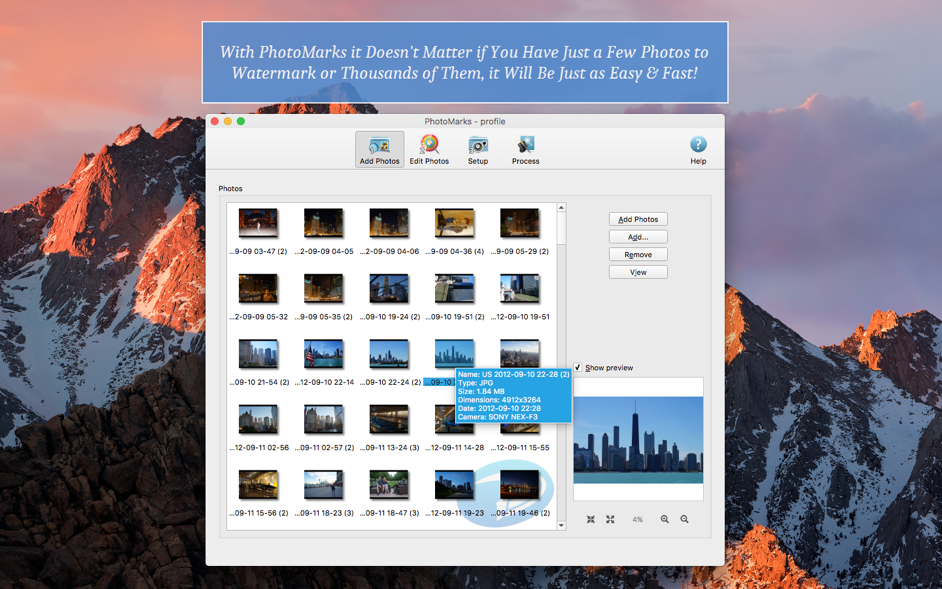
PhotoMarks is a full-featured solution for visually watermarking your copyrighted images in batch mode. Why use a complicated, general-use photo editor when you can use a lightweight, specially built tool to perform the same task?
Here is what PhotoMarks can do for you :
• Batch photo processing with support for multi-core processors;
• Completely customizable text watermarks with pixel-perfect positioning, tile mode, rotation, multiline text, custom and textured fonts, shadow, stroke, bounding box, and more;
• Completely customizable logo watermarks with pixel-perfect positioning, tile mode, rotation, scaling, stroke, shadow, and more;
• Smart-resize filter that makes the difference between landscape and portrait photos, for automatically reducing image
size
in pixels;
• Auto-rotate filter for automatically rotating photos to the right orientation, or just use a predefined rotation;
• Graphically decorate photos with beautifully designed grunge, vintage, picture, and shape frames, add a shadow effect or a simple border;
• Completely customizable rename filter with keywords and search-and-replace in filenames;
• Upload directly to FTP or send via email;
• Upload your watermarked photos directly to Flickr;
• Easy-to-use interface with previews for every step of the process;
• Support for 50 image formats, including RAW formats from DSLR digital cameras;
• Save settings as profiles and easily reuse them.
WHAT’S NEW
Version 4.1:
• Introducing a new Dark app theme!
• Automatically set the app theme based on OS preferences
• New minimalist toolbar icons for a modern look and feel
• Option to ‘Keep original image format’ when uploading to SFTP/FTP
• Image Formats (Win & Mac)
• WEBP — New option to create a lossless image and a multi-page image
• HEIF, AVIF — New option to create a lossless image
• New option to choose the file extension for each format (e.g., JPG or JPEG)
REQUIREMENTS
• Intel, 64-bit processor
• macOS 12.0 or later
ScreenShots
If y
Editor-checked details
Recommended for photographers, ecommerce, event delivery and content teams that repeatedly mark, resize, rename, convert and upload tens to thousands of images while keeping assets local. Use a controlled chain: read-only originals; 20 representative proofs; one approved Profile; empty output folder; inspect first, last and a random 10%; generate input/output SHA-256 manifest; archive Profile, logos and font licenses; publish through least-privilege SFTP. Define anchors and maximum logo ratio separately for landscape, portrait, square and panorama; keep screen and print Profiles distinct; remove unnecessary GPS. Copy a Profile for regression before upgrades instead of editing the production template. Compare Lightroom, Capture One, Photomator or Affinity Photo for RAW/retouching, ImageOptim for simple compression, and ImageMagick/CI for programmable pipelines. Treat a watermark as identification and deterrence, never as unremovable protection.
Pros
- Its guided batch workflow is faster than marking images one by one in a general editor. Multiple text, logo and mask layers can share a pass with resize, auto-rotate, rename, frames and conversion. Nine-zone positioning, tiling, rotation, stroke, shadow, opacity, multiline text and EXIF/GPS keywords suit copyright, event delivery, product imagery and social exports. Profiles make repeat jobs consistent, multicore processing helps large sets, and more than 50 formats include RAW plus HEIF, WEBP and AVIF. Processing is primarily local, useful for unpublished images users do not want on a third-party editor; the App Store privacy label says data is not collected, while optional FTP/SFTP/email still uses those chosen services. Universal support covers Intel and M-series Macs. SFTP, connection testing and original-format upload connect generation with delivery.
Cons
- It is a batch watermark/basic-output tool, not a full RAW developer, layered retoucher, DAM, color-management or approval system. RAW support does not replace Lightroom/Capture One camera profiles, local adjustments or catalogs. Automation magnifies errors: wrong logo scale, opacity, orientation, crop, collision or overwrite can affect a whole set, so run a small proof and keep read-only originals. Visible marks can be cropped or removed by retouching/generative tools and do not replace registration, metadata, provenance or access control. EXIF/GPS keywords can unintentionally publish location, author or device data. FTP/SFTP/email adds credential, host-key, remote-permission, transfer and privacy responsibilities that teams must manage separately. The interface/listing is primarily English, while advanced conditional templates, scripting, collaborative review and server-side automation are limited. A paid license may not suit occasional few-image jobs.
Installation steps
- PhotoMarks 4.1 requires macOS 12.0+ and is a Universal Mac app for Intel and Apple silicon. Move it to Applications, then build a non-destructive trial with copied landscape/portrait images, transparent PNG, HEIF, WEBP, AVIF, RAW, mixed EXIF orientation and duplicate names. Add text, logo or full-frame mask layers, then configure resize, auto-rotate, rename, frames and output. Inspect nine-zone positioning, tiling, rotation, stroke, shadow, opacity and multiline text in preview. Save a Profile and export to a separate test directory; verify dimensions, color, orientation, alpha, names, EXIF/GPS and watermark legibility image by image. For FTP/SFTP, use a least-privilege test account and validate connection, remote path and Keep original image format; never put production credentials in a shared Profile. Process copies only and never make source and destination the same folder.
Uninstallation steps
- Before removal, export or capture every important Profile: text, font, size, color, original logo/mask assets, position, scale, opacity, output format, rename template, FTP/SFTP target and filter order. A Profile is not an asset backup, and passwords do not belong in the manifest. Retain sample inputs, matching outputs, app version, license receipt and a manifest with input/output SHA-256 and settings. Reproduce a batch on another Mac or clean account before quitting and deleting the app. Back up preferences/containers first; for full cleanup, inspect the user Library for confirmed Bits&Coffee/PhotoMarks preferences, Application Support, caches and containers, deleting only exact matches. Revoke or rotate FTP/SFTP accounts separately because uninstalling does not invalidate remote credentials.
Common errors and fixes
- Wrong orientation: normalize EXIF orientation on copies or create standard-orientation files before Auto Rotate; sample camera RAW, phone HEIF and scans. Drifting/clipped marks: fixed pixels do not fit every aspect ratio, so use nine-zone anchors and relative margins and preview landscape, portrait, panorama and small images; test transparent bounds on tiled logos. Missing-font boxes: install a licensed font on the processing Mac and retain font/license details instead of relying on one user account. Color/alpha or WEBP/HEIF/AVIF differences: test sRGB decoding, alpha and lossless options; lossless encoding does not preserve original RAW sensor data. Rename collisions: use an empty output directory and combine date, original name and counter; preview Rename and check per-folder counter reset for duplicates. FTP/SFTP failures: distinguish protocol, port, host fingerprint, passive mode, remote permission and path; test the connection and never disable host-key checks as a workaround. Activation errors: 4.1 lists a fix, but persistent cases require checking purchase channel, characters and device limits with official support, not patches. For high memory/slow work, split huge RAW batches, reduce preview load, export to local SSD and upload afterward.
What changed in this version
- PhotoMarks 4.1, dated January 20, 2026 in the official history, adds a dark app theme, automatic appearance from OS preferences and minimalist toolbar icons. FTP/SFTP gains Keep original image format during upload, and incorrect activation codes are fixed. WEBP adds lossless and multipage output; HEIF and AVIF add lossless output; each format can choose an extension such as JPG or JPEG. These are the itemized official 4.1 changes. Existing capabilities include batch text/logo/mask marks, Profiles, multicore processing, resize, rename, auto-rotate, frames and FTP/SFTP/email delivery. Official and App Store sources identify a Universal Mac app with macOS 12.0 as the current minimum.






Alternatives



Screenshots