Pastello
Introducing Pastello a brand-new companion app to JixiPix’s Impresso Pro. Pastello takes you back in time to the 15th century. Away from ...
Description
Introducing Pastello , a brand-new companion app to JixiPix’s Impresso Pro. Pastello takes you back in time to the 15th century. Away from brushes and large strokes and into the realm of dry media with color that is both brilliant and subtle. The “Dry color method” made famous by Leonardo da Vinci is so powerful in its simplicity and beauty with its black and red chalk and yellow pastel highlights.
Later, artists would paint charming portraits in a smooth heavily blended fashion. Move forward a few centuries later and pastel quickly became filled with brilliant color and crisp detail. Fast forward to today and a digital age has made it so you, the artist, can mix and match media that is difficult or impossible in a traditional setting.
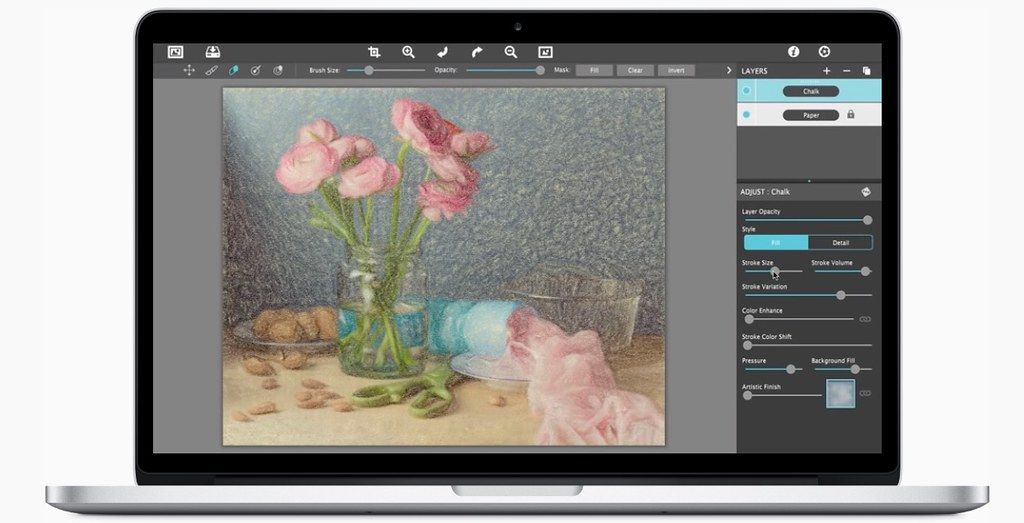
Pastello makes it simple and convenient to take an image and change it into Pastel, Chalk, Charcoal, Crayon, Colored Pencil and Graphite drawings. Use alone or combine these medias using powerful layers to produce interesting expressive sketch effects filled with colorful personality and passion. And the best part is Pastello does all the work.
With Pastello, photographers and artists can now go beyond the camera to turn image files into creative works that resemble traditional handmade media using a professional workflow that is easy and comfortable to operate.
Features:
Pastello has a pro workflow that automatically transforms a photo into a pastel drawing and places it on an art paper with options to customize. The Pastel can then be changed to Chalk, Charcoal, Colored Pencil, Graphite, Conte or Crayon using Layer styles.
The medias start out delicate like traditional drawings do, then allows you to build them up using fills, shading and detail layers. The medias are beautiful as they are, or mix them for an expressive artwork.
Pastello includes plenty of traditional sketch styles as well as a DaVinci effect using a mixed media of pencil, charcoal, crayon and old paper. It’s easy to use! We have mixed the media into one-c
Editor-checked details
Recommended for photographers and illustrators turning portraits, pets, still lifes and landscapes into a consistent pastel/drawing series. Workflow: choose a high-quality lossless source; correct exposure/white balance; set final size; choose one primary medium; add a second medium for shade/highlight; tune Conform Strokes; restore locally with Fill/Detail and masks; select coherent paper/edge; sign; inspect faces, text, texture and banding at 100%; export TIFF/PNG master and JPEG proof; archive presets, layer recipe, manifest and SHA-256. Use Corel Painter or Rebelle for precise hand drawing, and Photoshop, Affinity Photo or Pixelmator Pro for deeper compositing/masks.
Pros
- It unifies pastel, chalk, charcoal, coloured pencil, graphite, Conté and crayon in stackable smart layers, making a coherent style easier than chaining unrelated filters. Media controls cover stroke size, volume, colour and detail, while paper grain responds to layered coverage like dry media. Fill, Detail, masks, Smudge, Signature, Artistic Edge and custom presets support local finishing and reuse. High-resolution output, 16-bit host workflows and transparency are supported.
Cons
- It is a photo-to-dry-media renderer, not a full drawing, retouching, RAW-development or colour-management application. Automatic strokes may create false detail on skin, text, fine lines and repeated textures, requiring masks and layered correction. High-resolution mixed-media renders can be slow and memory-heavy; raster output limits later enlargement. Plug-in compatibility depends on host and architecture, and native Apple silicon support is not explicitly promised. Check paper, font and source-image licences for commercial delivery.
Installation steps
- Pastello 6.0.102 officially requires macOS 10.9 or later and a 64-bit processor. Intel is supported directly; prepare Rosetta 2 on Apple silicon and validate each host plug-in separately. Back up user presets, layer recipes, signatures, fonts and source photos. Test a lossless portrait containing skin, hair, fabric and hard edges with Pastel, Chalk, Charcoal, Colored Pencil, Graphite, Conté and Crayon, then stack Fill, Detail, Paper, Artistic Edge and Signature layers. Raise Conform Strokes gradually to avoid brittle facial detail. Define output pixels, print dimensions, resolution and colour space, and inspect grain, hatching and mask edges at 100%. In Photoshop, Elements, Lightroom or Affinity Photo, test 16-bit data, alpha, blending and batch processing on copies. The Mac App Store edition has no plug-in.
Uninstallation steps
- Before uninstalling, export or document every user preset, media-layer order, blend/opacity, stroke direction, Conform Strokes value, paper, edge, signature font and mask. Preserve sources, editable project/preset data, lossless TIFF/PNG masters and JPEG proofs. Create a manifest with app version, host plug-ins, output pixels, resolution, colour space and licensed assets, then calculate SHA-256 for source and deliverables. Reopen an offline copy and apply the recipe to a second photo to prove reproducibility before removing host plug-ins, the app and preferences.
Common errors and fixes
- If the result looks like a plastic filter, reduce Fill/Detail strength, mix media and preserve visible paper grain. Lower Conform Strokes and detail when facial contours become brittle. Grain may disappear because layers are too dense or the export is heavily downscaled; inspect at delivery size. Smudge is unavailable for Pastel by design, so use masks, a softer layer or another medium. Use Mask Invert for reversed painting, or Fill to restore and repaint. For slow high-resolution renders, reduce preview size, duplicate layers and large textures. A missing plug-in may be the plug-in-free App Store build or a host/architecture/folder mismatch; test Rosetta on Apple silicon. Keep a rasterised final signature if fonts may change.
What changed in this version
- The channel build is 6.0.102. The official page does not map a detailed changelog to that patch number, so no fixes are invented. Its verifiable update highlight is the Conform Strokes slider, which aligns strokes more closely with facial and foreground detail. Pastel, Chalk, Charcoal, Colored Pencil, Graphite, Conté, Crayon, smart layers, Fill/Detail, papers, signatures and artistic edges are established capabilities.






Alternatives



Screenshots