ON1 Sky Swap AI 2023.5
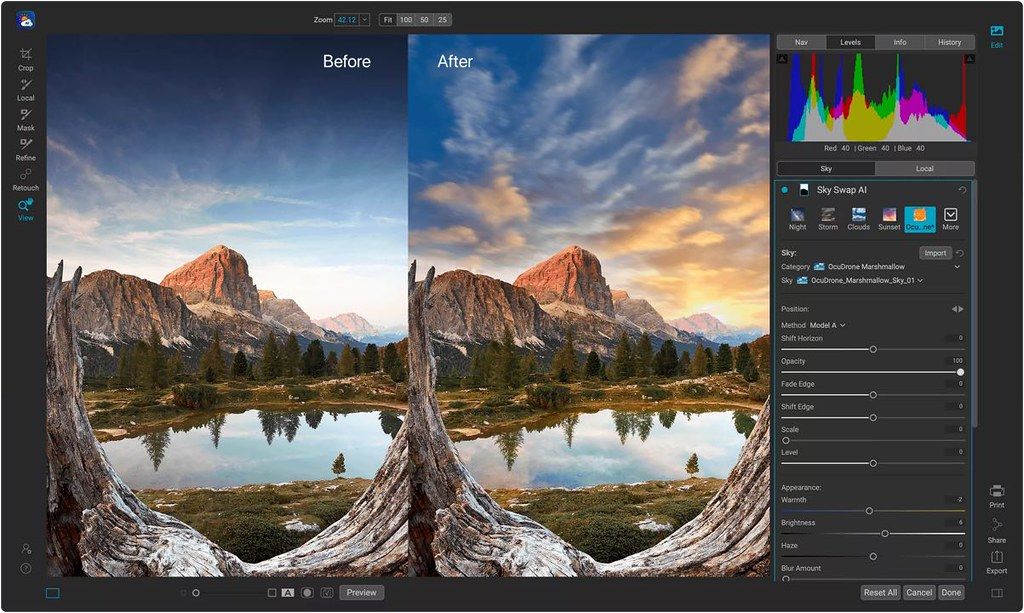
Sky Swap AI makes replacing or enhancing a dull sky a breeze. It detects the sky in your photo and creates a gorgeous mask...
Description
Sky Swap AI makes replacing or enhancing a dull sky a breeze. It detects the sky in your photo and creates a gorgeous mask automatically. Simply select from one of the 231 included skies or import your own. 125 of the built-in skies are sourced from OcuDrone, a leading provider of ultra-high resolution aerial images.
Sky Swap AI combines machine learning with amazing curated skies to eliminate the need for complex masks and layers normally required in other editing apps.
Sometimes you don’t want to replace a sky completely; you want to blend in some additional clouds, for example. Sky Swap AI gives you everything you need to blend a new sky realistically with an existing one.
Bring the power of Sky Swap AI into your workflow. Whether you work in Adobe Photoshop, Photoshop Elements, Lightroom Classic, Capture One, Affinity Photo, Corel Paintshop Pro, and Apple Photos; you have seamless access to it.
WHAT’S NEW
Version 2023.5 17.5.1.14028:
• Release notes were unavailable when this listing was updated.
REQUIREMENTS
• Intel, 64-bit processor
• macOS 10.15.6 or later
ScreenShots
If you are using Adblocker!! Please support this website by adding us to your whitelist. Ads are what helps us bring you premium content! Or read this to know how you can support us. Thank you!
Size
– 1.93GB
Previous Versions
Editor-checked details
Recommended for landscape, architecture, real-estate and travel photographers who need faster sky work but will review edges and lighting. Workflow: finish lens/exposure corrections; choose a sky matching focal length, sun, weather and horizon; generate mask; refine branches/buildings with Refine Mask/Encircle; set position, scale, flip and blend; match foreground temperature, exposure, haze and grain; build water/glass reflections and local shadows in the host; inspect edges at 100%; synchronise only across images with the same light; export high-bit TIFF/PSD plus delivery JPEG; verify ICC/metadata; record sky licence, settings, manifest and SHA-256. Use Photoshop/Affinity Photo for full layer compositing, or compare ON1 Photo RAW and Luminar Neo for integrated workflows.
Pros
- Automatic sky detection and masking cut the manual work around branches, roofs and horizons, while 2023.5 Refine Mask and Encircle improve difficult-edge repair. Its 231 included skies offer fast composition trials; 125 OcuDrone 8K sources have smooth horizons, and licensed personal skies can be imported. Horizon, rotation, flip, blending and foreground tone can be adjusted, and clouds can be blended without total replacement. It runs standalone or with Photoshop, Lightroom Classic, Capture One, Affinity Photo, Apple Photos and other hosts. ICC/soft-proof and pressure-tablet support suit photographic workflows.
Cons
- Automatic masks still fail on fine branches, hair, translucent cloud, haze, gaps and complex horizons, requiring zoomed manual refinement. Replacement does not enforce physical consistency: sun, shadows, reflections, focal length, noise, depth, temperature and atmospheric perspective can look false. Water/glass reflection needs extra host compositing. The roughly 1.93GB app/content footprint is substantial, and account/network activation adds offline dependency. Plug-in round trips can create large TIFF/PSD copies and interrupt non-destructive history; host bit depth, ICC and save behaviour need testing. Repeated stock skies look templated, and personal skies need rights clearance. Validate 2023.5 with later hosts/macOS.
Installation steps
- The site package is ON1 Sky Swap AI 2023.5 (17.5.1.14028). Official minimum is macOS 10.15.6, with macOS 12+ recommended; activation, update checks, content downloads and tutorials require fast internet and an ON1 account. Back up originals, catalog/session and host plug-in folders. First use the standalone app on a representative image containing branches, architecture, thin cloud and water; inspect the automatic sky mask and repair edges with Refine Mask/Encircle. Choose a licensed built-in or personal sky, then match horizon, scale, rotation/flip, feathering, foreground tone, light direction, focal length, noise and colour temperature. Reflections usually need separate host editing. Test round trips from Photoshop, Lightroom Classic, Capture One, Affinity Photo or Apple Photos and verify destination, bit depth, ICC and copy behaviour.
Uninstallation steps
- Before removal, export reproducible work as high-bit-depth TIFF/PSD plus delivery JPEG, retaining RAW originals, replacement-sky sources, edited copies, masks/layers and host catalog or Capture One session. Record sky name/source/licence, horizon/scale/flip, mask refinements, foreground adjustments, colour space, bit depth and output size; create a manifest and SHA-256. Reopen files in an independent viewer and host to inspect edges, gradients, ICC and metadata. Quit all hosts before removing plug-ins and standalone app so no old component remains loaded. Preserve ON1 account/licence records. Before deleting content/cache, copy custom skies to project storage; uninstalling is not asset archiving.
Common errors and fixes
- For halos around branches, hair, roofs or wires, zoom in and use small Refine Mask/Encircle add/subtract regions instead of excessive global feathering; also inspect original-sky colour fringing and haze. If horizon or cloud scale looks wrong, match the original lens angle and sky position; after flipping, recheck sun direction and shadows. A pasted look usually comes from mismatched temperature, exposure, contrast, haze, grain or depth of field—match them with local adjustments. Water/glass reflections are not made credible by the sky mask alone; transform, blur and mask them separately in Photoshop/Affinity. If the plug-in is absent, check host support, plug-in path and restart. If no round-trip result appears, inspect generated copies, permissions and colour mode. For activation/content failure, check account, network, firewall, disk space and system time.
What changed in this version
- Official ON1 Sky Swap AI 2023.5 (17.5.1.14028) updates add two Mask AI options for foreground/background masks, improve Refine Mask Brush quality on hair and branches, and add Encircle to add, subtract or create masks around boundaries. Scroll-wheel handling now combines zoom, pan and tool control more naturally. The 2023.5 plug-in line also improves RAW shadows/edge artefacts and adds Nikon Z 8 plus lens profiles. Core features remain automatic sky detection, 231 built-in skies (125 from OcuDrone), personal-sky import, horizon/rotation/flip and local foreground adjustments.






Alternatives




Screenshots