Iridient Developer
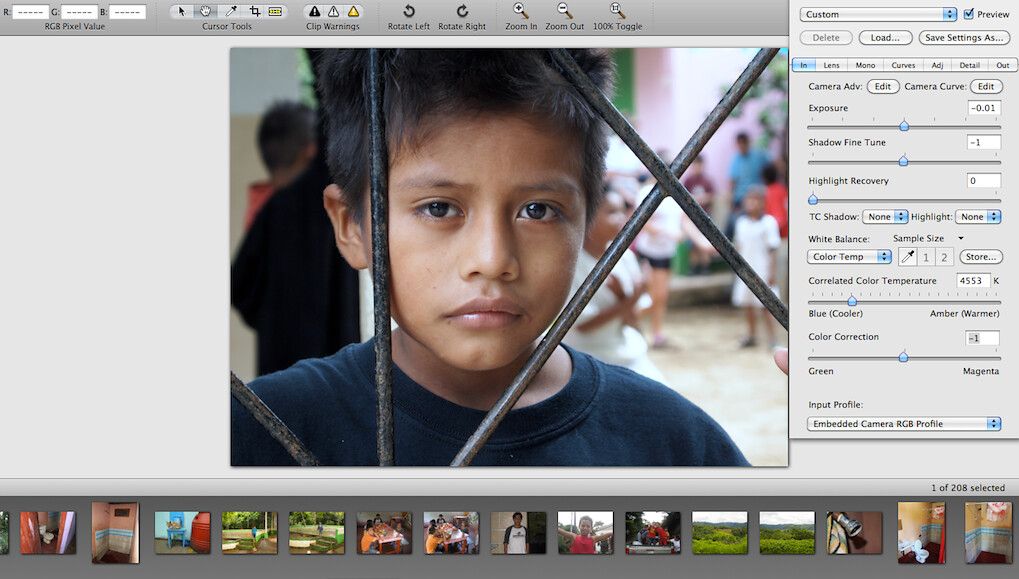
Iridient Developer (was RAW Developer) is a powerful image conversion application designed specifically for OS X. Iridient Developer gives ...
- Intel, 64-bit processor
- macOS 11.0 or later
Description
Iridient Developer (was RAW Developer) is a powerful image conversion application designed specifically for OS X. Iridient Developer gives advanced photographers total control over every aspect of their digital camera’s output, yet still provides easy drag and drop conversion convenience and access to basic adjustments for the casual user.
WHAT’S NEW
Version 5.5:
New Features :
• Support added for RAW images from the Sony A7R VI and Sony A7 V (ILCE-7M5) (lossy “lightweight” RAW modes not supported yet).
• Support added for RAW images from the Panasonic Lumix DC-L10 and DC-ZS300 (TZ300).
• Support added for RAW images from the Canon EOS R6 Mark III and EOS C50.
• Support added for RAW images from the Nikon ZR (lossy High Efficiency modes not supported yet).
• Support added for RAW images from the Ricoh GR IV Monochrome.
• Support added for RAW images from the Fujifilm X-T30 III.
• Support added for RAW images from the Leica M EV1 and Q3 Monochrom.
Improvements :
• Refined HiFi RAW demosaic processing methods, especially improved for high 40+ megapixel models with weak or no anti-aliasing filter on the sensor.
• Updated DNG color and white balance default metadata to match up with the latest Adobe DNG Converter 18.3.2 release values.
• Adobe DNG SDK libraries updated to latest version (1.7.1 build 2573, May 12, 2026).
• Deflate compression libraries updated to latest version (libdeflate 1.25).
• TIFF export libraries updated to new version (libtiff 4.7.1).
• ZLIB libraries updated to latest version (zlib 1.3.2).
• PNG export libraries updated (libpng 1.6.58).
• JPEG export libraries updated to new version (libjpeg-turbo 3.1.4.1).
• Updated to OpenEXR libraries (3.4.11).
• Updated to a more recent libraw version (2026-05-14).
• The Little CMS library, an alternate ICC color management engine, has been updated to version 2.19.1.
Bug Fixes :
• Fixed issue with HiFi RAW demosaic processing that would produce high levels of speckle noise with Fujifilm GFX
Editor-checked details
Recommended for photographers prioritising RAW micro-detail, Fujifilm X-Trans/Bayer demosaic, monochrome, custom ICC/DCP and high-quality batch output, especially as a RAW front end beside an existing DAM/editor. Use: read-only verified RAW backup; camera/mode support check; calibrated display; standard test set; choose demosaic; denoise before output sharpening; inspect highlights/skin/shadows; 16-bit wide-gamut intermediate; target ICC/size export; metadata/SHA-256; print/browser proof. Compare Capture One or Lightroom Classic for catalogue/team workflows, RAW Power for Apple’s RAW pipeline, Photomator/Darkroom for library editing, Affinity Photo for layered compositing and DxO PhotoLab for optical correction.
Pros
- Its strength is high-quality RAW demosaic and micro-detail control, particularly for high-resolution/no-OLPF Bayer and Fujifilm files. HiFi and smoother methods, six sharpening approaches, edge masks, bad-pixel handling, denoise, lens correction and high-quality resizing expose the processing order. The pipeline is at least 16-bit with 32-bit floating-point stages, ColorSync/Little CMS, ICC/DCP, RAW/RGB/LAB curves and extensive monochrome conversion. Unlimited background batches coexist with foreground editing, with TIFF, JPEG, PNG, JPEG XL and EXIF/IPTC/XMP output. The non-expiring demo enables camera-specific quality testing. The Universal binary supports Apple silicon and qualifying Intel Macs.
Cons
- It is not a full catalogue/DAM, cloud sync, collaborative proofing, layered pixel editor or generative-retouch platform; ingestion, keywords, versions and composites usually need Photo Mechanic, Lightroom, Capture One or an editor. Deep parameters and multiple algorithms can compound demosaic, sharpening, denoise and output resize into oversharpening, worms, halos or plastic texture; inspect both 100% and final print size. Default colour from different RAW engines is not directly comparable. New cameras and special lossy modes depend on updates; a listed camera does not imply every recording mode. Intel requires AVX. Demo watermarks are irreversible, so treating trial exports as masters causes rework.
Installation steps
- Iridient Developer 5.5 requires macOS 11 or later; it runs natively on Apple silicon, while 64-bit Intel Macs require AVX. The demo is functionally identical but permanently watermarks exports; after licensing, originals must be reprocessed because existing watermarks cannot be removed. Build a baseline from copies: low-ISO detail, high-ISO shadows, skin tones, clipped highlights, and night/long exposure. Compare HiFi and smoother demosaic options, lens correction, bad-pixel handling, noise reduction and sharpening. Define camera input profile, working space, calibrated-display ICC, output ICC, white point, bit depth and rendering intent before creative grading; do not approve colour on an uncalibrated display. Before batch work, lock camera/lens, algorithms, colour settings, naming, folders, TIFF/JPEG/PNG/JPEG XL options and metadata policy, then inspect 5–10 files before the full run.
Uninstallation steps
- Before removal, preserve every original RAW, XMP/IPTC/EXIF sidecar, camera/output ICC or DCP profile, lens correction, processing preset, batch naming template, licence file and a reproducible test set. For final deliveries record app version, HiFi/other demosaic method, white balance, exposure, curves, denoise, sharpening, dimensions, working/output spaces, bit depth, format, compression and metadata. Retain a 16-bit TIFF or lossless intermediate plus final SHA-256. Never keep only JPEG or treat exported DNG/TIFF as a replacement for the camera RAW. Isolate demo-watermarked files and reprocess originals to avoid accidental delivery. Back up the emailed licence file privately. Confirm presets/profiles restore in a clean account before deleting the app and unneeded support data.
Common errors and fixes
- RAW will not open: verify the exact camera and recording mode. Some lossy lightweight/high-efficiency modes are unsupported in 5.5; renaming the extension cannot fix them. For high-ISO speckles, maze patterns or false colour, compare HiFi and smoother demosaic, then tune bad-pixel, chroma/luminance noise and sharpening order—do not mask demosaic defects with excessive sharpening. Colour differing from Lightroom or camera JPEG often reflects different DCP/ICC, white balance, tone curve and maker looks; align input profile, working space and output ICC first. Inconsistent batch exposure/crop means one image’s local settings were applied across unlike cameras/ISO; split presets by capture condition. Watermarks indicate demo mode and require reprocessing after licensing. Intel launch failure may mean no AVX. For missing metadata, inspect EXIF/IPTC/XMP options and each output format’s limits.
What changed in this version
- Iridient Developer 5.5 adds RAW support for multiple Sony, Panasonic, Canon, Nikon, Ricoh, Fujifilm and Leica cameras, while certain lossy lightweight/high-efficiency modes remain unsupported. Refined HiFi demosaic processing targets 40+ MP sensors with weak/no optical low-pass filter, reducing noise and improving gradients, diagonal edges, interpolation around bad pixels and high-ISO speckles. It aligns default DNG colour/white-balance metadata and updates the DNG SDK, Deflate, TIFF, zlib, PNG, JPEG, OpenEXR, LibRaw and Little CMS components. Fixes include high-ISO HiFi speckle on Fujifilm GFX and HiFi monochrome processing. It is Universal for Apple silicon/Intel, with AVX required on Intel.






Alternatives



Screenshots