FotoJet Designer
FotoJet Designer makes graphic design easier than ever. It gives you the ability to design like a pro, with more than 900 templates...
Description
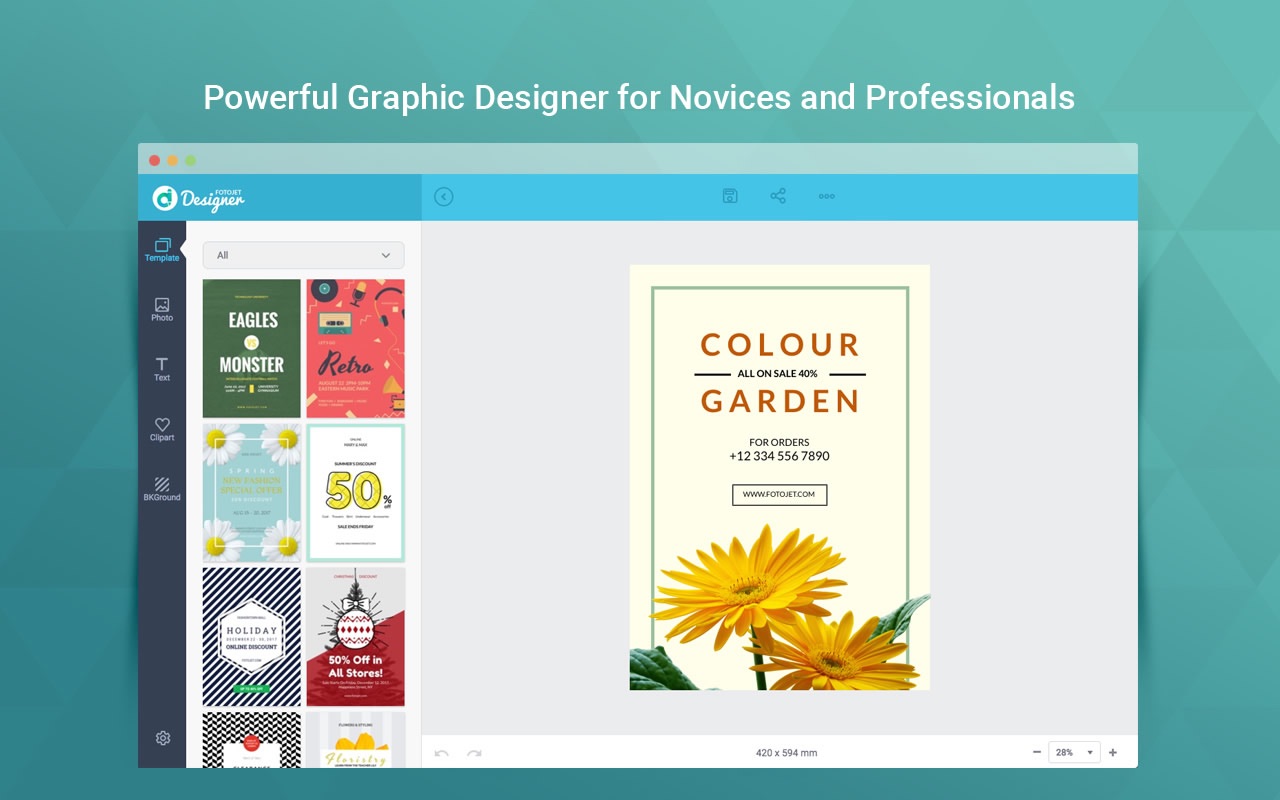
FotoJet Designer makes graphic design easier than ever. It gives you the ability to design like a pro, with more than 900 templates, thousands of resources, and powerful editing tools. With no professional skill, anyone can create unique designs, such as social-media graphics, cards, invitations, posters, flyers, and banners in a matter of seconds.
Whether you are a design novice, who loves customizing graphics for personal use and various occasions, or a highly experienced designer, who wants to create professional designs, you will always find inspiration in FotoJet Designer.
Features
• Abundant Templates and Resources
• Almost all social media graphic templates are covered, including Facebook Cover/Post, YouTube Channel Art/Thumbnail, Google+ Cover, Twitter Header, Tumblr Banner, Email Header, Instagram Post, and Pinterest Graphic.
• Well-designed templates for Card, Invitation, Poster, Flyer, Logo, Facebook Ad, Leaderboard, and Magazine Cover.
• 80+ text fonts and 30+ preset text styles that can be applied with one click.
• 800+ preset clipart images to choose from or search through 93,000+ clipart images online.
• 80+ preset lines and shapes.
• Set background with solid/gradient color fill or 80+ preset patterns.
• Add photos from computer, Facebook, or online photo stock.
• Personalize Your Designs Freely
• Your photos can be edited freely: crop photos to show the exact part you want or apply popular photo effects to make them outstanding.
• Handy text editing tools: set text font,
size
, style, color, and effect.
• Move, resize, and rotate any element as per
requirements
.
• Select multiple elements and edit quickly.
• Start a design with custom
size
.
• More useful tools that help you design with ease: layer management, undo/redo, and auto snap, etc.
• Save, Share, or Print
• Save your design as a JPG or PNG image.
• Share it to Facebook, Twitter, Pinterest, or Tumblr.
• Directly print it out.
• Save as project and load for further editing.
WHAT’S NEW
Editor-checked details
Recommended for individuals and small businesses making one-off social graphics, invitations, simple posters or cards quickly. Workflow: obtain current destination dimensions/safe areas; prepare licensed logos, photos and fonts; choose a close template; set final canvas first; replace every placeholder; inspect hierarchy, alignment, whitespace and legibility; save a project revision; export PNG at target pixels (or JPG for photos); preview on phone and desktop; upload manually; archive project, asset licences, manifest and SHA-256. Canva suits cloud collaboration/current templates; Adobe Express suits Adobe assets; Pixelmator Pro/Photoshop suit detailed raster work; Affinity Designer suits editable vectors and professional output.
Pros
- Its template-led workflow is easy for social posts, invitations, cards, posters, flyers, banners and simple logos. It provides many templates, clipart, shapes, backgrounds and text styles, and local photos can replace placeholders quickly. Move, resize, rotate, crop, multi-select, layers, undo and snapping cover everyday layout. Custom canvases and saved projects support revisions, with direct JPG/PNG output. It is highly localised, has a low macOS minimum and covers Intel plus the documented Apple M1 compatibility path.
Cons
- It is bitmap-template layout, not professional vector, RAW, desktop publishing or prepress. There is no dependable SVG, editable PDF, CMYK/PDF/X, bleed or complete font-packaging workflow. Social specifications, discontinued service names and sharing integrations in templates can age. Some online assets, advanced features and cloud storage depend on a connection, account or subscription, and each asset licence still needs review. Text and shapes cease to be editable in JPG/PNG and an undersized canvas cannot be repaired by upscaling. Collaboration, version history, brand systems, accessibility checks and batch multi-size export are limited.
Installation steps
- FotoJet Designer 1.2.2 requires macOS 10.11 or later. The developer identified Apple M1 compatibility in 1.2.0 and Tahoe compatibility in 1.2.2. After installation, use non-sensitive art to test a template, text, cropping, layers, snapping, project save/reopen and JPG/PNG export. Online clipart, stock, social sharing and some premium resources depend on a connection or account and must not be treated as permanent assets. Reconfirm pixel dimensions, safe areas and limits with the destination platform because social templates can age. For print, obtain trim, DPI, bleed and colour requirements; this JPG/PNG workflow is not professional CMYK/PDF prepress.
Uninstallation steps
- Before uninstalling, open every editable job and ensure more than the final bitmap was saved. Archive project files, source photos, brand fonts and licence evidence, logos, palette, template name, canvas dimensions, layer order and final JPG/PNG. Record the source, download date and licence for online material; future access is not guaranteed. Create a manifest and SHA-256 for delivered files, then reopen one project offline to expose missing local dependencies. Revoke unused social connections and sessions, export cloud projects, remove the app, and include both projects and final exports in routine backup.
Common errors and fixes
- If templates or online assets are blank, inspect connectivity, account/subscription state and whether the service still offers the item; continue with a local placeholder rather than repeatedly overwriting the project. For a project that will not open, duplicate it first and check version, extension, disk permissions and source-photo paths. Soft exports usually mean an undersized canvas or source, so rebuild at target pixels and avoid enlarging low-resolution art. Text reflow requires the exact font, glyph coverage and text-frame dimensions. If a social platform crops edges, redesign to its current safe area. Sharing APIs may expire; export locally and upload manually. For print colour or trim, use printer specifications and a proof, not screen appearance. Save revisions before online assets or undo history disappear.
What changed in this version
- The published 1.2.2 note says only “Fully compatible with Tahoe”; it does not claim new templates, editor tools or export formats, so none are invented. Apple M1 and Monterey compatibility was documented for 1.2.0. The 900+ templates, text styles, clipart, backgrounds, cropping, layers, snapping, JPG/PNG, sharing, printing and project save are existing capabilities, not 1.2.2 additions. Regress launch, template loading, project reopen, fonts, online resources, JPG/PNG and printing; an OS compatibility statement does not prove every third-party sharing API works.






Alternatives



Screenshots