Aspect Ratio X
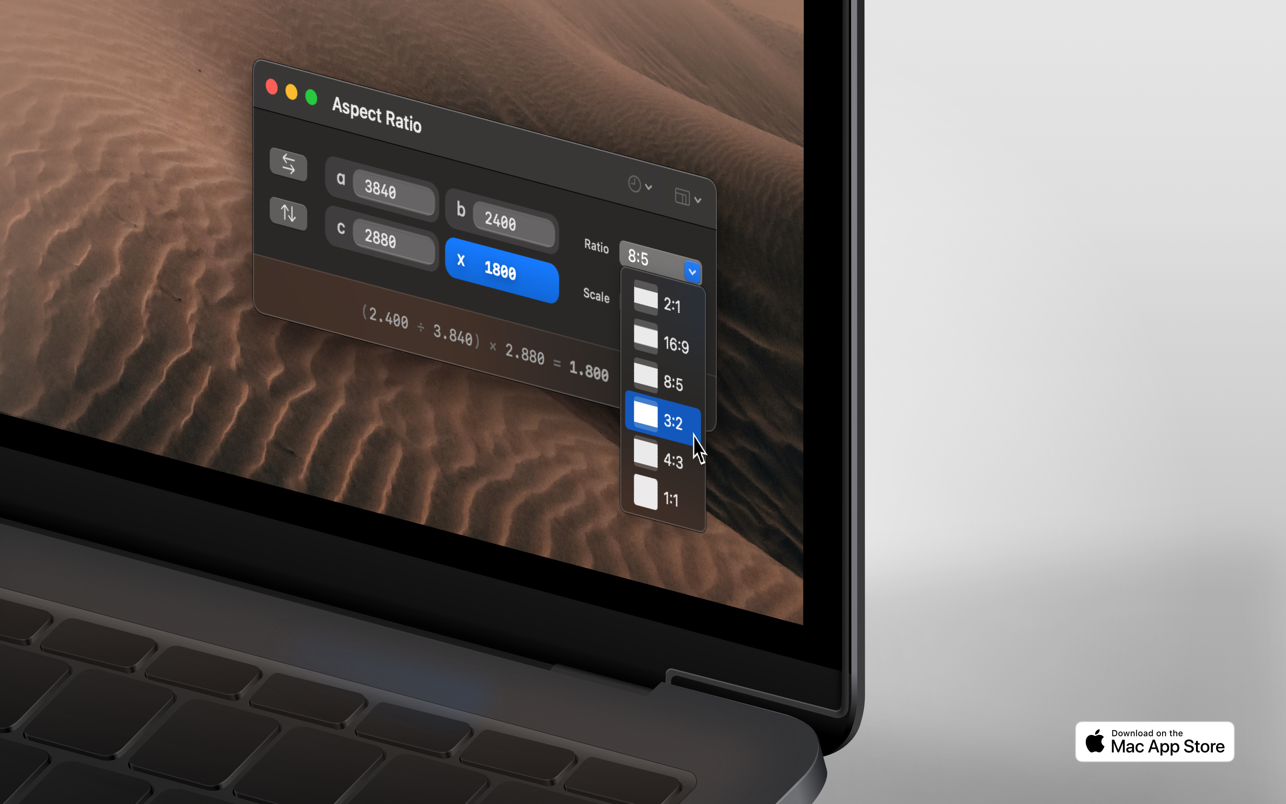
Aspect Ratio X is a rule-of-three calculator.FeaturesCalculate aspect ratios (rule of three)Swap values horizontally and...
Description
Aspect Ratio X is a rule-of-three calculator.
Features
• Calculate aspect ratios (rule of three)
• Swap values horizontally and vertically
• Select scales and ratios
• Browse common resolutions
• Browse recent ratios
• Formula preview
• Uses imperial or metric system automatically based on your system settings
• Multi-window support
• Optimized for macOS 11+
• Optimized for Mac with M1 (Apple Silicon)
WHAT’S NEW
Version 2.25:
• Just a little tune-up to keep things running smoothly. This app is now almost ten years old. Thank you for your continued support!
REQUIREMENTS
• Intel, 64-bit processor
• macOS 11.5 or later
ScreenShots
If you are using Adblocker!! Please support this website by adding us to your whitelist. Ads are what helps us bring you premium content! Or read this to know how you can support us. Thank you!
Size
– 7.4MB
Previous Versions
Editor-checked details
Recommended for people who repeatedly convert web-image, video-frame, print or model proportions, as a quick calculation sheet before production. Workflow: confirm destination and purpose; label width/height and one unit; select a ratio/preset; enter three known values; inspect the formula; apply the project rounding/even-number policy; execute in Photoshop, Pixelmator Pro, Affinity or Final Cut Pro; inspect the exported dimensions; record values, units, formula and the delivered file SHA-256. Calculator or Numbers is enough for occasional work; use an image editor for cropping/resizing and Final Cut Pro or HandBrake for video delivery.
Pros
- It is focused: a rule-of-three calculator finds the fourth value without opening a full design suite. Orientation swap, common ratios/resolutions, recent ratios and formula preview make input-direction mistakes easier to spot. Metric/imperial behaviour and multiple windows help when comparing several specifications. The native macOS utility is lightweight and works on Intel and Apple silicon. It is useful for web images, video frames, print scaling, model ratios and UI specification conversion.
Cons
- It calculates numbers only: it does not resize media, choose a crop, batch-convert, manage metadata, add print bleed/safe areas or validate an encoder. A mathematically correct ratio does not guarantee sensible subject framing or platform compliance. Units, direction and rounding remain human decisions, so a wrong input can produce a plausible but wrong answer. It is not specification management, version review or delivery validation and cannot replace the production app and final export check.
Installation steps
- Aspect Ratio X 2.25 requires macOS 11.5 or later and supports 64-bit Intel and Apple silicon. After installation, validate it with a known case: 16:9 at 1920 width should return 1080 height; changing width to 1280 should return 720. Label width, height and units before calculating. A print scale such as 1:50 is not the same as a canvas aspect ratio, and inches, millimetres and pixels must not be mixed. The app follows metric/imperial settings, but record the unit explicitly. Separate jobs can use separate windows. For video, check whether the codec requires even dimensions. Record inputs, formula, rounding rule and result, then perform the actual resize or crop in the production app.
Uninstallation steps
- Before uninstalling, copy every active calculation into the project record: source and target dimensions, ratio direction, unit, formula, rounding policy and intended use. Aspect Ratio X is a calculator, not the authoritative specification store; recent entries and window state do not replace design files. Keep a manifest and SHA-256 for delivered images, videos or print files—the hash applies to the actual artifact, not a numerical result. Remove the app after checking no pending job depends on it, then remove preferences only if a clean reset is required.
Common errors and fixes
- Reversed results usually mean width/height or the unknown in A:B=C:X was placed on the wrong side; retest with 1920:1080=1280:720. A one-pixel difference is normally rounding. Video encoders may require the nearest even dimension, while responsive layouts need verification at the target breakpoint. Do not confuse pixel aspect ratio with display aspect ratio, or a 1:50 drawing scale with a 50:1 frame. Mixing inches and millimetres creates a 25.4-fold error. Zero, negative or incomplete inputs have no valid ratio. If decimal entry fails, inspect the system locale separator. Presets guarantee only the mathematics, not platform acceptance, bleed, safe areas or codec limits; export and inspect in the target app.
What changed in this version
- The published 2.25 note says only that it is a small tune-up to keep things running smoothly and thanks users for almost ten years of support. This is a maintenance release; there is no evidence for a new calculation mode or redesigned interface. Ratio calculation, orientation swapping, common resolutions, recent ratios, formula preview, metric/imperial behaviour and multiple windows describe available functionality, not 2.25 additions. After updating, regress 16:9 with 1920×1080 and 1280×720 and recheck project units and rounding.






Alternatives



Screenshots