ArchiCAD
ArchiCAD is a well-designed and fully-featured cross-platform CAD application that provides a distraction free design environment created...
Description
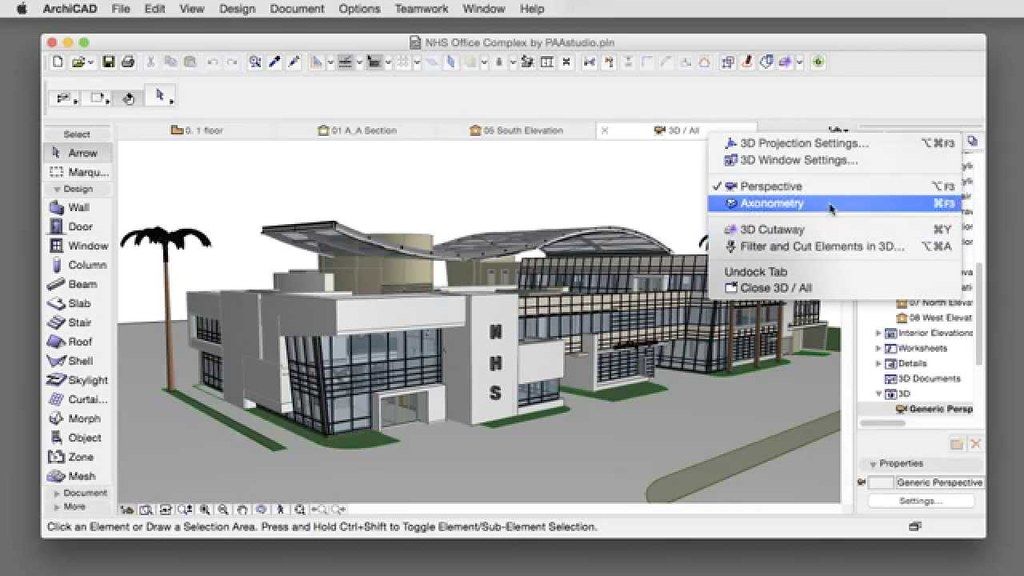
ArchiCAD is a well-designed and fully-featured cross-platform CAD application that provides a distraction free design environment created to enable architects to work on their projects with little to no distraction and all the tools they need to generate a high quality end product.
Helps you translate your creativity into impressive designs
Thanks to ArchiCAD’s Building Information Modeling approach, you can concentrate on your work, explore new ideas and let ArchiCAD capture every detail and synchronize your documents at all times.
Moreover, with ArchiCAD’s real-time BIM collaboration environment, you can take advantage of the smart, model-based workflow that you can share with your team members in order to increase your efficiency in the designing process.
Easily collaborate with other architects and enjoy the reliable data-exchange between users
Furthermore, ArchiCAD helps you model and shape freely to create complex items, and innovative designs, which can be viewed from different angles. You can also combine the provided creative freedom with the efficiency of the powerful Building Information Model.
ArchiCAD also comes with a comprehensive list of tools that you can use throughout your project while the direct modeling capabilities in the native BIM environment along with the end-to-end BIM workflow based on Priority Based Connections, together with the MORPH tool and Intelligent Building Materials make ArchiCAD a must have for both novice and experienced architects.
In addition, ArchiCAD is capable to automatically create the required documentation and images for your 3D Building Information Model while the priority based junctions and the intelligent building materials provide the accurate graphical representations of the elements and materials used in the project.
Let ArchiCAD do the hard work for you and effortlessly create 3D Building Information Models in a snap
ArchiCAD is also designed to offer you numerous view settings, unique drawing han
Editor-checked details
Recommended for architectural teams with a BIM execution plan, library/attribute standards, backups and a BIM manager—not for ad-hoc “open and issue drawings.” Freeze/back up the source version; inventory licence/localisation/build/add-ons/libraries/hotlinks/BIMcloud; clean warnings/attributes in the old version; require Send & Receive/leave; rehearse migration in a copied environment; inspect library/model deltas; publish baseline PDF/DWG/IFC/BIMx and compare automatically/manually; test consultant returns; validate Teamwork permission, offline and Travel Pack; load-test performance; schedule cutover after approval; retain old environment/rollback package; record owner, review date, manifest and SHA-256. Compare AutoCAD for 2D CAD, Revit for multidisciplinary parametric BIM, or SketchUp for light concepts, but define IFC/DWG/document/collaboration requirements before choosing.
Pros
- Archicad 26 links the building model, 2D documentation, schedules, layouts and publishing to shared BIM data, allowing model changes to drive plans, sections, elevations and quantities. Building Materials, Priority Based Connections, Morph, attributes and expressions support structured work from concept to construction documents. Teamwork/BIMcloud provides element reservation, Send & Receive and central libraries. IFC, DWG, PDF, BIMx and Publisher support consultant exchange and multi-format delivery. Migration Libraries and the official migration workflow preserve many legacy objects, while PLA supports self-contained archives. Standardised views, Graphic Overrides, templates and Publisher sets can form a repeatable office QA system. Graphisoft provides Intel and a later separate Apple-silicon route, but builds must match.
Cons
- BIM linkage amplifies errors: bad attributes, material priorities, stories, coordinates, library objects or Publisher settings can contaminate model, drawings, schedules and exchanges together. Cross-version saves are generally irreversible, and Teamwork migration deletes Project Log, comments, messages and reservations; linked Teamwork sources must migrate too. Projects depend on localisation, exact build, BIMcloud, CodeMeter, libraries, fonts, add-ons, IFC translators and office templates. Large models need substantial RAM, fast SSD and graphics capacity, while network latency affects Teamwork. IFC/DWG round-trips do not guarantee lossless semantics, classification, geometry or properties. Build 3001 is an early Intel build using Rosetta on Apple silicon and cannot mix later native add-ons. It does not automatically prove structural, fire or code compliance; professional review, consultant coordination and sign-off remain essential.
Installation steps
- The site build is Archicad 26.0.0.3001. Graphisoft lists macOS 11.3 as minimum and 12.3 as recommended, with a 64-bit multicore processor, at least 5 GB free space, and an Archicad 26 CodeMeter hardware or software key. Build 3001 is an initial Intel 30xx build; test Apple silicon through Rosetta. Upload/return borrowed licences and back up PLN/PLA, BIMcloud, libraries, attributes, templates, Publisher sets, hotlinks, add-ons and custom objects. Open legacy projects in their source version, resolve warnings and save a copy. For Teamwork 13–25, require every member to Send & Receive and leave, run Prepare for Migration in the old version, then migrate in 26 to a matching BIMcloud. Load Archicad Library 26 plus Migration Libraries and inspect missing/duplicate objects, hotlink/drawing sources, classifications, attributes, expressions, IFC mapping, MEP, stories, coordinates and units. Test plans, sections, elevations, details, schedules, layouts, PDF/DWG/IFC publishing, BIMx and rendering on a representative model. Teamwork clients, BIMcloud, localisation, add-ons and Travel Packs must use the identical version and build. Lock backup, rollback window and owner before production conversion.
Uninstallation steps
- Before retiring 26, preserve native PLN, self-contained PLA, published PDF, DWG/DXF, IFC, BIMx and static approved views/schedules for every project. For Teamwork, require Send & Receive, then retain server backup, snapshots, users/roles, libraries, hotlinks and source projects. Graphisoft states migration deletes Project Log, Comments, messages and reservations, so export audit evidence first. Archive Archicad 26 and Migration Libraries, localisation, templates, attributes, Work Environment, Publisher sets, translators, add-ons and exact version/build, plus CodeMeter status and SHA-256. Open the PLA on another machine with the same build and inspect missing libraries, drawings, IFC and PDF. Return borrowed licences/upload software keys before removing the app, and preserve the source-version environment until migrated projects are signed off. Removing a client does not delete BIMcloud projects, caches, backups, licence-pool items or deliverables; handle each through change control.
Common errors and fixes
- For missing objects, load Archicad 26 and correct Migration Libraries in Library Manager and inspect local/embedded/BIMcloud libraries plus duplicate GUIDs. In Teamwork, recheck “Temporarily Missing” after other users Send & Receive. Broken hotlinks/drawings require source Teamwork projects on the same Archicad version; relink manually across servers and verify path/permission. Travel Packs merge only with identical version and build. Require all members to Send & Receive and leave before migration or unsent work is lost. Install only signed add-ons built for 26, the correct localisation and architecture, and test on a copy. If CodeMeter cannot find a licence, inspect network/hardware key, driver, borrowing, License Pool and firewall, and upload software keys before OS work. For model/document changes, compare attribute indices, composites, Building Materials, Priority Connections, expressions, fonts, pens, Publisher and IFC translators. On Apple silicon, build 3001 follows the Intel path: confirm Rosetta, add-on architecture and memory and do not mix later native components.
What changed in this version
- The site build is Archicad 26.0.0.3001, part of the initial 26 30xx series. Graphisoft’s Monterey compatibility record confirms Archicad 26 FULL/SOLO 30xx or newer is supported, but no verifiable itemised 3001 fix list was found. Therefore later 40xx, Ventura fixes and the later native Apple-silicon build are not attributed to 3001. Archicad 26 covers BIM modelling, documentation, collaboration, publishing and exchange, but each project must be validated against build 3001, its localisation and add-on set.
File verification






Alternatives


Screenshots