AutoCAD 2024
Autodesk AutoCAD 2024 design and documentation software, of the world’s leading 2D and 3D CAD tools. It will allow you to design and...
- Intel, 64-bit processor
- macOS 11.0 or later
Description
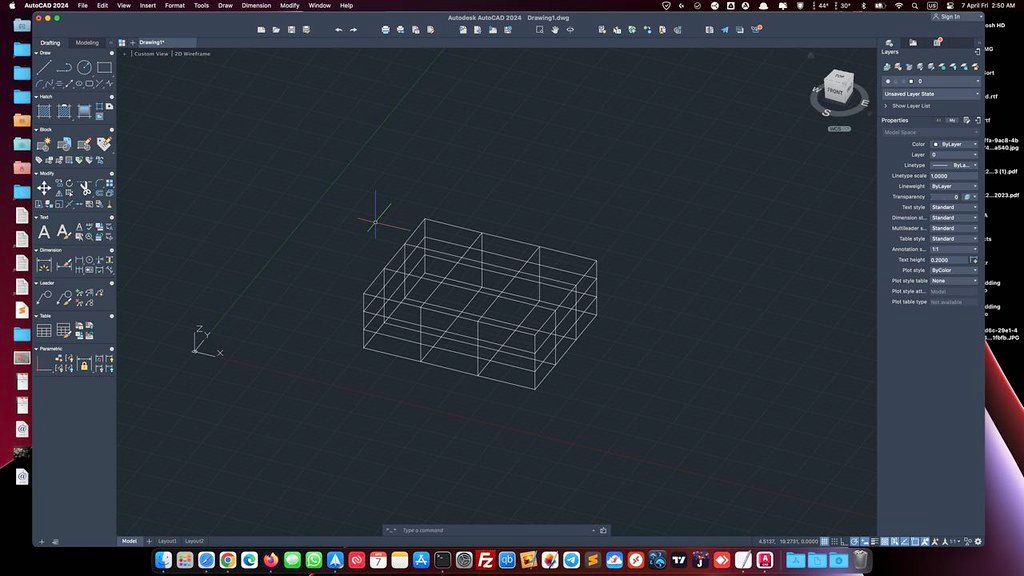
Autodesk AutoCAD 2024 design and documentation software, of the world’s leading 2D and 3D CAD tools. It will allow you to design and shape the world around you using its powerful and flexible features. Speed documentation, share ideas seamlessly, and explore ideas more intuitively in 3D.
With thousands of available add-ons, AutoCAD software provides the ultimate in flexibility, customized for your specific needs. It’s time to take design further. AutoCAD 2024 enables you to create and explore ideas like never before. It is all you need to create, visualize, document, and share your ideas.
From conceptual design through drafting and detailing. Import a wide variety of other formats including SolidWorks, Pro/ENGINEER, CATIA, Rhino, and NX. Drawing views, edge display, and location are instantly updated when an engineering change is made.
The drafting, detailing, and conceptual design leader is showing the way once again. AutoCAD 2019 propels day-to-day drafting forward with features that increase speed and accuracy while saving time. Annotation scaling and layer properties per viewport minimise workarounds, while text and table enhancements and multiple leaders help deliver an unmatched level of aesthetic precision and professionalism.
Document. Create your designs more intuitively, more efficiently, and faster than ever before.
Communicate. Present and share your designs more seamlessly, more accurately, and more powerfully.
Explore. Now you can turn ideas, regardless of shape or
size
, into a 3D CAD model to help take your designs further.
Customize. Make AutoCAD software work for you in ways you never thought possible.
Create stunning designs and improve collaboration
Share your work with TrustedDWG technology.
Work across connected desktop, cloud, and mobile solutions.
Get the AutoCAD 360 Pro mobile app when you subscribe.
WHAT’S NEW
Version 2024.v24.3.61.182:
• Release notes are available here .
REQUIREMENTS
• Intel, 64-bit processor
• macOS 11.0 o
Editor-checked details
Recommended for teams whose contract format is DWG and whose priorities are precise 2D drafting, annotation, review and standardised plotting. Establish a read-only template and CAD standard; pin each project to an AutoCAD release, fonts, plugins, DWT, CTB/STB, PC3 and units; use relative Xrefs under one project root; govern layers/blocks and turn repeated objects into dynamic blocks; review through Markup/Trace; run AUDIT at milestones and PURGE only copies. Publish DWG, PDF and ETRANSMIT together, recording revision, provenance and SHA-256, then validate fonts, Xrefs, lineweights, scale and plotting on a clean workstation. Compare Revit/Archicad for BIM, Fusion 360/SolidWorks for parametric mechanical work, Rhino for complex surfaces and DraftSight for lighter 2D CAD.
Pros
- Native DWG drafting, annotation, layout and plotting are mature for architecture, interiors, mechanical work and construction documents. Layers, dynamic blocks, fields, data extraction, Xrefs and Sheet Sets scale 2D delivery. TrustedDWG and broad industry adoption reduce exchange friction, while DWT, CTB/STB and PC3 encode standards. The Mac interface fits macOS, and the 2024 app runs natively on Intel and Apple silicon. Markup, Trace, COUNT and Smart Blocks suggestions reduce review and repetitive placement work. Command aliases, AutoLISP and scripts offer meaningful automation; PDF/DWF publishing and ETRANSMIT support review and archiving.
Cons
- Subscription/account licensing is costly and teams must govern versions, plugins and font licences. Mac and Windows are not feature-identical: some industry toolsets, plugins, rendering and enterprise automation are Windows-only, and Activity Insights was not supported on the 2024 Mac release. Large Xrefs, complex hatches, proxy objects and dense 3D geometry raise memory/GPU load. Cross-platform fonts, shortcuts, path case, printers and CTB/STB differences can shift output. Older LISP/CUI or binary plugins may not support Apple silicon. General solids/surfaces are useful, but parametric mechanical design, BIM, complex NURBS and rendering usually belong in specialist tools.
Installation steps
- The site build is AutoCAD 2024 24.3.61.182 and lists macOS 11 or later. The 2024 application runs natively on Intel and Apple silicon; the Intel-built installer can still request Rosetta 2 on Apple silicon. Back up DWG, DWT, CTB/STB, PC3, fonts, hatch patterns, LISP, PGP, workspaces and tool palettes, and record Xref and plotter paths. Mount the image, run Install Autodesk AutoCAD 2024 as an administrator, complete licensing, and initially avoid migrating every legacy preference. Test a project copy: open and AUDIT it; resolve fonts and Xrefs; inspect layers, layouts, viewports, annotation scales, tables and dynamic blocks; plot a PDF and compare lineweights, font substitutions and sheet size with a reference. Confirm every LISP/plugin explicitly supports 2024 and the current CPU architecture. Migrate templates and custom files only after validation, retaining the previous release until deliverables pass review.
Uninstallation steps
- Before removal, save drawings and run AUDIT/PURGE only on copies; bind or archive required Xrefs, images and fonts, and create reproducible ETRANSMIT packages. Export profiles, shortcuts and plot styles, preserve licensing/plugin inventories, and calculate SHA-256 for installers and deliverables. Quit AutoCAD and Autodesk background processes, then run Remove AutoCAD 2024 under Applications > Autodesk > AutoCAD 2024 instead of merely trashing the main app. For a repair reinstall, retain Autodesk settings in the user Library first. Follow Autodesk clean-uninstall steps for shared licensing, caches and preferences only when normal removal fails and no other Autodesk product depends on them. Restart and verify DWG associations and residual plugins.
Common errors and fixes
- For slow/crashing drawings, copy the file, run RECOVER/AUDIT, inspect corrupt Xrefs, proxy objects, huge hatches and third-party plugins, then disable plugins individually. For missing or shifted text, install licensed fonts or define substitutions, check SHX Big Font and text styles, and review every plotted PDF sheet. For missing Xrefs, use relative paths and a common project root, then archive with Reference Manager/ETRANSMIT rather than relying on personal absolute paths. Incorrect PDF lineweight/scale calls for checking CTB/STB mode, page setup, plot scale, DPI, transparency and PC3. On Apple silicon, installation failures require checking macOS 11+, disk space, admin rights and Rosetta 2; Intel-only plugins must match the architecture. For broken UI/commands, back up customization and use Reset AutoCAD/Reset Application Options, which creates a Settings Backup archive. Slow saves often involve cloud sync, network Xrefs, autosave locations or permissions.
What changed in this version
- The verifiable headline for AutoCAD for Mac 2024 is native application support for both Intel and Apple silicon, so the app itself no longer relies on Rosetta translation on Apple silicon; the installer may still require Rosetta 2. Autodesk’s 2024 Mac help also documents Markup Import/Markup Assist, Smart Blocks placement suggestions, Trace updates, COUNT improvements and enhanced 3D graphics. Platform boundaries matter: Activity Insights from Windows AutoCAD 2024 was not supported in this generation of AutoCAD for Mac and is not presented as a Mac feature. This page remains pinned to the site build 24.3.61.182.






Alternatives

Screenshots