Lost and Found Co.
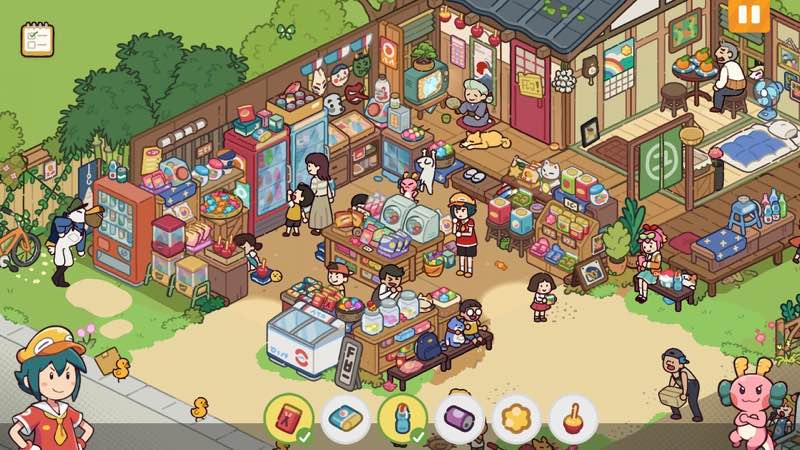
Lost and Found Co. is a whimsical hidden object game where you help Ducky, a duck-turned-human intern, at Goddess Mei’s company...
- Intel, 64-bit processor
- macOS 10.13 or later
軟體介紹
Lost and Found Co . is a whimsical hidden object game where you help Ducky, a duck-turned-human intern, at Goddess Mei’s company – a magical startup dedicated to finding lost items for its quirky townspeople.
Go on an adventure! Travel through charming locales that bring your childhood puzzle books to life in a heartwarming and whimsical world filled with bunch of items to discover!
Find out the goings-on in this wholesome place! Return lost items to their rightful owners in this adorable world, filled with thousands of interactive characters and objects-and we really mean thousands!
Hunt for well-hidden items in engaging challenge levels! Put your object-hunting skills to the test on these fun challenging levels, delivering pure hidden object gameplay goodness.
Chock-full of content! Enjoy countless levels with tons of items to find. This lively, animated world offers a joyful escape for players of all ages. Endless fun awaits!
Key Features :
• Single-player hidden object story campaign
• Bonus challenge levels testing your keen eyes
• Dozens of interactive levels taking you on a journey
• Decorate and customize your office
• Uncover easter eggs, surprises, and secrets galore!!!
WHAT’S NEW
Version 1.1.3:
• Release notes are available here .
REQUIREMENTS
• Intel, 64-bit processor
• macOS 10.13 or later
ScreenShots
If you are using Adblocker!! Please support this website by adding us to your whitelist. Ads are what helps us bring you premium content! Or read this to know how you can support us. Thank you!
•
Size
– 1.82GB
Previous Versions
編輯核對資料
推薦給喜歡《Hidden Folks》式密集手繪尋物、輕鬆家庭故事及彩蛋收集者,也適合家長與孩子輪流指出物品。第一輪先讀清單與對話,再把畫面按左上、右上、左下、右下分區掃描;卡住幾分鐘後才用提示。每完成兩三章便回辦公室整理獎勵並確認存檔槽,重要進度保留第二槽,不只依賴雲端。挑戰關卡放在熟悉普通場景之後。安全順序:雙備份→1.1.3/SHA-256→新槽一關→辦公室交付→章節重進→挑戰→Steam Cloud→舊檔。
優點
- 密集手繪場景把童年益智書變成鮮活世界,數千個可觀察或互動的角色與物件令清單完成後仍有發現。Ducky、Mei 與鎮民組成溫暖主線,尋物具有故事目的,不只是機械點擊。普通故事關卡適合放鬆,額外挑戰則提供更集中的眼力測試。辦公室裝飾把獎勵化為可見的長期成長,彩蛋與秘密鼓勵仔細探索。移動、縮放及點擊令年齡門檻低;Intel 與 Apple Silicon 都有官方配置,Steam Cloud 和存檔槽也方便延續進度。
不足
- 核心循環始終是掃描畫面與點擊目標,不喜歡尋物類型者不會只因劇情或裝飾而改變感受。場景非常密集,小螢幕、低亮度或視覺疲勞時容易漏掉細小或接近背景色的物品。提示可減少挫折,但過度使用會削弱觀察樂趣;挑戰關卡更重速度或精確度。辦公室裝飾有趣,但不及完整室內設計遊戲深入。部分任務需回辦公室交付或觸發對話,快速連點可能令人誤以為卡住。2 GB 只是最低安裝空間,宜預留 4 GB;Intel/8 GB 可用,但大型場景和縮放更適合 M1/16 GB。
安裝步驟
- 本頁對應 Lost and Found Co. 1.1.3。官方最低需求為 macOS Big Sur、Intel Core i5、8 GB 記憶體、Intel 整合圖形或 AMD Radeon Pro,以及 2 GB 空間;建議 Apple M1、16 GB 與 4 GB。安裝前備份故事章節、Ducky/Mei 任務節點、已找到物品、挑戰關卡、辦公室裝飾、彩蛋、成就、存檔槽及 Steam Cloud,記錄 1.1.3/SHA-256。先用新存檔完成一個故事場景:移動/縮放、找清單物品、點擊互動角色、領取獎勵並返回辦公室;重進章節確認完成標記、裝飾及存檔可讀。
解除安裝步驟
- 移除前離開正在搜尋的場景並回到章節或辦公室,等待自動儲存;不要在交付物品、對話切換、獎勵結算或辦公室擺放時強制退出。分別備份各存檔槽與 Steam Cloud,保留章節完成度、物品清單、挑戰結果、辦公室配置、彩蛋、成就及 1.1.3/SHA-256。重裝後先關同步,以新檔完成小場景並重載;確認點擊、縮放、提示和儲存正常後再複製舊檔。恢復雲端前逐槽核對章節、辦公室與時間。
常見錯誤及解決方法
- 最後幾個物品應按清單逐一排除,放大後沿場景邊緣、招牌、窗戶、角色手中及重疊物後方分區掃描;不要只依靠顏色,輪廓和比例也會改變。點擊無反應時先停止移動畫面,再點物件中心並關閉對話/獎勵浮窗。提示可能正在冷卻或目標尚未啟用,先完成目前互動。章節不推進時回辦公室確認物品已交付,再重進任務;使用備用存檔槽,不覆蓋唯一進度。辦公室裝飾放不下時移開鄰近物件再試。Intel/8 GB 宜降低解析度,M1/16 GB 為建議配置。
本次版本更新內容
- 站內版本為 1.1.3。官方頁面沒有提供與完整編號 1.1.3 精確對應的公開逐項說明,因此不虛構具體修正,也不披露更高版本。可核實範圍包括 Ducky 與龍女神 Mei 的單人尋物故事、數十個手繪互動場景、數千個角色與物件、額外挑戰、謎題、辦公室裝飾、彩蛋/秘密、Steam Cloud 與成就。驗收 1.1.3 顯示、新存檔槽、完成一份物品清單、交付獎勵、辦公室擺放、章節重進及雲端狀態;僅有更新記錄連結不足以推測個別變更。
檔案校驗與安全資訊






同類替代軟體

截圖預覽