Lost and Found Co.
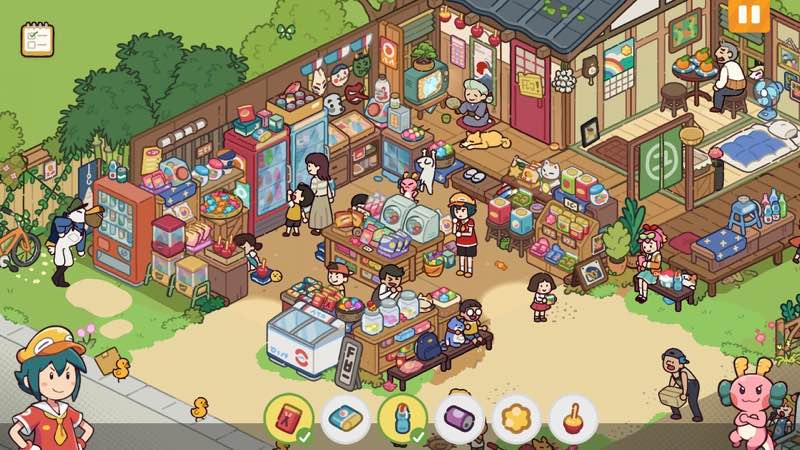
Lost and Found Co. is a whimsical hidden object game where you help Ducky, a duck-turned-human intern, at Goddess Mei’s company...
- Intel, 64-bit processor
- macOS 10.13 or later
Description
Lost and Found Co . is a whimsical hidden object game where you help Ducky, a duck-turned-human intern, at Goddess Mei’s company – a magical startup dedicated to finding lost items for its quirky townspeople.
Go on an adventure! Travel through charming locales that bring your childhood puzzle books to life in a heartwarming and whimsical world filled with bunch of items to discover!
Find out the goings-on in this wholesome place! Return lost items to their rightful owners in this adorable world, filled with thousands of interactive characters and objects-and we really mean thousands!
Hunt for well-hidden items in engaging challenge levels! Put your object-hunting skills to the test on these fun challenging levels, delivering pure hidden object gameplay goodness.
Chock-full of content! Enjoy countless levels with tons of items to find. This lively, animated world offers a joyful escape for players of all ages. Endless fun awaits!
Key Features :
• Single-player hidden object story campaign
• Bonus challenge levels testing your keen eyes
• Dozens of interactive levels taking you on a journey
• Decorate and customize your office
• Uncover easter eggs, surprises, and secrets galore!!!
WHAT’S NEW
Version 1.1.3:
• Release notes are available here .
REQUIREMENTS
• Intel, 64-bit processor
• macOS 10.13 or later
ScreenShots
If you are using Adblocker!! Please support this website by adding us to your whitelist. Ads are what helps us bring you premium content! Or read this to know how you can support us. Thank you!
•
Size
– 1.82GB
Previous Versions
Editor-checked details
Recommended for fans of Hidden Folks-style dense hand-drawn searches, gentle family stories and Easter-egg collecting; it also works well for a parent and child taking turns pointing. On the first run, prioritize story: read the list/dialogue, then scan upper-left, upper-right, lower-left and lower-right in sections; use a hint only after several stuck minutes. Return to the office every two or three chapters to arrange rewards and confirm the save slot. Keep important progress in a second slot instead of relying only on cloud. Leave challenge levels until regular scenes are familiar. Safe order: dual backup; 1.1.3/SHA-256; one fresh-slot level; office delivery; chapter re-entry; challenge; Steam Cloud; old save.
Pros
- Dense hand-drawn scenes turn childhood puzzle-book detail into a lively world; thousands of observable or interactive characters and objects reward lingering after the list is complete. Ducky, Mei and the townspeople provide a warm story purpose for finding items rather than pure mechanical clicking. Regular campaign levels are relaxing, while bonus challenges offer a tighter eyesight test once environments are familiar. Office decoration converts rewards into visible long-term growth, and Easter eggs/secrets encourage careful exploration. Pan, zoom and click controls keep the age barrier low. Both Intel and Apple Silicon have official tiers, while Steam Cloud and save slots help progress move between household devices.
Cons
- The loop remains scanning and clicking, so players who dislike hidden-object games will not be converted by story or decoration alone. Extremely dense scenes make tiny or background-colored silhouettes easy to miss on small, dim displays or when eyes are tired. Hints reduce frustration but overuse removes observational satisfaction; challenge levels can be more sensitive to speed or precision. Office customization has charm but not the depth of a dedicated interior-design game. Some quests require returning to the office for delivery or dialogue, and rapid clicking can make progress appear stuck. Two GB is only the minimum install space; keep at least the recommended 4 GB. Intel/8 GB works officially, but large scenes and zoom animation favor M1/16 GB.
Installation steps
- This page covers Lost and Found Co. 1.1.3. Official minimums are macOS Big Sur, Intel Core i5, 8 GB RAM, integrated Intel graphics or AMD Radeon Pro, and 2 GB storage; recommended is Apple M1, 16 GB and 4 GB. Back up story chapters, Ducky/Mei quest states, found objects, challenge levels, office decoration, secrets, achievements, save slots and Steam Cloud, then record 1.1.3/SHA-256. On first launch, use a fresh slot to complete one story scene: pan/zoom, find listed objects, click interactive characters, collect the reward and return to the office. Reopen the chapter and confirm completion marks, décor and the save slot all load.
Uninstallation steps
- Before uninstalling, leave the active search scene for the chapter/office screen and wait for autosave; never force-quit during item delivery, dialogue transitions, reward settlement or office placement. Back up every save slot and Steam Cloud separately, preserving chapter completion, object lists, challenge results, office layout, secrets and achievements, plus the 1.1.3/SHA-256 record. Reinstall with cloud sync off, create a fresh slot, finish a small scene and reload it. Once clicking, zoom, hints and saving work, copy back the old saves. Before restoring cloud, compare chapter, office and last-played time slot by slot; retain the most complete, clearly timestamped copy.
Common errors and fixes
- For the final hidden objects, eliminate the list methodically, zoom fully and scan in sections along scene edges, signs, windows, characters’ hands and behind overlapping objects; do not rely on color because silhouette and scale change. If clicking fails, stop camera movement, click the object center and close any dialogue/reward overlay. Hints may be cooling down or the target not yet active, so finish the current interaction first. If a chapter will not advance, return to the office, confirm delivery and reopen the quest; use a spare save slot rather than overwriting the only progress. If office décor will not fit, move neighboring items and re-enter placement. Reduce animation/resolution and close memory-heavy apps for low FPS; Intel/8 GB favors lower settings, while M1/16 GB matches the recommended tier.
What changed in this version
- The site build is 1.1.3. The official page does not expose a public itemized list matching the complete 1.1.3 number exactly, so specific fixes are not invented and higher versions are not disclosed. Verifiable scope includes the single-player hidden-object story of Ducky and dragon goddess Mei, dozens of hand-drawn interactive scenes, thousands of characters/objects, bonus challenge levels, puzzles, office decoration, Easter eggs/secrets, Steam Cloud and achievements. Acceptance covers the 1.1.3 display, a fresh save slot, one completed object list, reward delivery, office placement, chapter re-entry and cloud state. A channel note merely linking to release notes is not enough to infer individual changes.
File verification






Alternatives

Screenshots