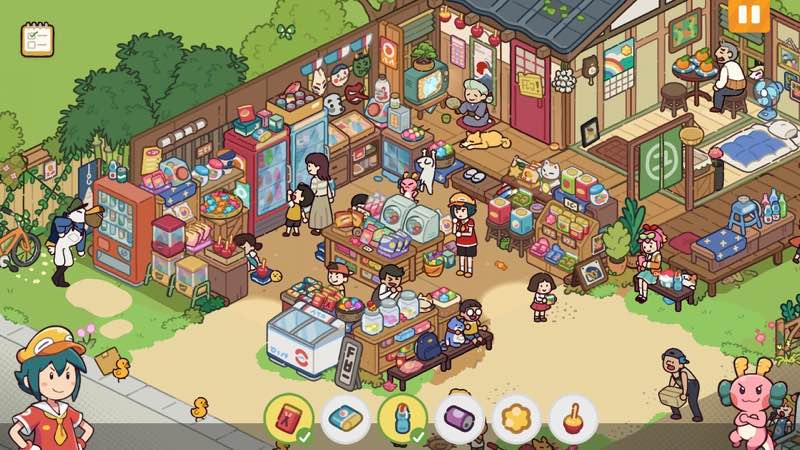
Lost and Found Co.
Lost and Found Co. is a whimsical hidden object game where you help Ducky, a duck-turned-human intern, at Goddess Mei’s company...
- Intel, 64-bit processor
- macOS 10.13 or later
概要
Lost and Found Co . is a whimsical hidden object game where you help Ducky, a duck-turned-human intern, at Goddess Mei’s company – a magical startup dedicated to finding lost items for its quirky townspeople.
Go on an adventure! Travel through charming locales that bring your childhood puzzle books to life in a heartwarming and whimsical world filled with bunch of items to discover!
Find out the goings-on in this wholesome place! Return lost items to their rightful owners in this adorable world, filled with thousands of interactive characters and objects-and we really mean thousands!
Hunt for well-hidden items in engaging challenge levels! Put your object-hunting skills to the test on these fun challenging levels, delivering pure hidden object gameplay goodness.
Chock-full of content! Enjoy countless levels with tons of items to find. This lively, animated world offers a joyful escape for players of all ages. Endless fun awaits!
Key Features :
• Single-player hidden object story campaign
• Bonus challenge levels testing your keen eyes
• Dozens of interactive levels taking you on a journey
• Decorate and customize your office
• Uncover easter eggs, surprises, and secrets galore!!!
WHAT’S NEW
Version 1.1.3:
• Release notes are available here .
REQUIREMENTS
• Intel, 64-bit processor
• macOS 10.13 or later
ScreenShots
If you are using Adblocker!! Please support this website by adding us to your whitelist. Ads are what helps us bring you premium content! Or read this to know how you can support us. Thank you!
•
Size
– 1.82GB
Previous Versions
編集部確認情報
Hidden Folks のような Dense Hand-drawn Search、Gentle Family Story、Easter Egg Collection が好きな人に推奨し、Parent/Child が交互に指す遊びにも向きます。初回は List/Dialogue を読み、Upper-left→Upper-right→Lower-left→Lower-right に分け、数分止まった後だけ Hint を使います。2~3 Chapter ごとに Office で Reward と Save Slot を確認し、重要 Progress は Second Slot にも保存。Challenge は Regular Scene に慣れた後にします。安全順序は Dual Backup→1.1.3/SHA-256→Fresh Slot Level→Office Delivery→Chapter Re-entry→Challenge→Cloud→Old Save です。
長所
- Dense Hand-drawn Scene が Childhood Puzzle Book を生きた世界にし、数千の Character/Object は List 完了後の探索にも発見を残します。Ducky、Mei、Townspeople の温かい Story により Item Search に物語上の目的があります。Campaign は Relaxing、Bonus Challenge はより集中した Eyesight Test。Office Decoration は Reward を長期的な成長として見せ、Easter Egg/Secret は Corner 探索を促します。Pan/Zoom/Click だけで年齢障壁が低く、Intel/Apple Silicon の公式 Tier、Steam Cloud、Save Slot も利点です。
短所
- Core Loop は Scan/Click のままで、Hidden-object が苦手な人は Story/Decoration だけでは変わりません。Dense Scene の Tiny/Background-colored Object は小型・暗い Display や Eye Fatigue で見落としやすいです。Hint の多用は Observation の満足を減らし、Challenge は Speed/Precision が必要です。Office Customization は Dedicated Interior Design ほど深くありません。Quest は Office Delivery/Dialogue が必要な場合があり Rapid Click で停止したように見えます。2 GB は最小で 4 GB 以上推奨。Intel/8 GB は公式対応ですが Large Scene/Zoom は M1/16 GB 向きです。
インストール手順
- このページは Lost and Found Co. 1.1.3 用です。公式最小要件は macOS Big Sur、Intel Core i5、RAM 8 GB、Intel Integrated Graphics または AMD Radeon Pro、空き 2 GB。推奨は Apple M1、RAM 16 GB、4 GB です。Story Chapter、Ducky/Mei Quest、Found Object、Challenge Level、Office Decoration、Secret、Achievement、Save Slot、Steam Cloud を保存し、1.1.3/SHA-256 を記録します。新規 Slot で Pan/Zoom、List Object、Interactive Character、Reward、Office Return を含む 1 Scene を完了し、Chapter を再度開いて Completion、Décor、Save Slot を確認します。
アンインストール手順
- 削除前に Search Scene から Chapter/Office に戻り Autosave を待ちます。Item Delivery、Dialogue Transition、Reward、Office Placement 中は強制終了しません。各 Save Slot と Steam Cloud を別々に保存し、Chapter、Object List、Challenge Result、Office Layout、Secret、Achievement、1.1.3/SHA-256 を残します。Cloud を切って再導入し、新規 Slot で Small Scene と Reload を確認後、旧 Save を戻します。Cloud 復帰前に Chapter/Office/Last-played Time を Slot ごとに比較します。
よくあるエラーと解決策
- 最後の Object は List を順に消去し、最大 Zoom で Scene Edge、Sign、Window、Character の手、重なった Object の裏を区画ごとに調べます。Color だけでなく Silhouette/Scale を見ます。Click 無反応時は Camera を止め、Object Center を押し、Dialogue/Reward Overlay を閉じます。Hint は Cooldown または Target 未有効の場合があるため Current Interaction を完了します。Chapter が進まなければ Office で Delivery を確認して Quest を開き直し、唯一の Save を上書きせず Spare Slot を使います。Office Décor は周囲を空けて再配置。Intel/8 GB は低 Resolution、M1/16 GB は推奨 Tier です。
今回の更新内容
- Site Build は 1.1.3 です。公式ページに完全な 1.1.3 と一致する公開 Itemized List がないため、Fix を創作せず上位版も掲載しません。確認可能な範囲は Ducky と Dragon Goddess Mei の Single-player Hidden-object Story、数十の Hand-drawn Interactive Scene、数千の Character/Object、Bonus Challenge、Puzzle、Office Decoration、Easter Egg/Secret、Steam Cloud、Achievement です。1.1.3 表示、Fresh Save Slot、Object List、Reward Delivery、Office Placement、Chapter Re-entry、Cloud State を検収します。Channel の Release Notes Link だけから個別変更は推測しません。
ファイル検証






代替ソフト

スクリーンショット