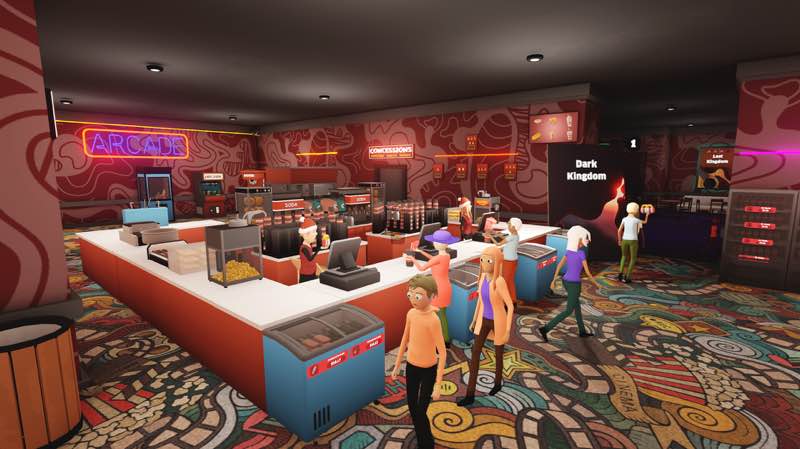
Ultimate Theater Simulator
Ultimate Theater Simulator is a first person cinema management simulator where you manage inventory, employees, & cinema...
- Intel, 64-bit processor
- macOS 11.0 or later
软件介绍
Ultimate Theater Simulator is a first person cinema management simulator where you manage inventory, employees, & cinema screenings.
Purchase popular films, set up projectors in each theater, and keep your audience excited with a steady stream of new releases.
Serve up classic cinema snacks like popcorn, pretzels, hot dogs, drinks, and more to keep moviegoers satisfied.
Track supplies, restock shelves, and keep your theater running smoothly by making sure nothing runs out during peak hours.
Grow your staff by hiring employees and assigning them roles like Janitor, Cashiers to keep your theater running smoothly.
Expand your theater with new rooms, unlock better upgrades, and attract more demanding (and rewarding) moviegoers.
Make the theater your own by designing the layout, placing decorations, and tailoring the interior to match your vision.
Handle unexpected situations like movie piracy, robberies, kids sneaking in, or customers smoking in the theater—and try to keep things under control!
WHAT’S NEW
Version 1.4.0:
• Release notes were unavailable when this listing was updated.
REQUIREMENTS
• Intel, 64-bit processor
• macOS 11.0 or later
ScreenShots
If you are using Adblocker!! Please support this website by adding us to your whitelist. Ads are what helps us bring you premium content! Or read this to know how you can support us. Thank you!
•
Size
– 859.5MB
Previous Versions
编辑核对资料
推荐给喜欢亲自摆放设备、服务顾客并逐步把小影院扩成综合娱乐场所的经营模拟玩家;只想看报表或完全自动化的人可能觉得手工操作偏多。开局先保持单一放映厅,稳定“购片—排片—售票—零食—清洁”循环和现金储备,再雇收银、清洁及补货员工;每次只扩一个瓶颈。到 15 级后先复制存档,再试 Arcade 扩建与 Sandbox。Mac 安全顺序:双备份→确认 Intel/macOS 11→核对 1.4.0/SHA-256→无自定义媒体新档→标准影片→员工路径→Arcade/Sandbox→逐项恢复自定义内容。
优点
- 把影院经营做成第一人称可操作流程:从买片、排片和投影,到售票、制作爆米花/热狗/饮料、补货、清洁及处理突发事件,问题能在现场直接观察。员工可承担收银、清洁和补货,房间扩建、装饰和定价提供持续成长。1.4.0 的 Arcade 扩展与 Sandbox 分别增加后期收入配置和无压力布局空间,日历趋势与折扣胶片让排片决策更有变化。官方提供 Steam Cloud、21 项成就和完整控制器支持;英语、简中、日文、韩文均有官方界面。
不足
- 第一人称搬货、补货和清洁在员工尚未解锁或路径规划不好时会重复且耗时;高峰期售票、零食、放映和清洁同时排队,扩建过快容易现金流断裂。自定义影片/图片增加个性化,但格式或路径错误可能影响播放与加载,需要单独测试。Sandbox 并非安装后立即开放,必须先有 15 级存档。官方商店的 Mac 页面没有公开独立的 Mac CPU/GPU/Apple Silicon 性能分级,站内渠道只标 Intel,因此不能承诺 M1/M2/M3/M4 原生兼容。繁体中文未列入官方语言,本站译文用于阅读深度说明,不等于游戏内繁中。
安装步骤
- 本页对应 Ultimate Theater Simulator 1.4.0。站内 Mac 来源要求为 Intel 64 位处理器和 macOS 11.0 或更高版本,来源包约 859.5 MB;官方 Steam 页面公开的性能参考为最低 8 GB 内存、GTX 1050 级图形和 4 GB 空间,推荐 16 GB 内存。安装前为下载、解包和存档保留额外空间,备份影院布局、等级、库存、员工岗位、自定义电影、日历和设置,并记录 1.4.0/SHA-256。首次启动先用新档完成购片、排片、放映、售票、零食补货和清洁闭环,再逐一雇用收银员、清洁工和补货员工;达到 15 级存档后才能验证 1.4.0 的 Sandbox。
卸载步骤
- 卸载前先结束营业日,等保存图标消失后退出。分别备份影院等级与声望、房间和座椅布局、放映计划、影片库、街机扩展、库存/定价、员工岗位、自定义图片/电影、成就及控制设置;记录 1.4.0/SHA-256。不要在移除应用时一并删除用户数据。重装后先关闭自定义内容,以新档核对售票、放映、顾客路径、库存、清洁和保存读取,再加载旧档检查日历、15 级 Sandbox 权限及 Arcade 机器;逐项恢复自定义内容,避免无法判断是哪一项造成加载或影片播放故障。
常见报错及解决办法
- 影院亏损通常先检查排片热度、票价、座位容量和放映间周转,不要同时扩建多个房间。零食断货时核对仓库容量、补货货架、员工岗位与高峰前备货;收银或清洁积压时缩短员工路径并增加对应岗位。顾客卡住、员工不寻路或箱子位置异常时先保存重载,移开门口、柜台和狭窄通道附近家具;1.4.0 已阻止顾客推动箱子。影片不播放或自定义图片崩溃时先移除自定义媒体,使用标准影片验证编码与路径。Sandbox 不出现需确认旧存档达到 15 级。黑屏、低帧率或加载很慢时核对 macOS 11、Intel 64 位、8/16 GB 内存参考、4 GB 空间及 SHA-256。官方界面支持英文、简中、日文和韩文,但未列繁中。
本次版本更新内容
- 是官方 Arcade Update:新增跳舞、敲击、摩托竞速和汽车竞速街机、自动售货机、影院 Arcade 扩建、新街机标牌与毛绒玩具;新建存档可选择 Sandbox,但必须先拥有达到 15 级的存档。日历会偶尔出现电影趋势以提高关注度,黑市商人有时以折扣出售电影胶片。该版本还阻止顾客推动箱子,并修复部分成就无法触发的问题。验收应覆盖版本显示、四类街机、售货机、扩建入口、15 级 Sandbox、日历趋势、折扣胶片、箱子碰撞和一个成就触发,不写入站内版本以上内容。
文件校验与安全信息






同类替代软件


截图预览