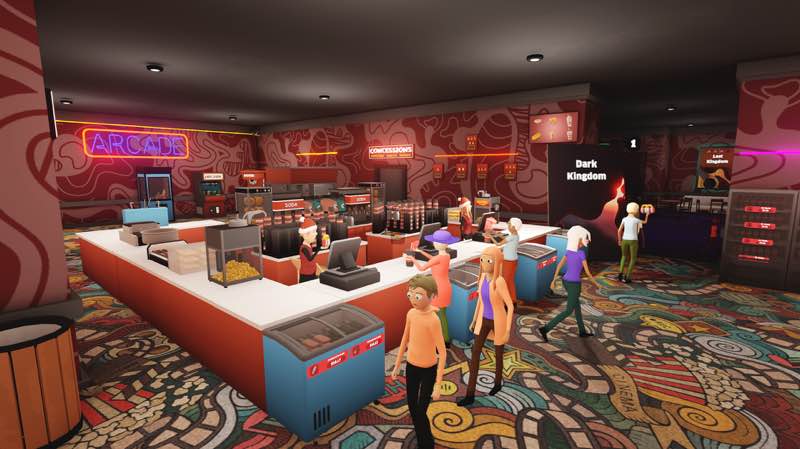
Ultimate Theater Simulator
Ultimate Theater Simulator is a first person cinema management simulator where you manage inventory, employees, & cinema...
- Intel, 64-bit processor
- macOS 11.0 or later
Description
Ultimate Theater Simulator is a first person cinema management simulator where you manage inventory, employees, & cinema screenings.
Purchase popular films, set up projectors in each theater, and keep your audience excited with a steady stream of new releases.
Serve up classic cinema snacks like popcorn, pretzels, hot dogs, drinks, and more to keep moviegoers satisfied.
Track supplies, restock shelves, and keep your theater running smoothly by making sure nothing runs out during peak hours.
Grow your staff by hiring employees and assigning them roles like Janitor, Cashiers to keep your theater running smoothly.
Expand your theater with new rooms, unlock better upgrades, and attract more demanding (and rewarding) moviegoers.
Make the theater your own by designing the layout, placing decorations, and tailoring the interior to match your vision.
Handle unexpected situations like movie piracy, robberies, kids sneaking in, or customers smoking in the theater—and try to keep things under control!
WHAT’S NEW
Version 1.4.0:
• Release notes were unavailable when this listing was updated.
REQUIREMENTS
• Intel, 64-bit processor
• macOS 11.0 or later
ScreenShots
If you are using Adblocker!! Please support this website by adding us to your whitelist. Ads are what helps us bring you premium content! Or read this to know how you can support us. Thank you!
•
Size
– 859.5MB
Previous Versions
Editor-checked details
Recommended for management-sim players who want to place equipment, serve customers and grow a small cinema into an entertainment venue. Spreadsheet-only or fully automated players may find the manual work heavy. Keep one screen initially and stabilize the purchase-schedule-ticket-snack-cleaning loop plus cash reserve before hiring cashiers, janitors and stockers; expand only one bottleneck at a time. At level 15, duplicate the save before testing Arcade and Sandbox. Safe Mac order: dual backup; confirm Intel/macOS 11; verify 1.4.0/SHA-256; fresh game without custom media; standard film; staff paths; Arcade/Sandbox; restore custom content individually.
Pros
- Cinema management is expressed as tangible first-person work: buying and scheduling films, projection, ticketing, popcorn/hot-dog/drink service, restocking, cleaning and handling incidents can all be observed on site. Cashiers, janitors and stockers automate routine jobs, while rooms, decoration and pricing provide progression. In 1.4.0, the Arcade Expansion adds a late-game revenue/layout layer and Sandbox provides unrestricted building after its level gate; Calendar trends and discounted tapes vary film decisions. Steam Cloud, 21 achievements and full controller support are official. English, Simplified Chinese, Japanese and Korean interfaces are supported.
Cons
- First-person hauling, restocking and cleaning can become repetitive before staff unlocks or when paths are poor. At peaks, ticket, snack, projection and cleaning queues overlap, while premature expansion can break cash flow. Custom films/images add personality but bad formats or paths can disrupt playback/loading and need isolated tests. Sandbox is not immediately available; a level-15 save is required. The official store does not publish a separate Mac CPU/GPU or Apple-silicon performance tier, while the site channel specifies Intel, so native M1/M2/M3/M4 compatibility is not promised. Traditional Chinese is not an official game language; this site translation is editorial guidance, not an in-game localization.
Installation steps
- This page covers Ultimate Theater Simulator 1.4.0. The site Mac source requires an Intel 64-bit processor and macOS 11.0 or later; its package is about 859.5 MB. The official Steam performance reference publishes 8 GB RAM, GTX 1050-class graphics and 4 GB storage as minimum, with 16 GB RAM recommended. Leave extra room for download, extraction and saves. Back up theater layout, level, inventory, staff assignments, custom movies, calendar and settings, then record 1.4.0/SHA-256. On a fresh save, validate purchasing, scheduling, projection, ticketing, snack restocking and cleaning before assigning cashiers, janitors and stockers. The 1.4.0 Sandbox option requires an existing level-15-or-higher save.
Uninstallation steps
- Before removal, finish the business day and quit after the save indicator clears. Separately back up theater level/reputation, room and seat layout, screening schedule, film library, arcade expansion, stock/prices, staff roles, custom images/movies, achievements and controls; retain 1.4.0/SHA-256. Do not delete user data with the app. Reinstall without custom content, then validate ticketing, projection, customer paths, stock, cleaning and save/load on a fresh game. Load the old save to check Calendar, level-15 Sandbox entitlement and arcade machines. Restore custom content individually so a loading or movie-playback fault can be isolated.
Common errors and fixes
- For losses, first examine film trends, ticket price, seat capacity and screen turnover instead of expanding several rooms together. Snack shortages require adequate storage, stocked shelves, assigned workers and pre-peak preparation. Shorten staff routes or add the matching role when checkout/cleaning queues grow. If customers stick, workers stop pathing or boxes move out of place, save/reload and clear furniture around doors, counters and narrow aisles; 1.4.0 prevents customers from pushing boxes. For failed playback or custom-image crashes, remove custom media and test a standard film. A missing Sandbox option usually means no existing level-15 save. For blank screens, low FPS or slow loading, check macOS 11, Intel 64-bit, the 8/16 GB RAM reference, 4 GB space and SHA-256. Official interfaces cover English, Simplified Chinese, Japanese and Korean, but not Traditional Chinese.
What changed in this version
- Official 1.4.0 is the Arcade Update. It adds dancing, smash, motorcycle-racing and car-racing machines, a vending machine, the theater Arcade Expansion, signs and plushies. New saves can select Sandbox only after an existing save reaches level 15. Occasional Calendar movie trends attract extra attention, and the black-market dealer sometimes offers discounted movie tapes. Customers can no longer push boxes, and some achievements that failed to trigger were fixed. Validate the displayed build, four arcade types, vending machine, expansion access, level-15 Sandbox, Calendar trend, discounted tape, box collision and one achievement trigger; content above the site version is excluded.
File verification






Alternatives


Screenshots