QLab
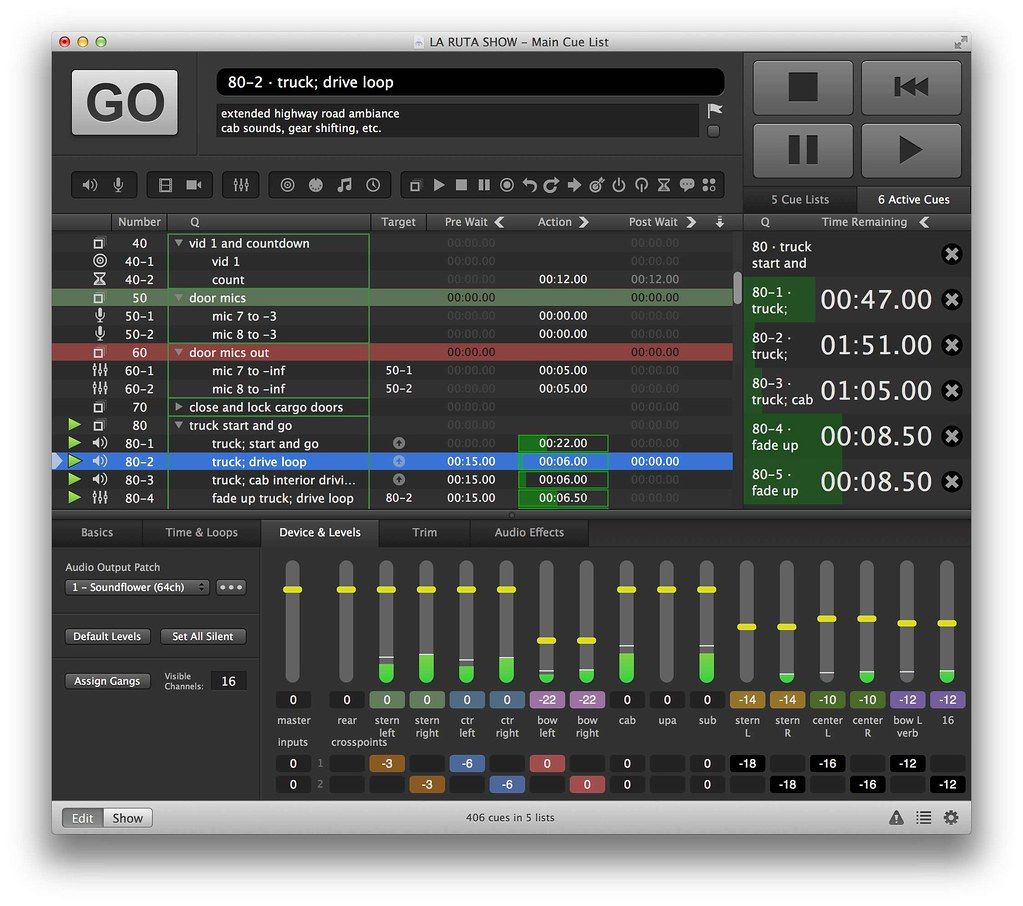
QLab provides live show control for your Mac. Create media designs for theatre, dance, composition, installation, and more. Play back ...
- Intel, 64-bit processor
- macOS 11.0 or later
Description
QLab provides live show control for your Mac. Create media designs for theatre, dance, composition, installation, and more. Play back audio, video, and MIDI from a single workspace.
QLab is powerful macOS software for designing and playing back sound, video, light, and show control cues. It’s a flexible, reliable, and user-friendly tool used by everyone from Provincetown Repertory Theatre to Dana H. on Broadway.
QLab offers one central place to build your sound, video, lighting, and show control cues. Create intricate designs and have the flexibility to change them quickly. Collaborate remotely with other designers on a single workspace, or sync across departments using our show control features. When you’re done designing, run the whole show just by pressing the “GO” button.
Audio
Trusted by sound designers all over the world, QLab is the best software for creating and playing back audio cues for live events. Need to play a thunderclap for a school play? Drag and drop your audio file into the workspace and you’re ready to go. Need to send up to 128 channels of audio output to a custom speaker array?
No problem: QLab has matrix-based audio routing and multi-channel audio support. QLab also has audio effects chains, support for Dante, AVB, and NDI, sophisticated mixing tools, and much more.
Video
QLab is a reliable and flexible way to design and run your projections. Play full screen videos and images, or customize the geometry for projection mapping. QLab offers up to 1,000 video layers, chained video effects, per-cue blend modes, text cues, NDI and Syphon for video input and output, and more.
We rewrote our video engine from scratch for QLab 5, utilizing Apple’s new Metal framework and vastly increasing the power and flexibility of our video features.
WHAT’S NEW
Version 5.6.3:
• Added: In the Light Library or Light Definition editor, rows now display in a different color if one of the instrument definitions inside that row is misconfigured.
• Added:
Editor-checked details
Recommended for theatre sound, stage management, installations and live teams needing dependable sequential show control. Compare Millumin for projection mapping, Mitti for video playback and Resolume Arena for VJ/realtime visuals. Stress-test the exact media, interfaces, displays and network, with a ready backup Mac. Verified from QLab's manual, system recommendations, licensing reference and 5.6.3 change log
Pros
- Combines audio, video, lighting, MIDI, OSC, timecode and scripts in one cue workflow; mature for theatre, installations and live events; strong programming, audition, snapshots, collaboration and external control; useful core features are free for smaller projects.
Cons
- Mac-only; complex video, object audio and large lighting rigs demand strong hardware and rehearsal; Audio, Video and Lighting are licensed separately; projects omit fonts and Audio Units; reliability still depends on media, interfaces, network, clocking and backup design.
Installation steps
- QLab 5 is Mac-only, requires macOS Big Sur 11 or later, and runs natively on Intel and Apple silicon. Use at least 8 GB RAM for medium or larger shows; prefer Apple silicon and internal SSD storage for video. Connect the actual audio interface, displays, MIDI, OSC and Art-Net/DMX equipment before building patches.
- Use Save Workspace and Media to New Project Folder to collect the workspace and audio, video and MIDI assets. Fonts and Audio Units are not copied, so install them on both primary and backup Macs. Rehearse the full show offline, freeze OS/app/plugin/firmware versions, and keep an equivalently configured backup.
Uninstallation steps
- Save a complete project folder and separately archive fonts, Audio Units, device patches, license details and show logs. Deactivate the old Mac before moving machines; a standard license normally covers a primary and backup. Quit QLab and move it from Applications to Trash. Do not remove snapshots, media or preferences until the project opens completely elsewhere.
Common errors and fixes
- Missing media or cue targets: use Workspace Status, relink assets and keep identical project paths on primary and backup Macs; install fonts and Audio Units manually.
- For audio clicks or latency, use internal SSD storage, align sample rate and interface clock, and reduce simultaneous channels/effects; rates above 48 kHz add load. For video stutter or black output, check codec, resolution, routes and GPU, and avoid DisplayLink.
- Use an isolated wired network, fixed addresses and unique IDs for Network, MIDI and lighting, and validate every patch. Avoid verbose logging during shows. Workspaces saved by 5.4+ cannot open in 5.3.8 or earlier; retain a copy before upgrading.
What changed in this version
- QLab 5.6.3 (July 21, 2026) adds clearer warnings for misconfigured Light Library rows and Light Patch instruments; improves Network cues, audio faders and effect editing over collaboration; fixes a rare crash when stopping video, plus DMX input, Timecode MIDI-patch undo/redo and Stage|Tracks definition issues.





Alternatives


Screenshots