Project Hospital

Project Hospital

· v1.2.23726 Free

Become an ace doctor, an aspiring architect and a successful manager at the same time. Design your very own hospital, tweak every...

 System Requirements
  • Intel, 64-bit processor
  • OS X 10.6.8 or later

Description

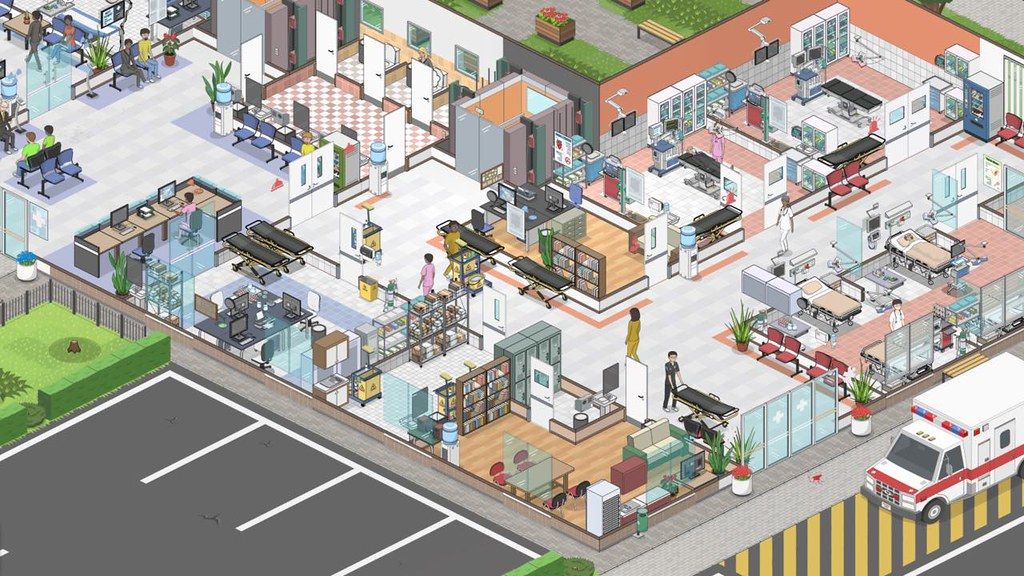
Become an ace doctor, an aspiring architect and a successful manager at the same time. Design your very own hospital, tweak every detail or use one of the predefined models and just jump to the doctor’s duty.


Contract different insurance companies to gain access to patients with interesting medical conditions, perform examinations, laboratory tests and use various equipment to solve the diagnostic puzzles. Hospitalize your patients, perform surgery and more!


Use a collection of various objects, materials and colors to make it truly yours or save your time and use one of many different prefabs.


From hiring to specializations, from doctors to janitors, make sure everybody is doing a great job and finds satisfaction in their work.


Help your doctors and walk them through the most complicated cases or just follow your favorite patients.


There are a few different modes in Project Hospital :

• Tutorial levels will guide your through the basics of treating patients and running hospitals.

• Sandbox mode offers endless hours of content, building anything from small clinics to huge multi-storey hospitals, starting from scratch or in one of pre-built hospitals or clinics in case you want to jump straight into management. Run you own ambulance service and help handle events and emergencies.

• The campaign will put you in the shoes of a crisis manager trying to save a few hospitals in critical state.

• 6 challenge levels will test your skills and let you focus on the intricate details of individual specialized departments.

WHAT’S NEW

Version 1.2.23726:

• Release notes are available here .

REQUIREMENTS

• Intel, 64-bit processor

• OS X 10.6.8 or later

ScreenShots

If you are using Adblocker!! Please support this website by adding us to your whitelist. Ads are what helps us bring you premium content! Or read this to know how you can support us. Thank you!


Size

– 254.6MB

Previous Versions

✓ Checked against source material

Editor-checked details

Editor: macv.net Editorial Team · Last reviewed: 2026-08-08
macOSOfficial Mac minimum lists Intel i3 3210/AMD Ryzen 3 1200, 4 GB RAM, Intel HD 4000 and 1 GB storage; recommended Intel i5 6600K/AMD Ryzen 3 3300X, 8 GB and GTX 1050/RX 460. Mac mini should use the main SSD; some audio drivers/plugins can break sound.
Apple Siliconunknown: official Mac specifications do not state native Apple-silicon support.
Intel MacCompatible
Why we recommend it

Recommended for management players who enjoy detailed layouts, queue optimization, staffing and diagnostic pipelines and will trace bottlenecks layer by layer. Start with a short reception-consultation-basic-lab-pharmacy loop, then add imaging, admission and surgery according to insurance goals; reserve night shifts, cleaning, corridors and lifts before expansion. Observe a full shift after every new department. Safe order: back up hospital/mods; 1.2.23726/SHA-256; main SSD; unmodded temporary save; old-save load; queue/transfer; audio; save reload; restore mods one by one. Apple-silicon users should validate the runtime and fonts first rather than assume native support.

Pros

  • It combines architecture, hospital management and doctor mode: grow a small clinic into a multistorey hospital or directly control a doctor through complex cases. Insurance contracts shape patient and income flow, while examinations, lab, imaging, diagnosis, admission and surgery form a full clinical pipeline; doctor, nurse, technician, reception and janitorial skills/shifts must align. Tutorials, sandbox, crisis campaign and six challenges support different learning rhythms, with ambulances, events and emergencies pressuring mature hospitals. Prefabs lower entry cost while materials/colors enable detailed layouts, complemented by 61 achievements, Cloud and Workshop.

Cons

  • As hospitals grow, room rules, equipment, paths, department hours, skills, fatigue, wages, insurance goals and patient priority interact, making bottlenecks time-consuming to diagnose. Medical systems are game abstractions, not clinical advice. Official Mac examples remain older Intel/AMD CPUs and discrete graphics with no native Apple-silicon promise; main-SSD and audio-plugin warnings expose platform-specific risk. The official Asian-language Proton note is for Steam Deck, not macOS. Mods add depth but can break saves or diagnosis data after patches, so every update needs an unmodded validation first.

Installation steps

  1. This page covers Project Hospital 1.2.23726. Official Mac minimum lists Intel i3 3210/AMD Ryzen 3 1200, 4 GB RAM, Intel HD 4000 and 1 GB storage; recommended is Intel i5 6600K/AMD Ryzen 3 3300X, 8 GB, GTX 1050/RX 460. No native Apple-silicon status is stated. Mac mini users should install on the main SSD, and some audio drivers/plugins may cause sound loss. Back up Cloud, local hospitals and mods and record 1.2.23726/SHA-256. First use an unmodded temporary hospital to validate loading, waiting room, examinations, hospitalization, save reload and audio.

Uninstallation steps

  1. Before uninstalling, pause intake and ambulances and wait for examinations, surgery, transfer, hospitalization, finance and Cloud sync; never force-quit while patients move or saving is active. Back up layout, insurance contracts, staff, departments, patients, finances, settings and the full mod list, recording 1.2.23726/SHA-256, Mac/OS and save times. Reinstall on the main SSD, disable mods and avoid hidden AppleDouble files introduced during copying. Use a save copy to validate waiting queues, Boston-brace transfer, audio and saving, then restore mods in dependency order.

Common errors and fixes

  1. If a Mac save or game will not load, note that 1.2.23726 fixes hidden AppleDouble-file interference. Preserve the original, inspect copied/extracted folders for hidden metadata and test an unmodded copy. On Mac mini, verify installation on the main SSD. For no audio, temporarily disable Zoom-related audio drivers, virtual devices or plugins and reboot before touching saves. If a taken-over patient loops in a specialist waiting room, confirm this build and inspect examination room, staff, path and queue; retain diagnosis/takeover steps if reproducible. Boston-brace patients should transfer ICU-to-Orthopaedy; check beds, transport and department hours if not. Separate reception, lab, imaging and lift traffic and align shifts for congestion.

What changed in this version

  1. Official 1.2.23726 (Patch 43) applies Unity’s security-vulnerability patch to the Windows build; fixes Mac loading broken by hidden AppleDouble system files; fixes taken-over patients looping in a waiting room en route to specialist examination; allows patients needing a Boston brace to transfer from ICU to Orthopaedy; and includes minor text fixes. The Windows-only security patch must not be represented as a Mac fix. Mac acceptance should focus on old/copied-save loading, specialist queue, ICU-to-Orthopaedy route, audio and save reload.

File verification

Security scanRecord 1.2.23726/SHA-256, keep the original hospital and mod list, then validate an unmodded copy for AppleDouble-safe loading, queues, transfer, audio and save reload. View report

Alternatives

Screenshots

Project Hospital 截图