Pixel Cup Soccer
Pixel Cup Soccer is a casual retro-style soccer game, a great evolution from the previous edition. It's dynamic, arcade, with...
- Intel, 64-bit processor
- macOS 10.13 or later
Description
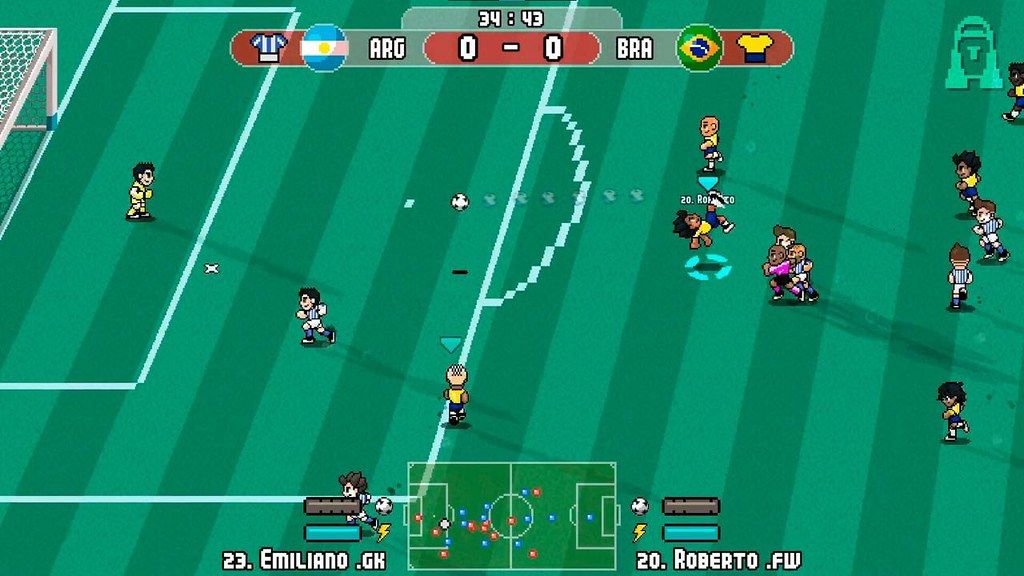
Pixel Cup Soccer is a casual retro-style soccer game, a great evolution from the previous edition. It’s dynamic, arcade, with fast-paced gameplay, just the fun part of soccer! The game has great pixel art graphics like the games from the 80s and 90s, evoking nostalgia.
Move, pass, and shoot the ball to victory! You will learn to play in one minute, but it takes much longer to master it. The simple controls enable a rich set of features such as passing, shooting, tackling, sprinting, dribbling, etc.
Play single-player (player VS computer) or local multiplayer (player VS player). Play local multiplayer with your friends. With Remote Play Together, you can play online with your friends in competitive or cooperative modes.
Play Modes :
• Friendly Match
• Tournaments
• Career Mode
• Penalty Kicks
• Cooperative / Competitive. Up to 8 players (4 vs 4)
• Party Tournament
• Steam Remote Play Together
Career Mode :
• Build your own team from the ground up. Climb to the top.
• Play leagues D, C, B, A, Country Cup, and International Cup and become the Champion of the Club Global Cup!
• The Club’s board of Directors has put you in charge of the important decisions of the Club! You will be the General Manager and Coach.
• The teams can be fully customized (name, players, shirt colors, club flag, etc.)
Competitions :
• Global Cup
• American Cup
• European Cup
• Women’s Global Cup
• Global Cup 1930 (evoking the first international cup)
• OlymPixel Cup (men and women)
• Liberty Cup
• Euro Champ Cup
• Pixel League A, B, C, D.
• Pixel Tournament
• Infinite teams and tournaments to download through Steam Workshop
Features :
• Simplified Controls For Casual Players.
• Easy to pick up and enjoy, with clean and challenging gameplay.
• Retro-style art resembling old games and evoking nostalgia.
• Women’s Soccer.
• Penalties, Free Kicks.
• Fouls, injuries, yellow and red cards.
• Tactical and Strategy panels, to manage player substitutions, team formation, and attitude.
•
Editor-checked details
Recommended for players nostalgic for 1980s/90s arcade sports who want instant matches plus career, team editing and couch-multiplayer depth. Finish the tutorial and practice short, through and lob passes plus controlled shots at low difficulty before Career; align controller layouts and contrasting kits before local play. Safe order: backup; build 278/SHA-256; Rosetta/Metal; controllers; friendly; penalty/substitution; Career reload; Local/Remote; Online; Workshop; long save.
Pros
- Movement, passing and shooting take a minute to learn, while through/lob passes, controlled shots, player skills, super shots, formations and team attitude provide mastery. Retro pixels and overhead, scorpion, scissor and diving-header animations favor speed over simulation. Friendly matches, cups, career, penalties, women’s football and custom teams cover quick play and long management. Local/Remote Play supports up to eight and 4v4 in cooperative or competitive combinations. Online PvP, Cloud, 40 achievements, Workshop, a level editor and Family Sharing extend its life.
Cons
- This is arcade football rather than a licensed simulation: teams, players and competitions are fictional or community-made, so authentic rosters depend on Workshop. Pixel kits and possession can be hard to read in crowded play, while aggressive AI pressing makes ground passing feel congested; contrasting kits and suitable zoom help. Matchmaking depends on concurrent players, and Remote Play depends on host networking/input assignment. Mac requirements specify x64/SSE2 without a native Apple-silicon promise. Traditional Chinese is absent, and no language has full audio.
Installation steps
- This page covers Pixel Cup Soccer - Ultimate Edition build 278. Official Mac minimums are macOS 10.13 High Sierra, x64 with SSE2, 2 GB RAM, Metal graphics and 1 GB storage. Back up career teams, rosters, tournaments and custom/Workshop content and record the installer SHA-256. Start with a friendly match to validate English interface, keyboard/controller, passing, shooting, tackling, sprinting, substitutions, penalties and save reload; then test local multiplayer, Remote Play Together, online matchmaking and Workshop before restoring a long career.
Uninstallation steps
- Before uninstalling, finish the match and wait for results, career schedule and Cloud saving; never force-quit during penalty resolution, roster writes, Workshop downloads or online sync. Back up every career slot, team customization, players, tactics, tournaments and Workshop items, recording build 278, SHA-256, Mac/OS and time. After reinstalling, use a copy to finish a short match, substitution, penalty and quit/reload. Confirm controller order and team assignment before restoring multiplayer competitions.
Common errors and fixes
- For launch failure, confirm 10.13+, 64-bit x64/SSE2, 2 GB RAM, Metal and storage, verify files/permissions and retry once. Official requirements do not promise native Apple silicon; M1/M2/M3/M4 normally require Rosetta 2, which should be updated before controller testing. If a gamepad is silent, choose the developer Generic Gamepad Steam Input layout and check player slots/sides. For matchmaking, align build, region, invites and network; the Remote Play host must assign inputs. Re-test goal kicks after stumbled penalties and the halftime injury hint, issues addressed by a maintenance update. Use contrasting kits/zoom when players are hard to distinguish. Restart after Workshop subscription. Traditional Chinese is unsupported; use Simplified Chinese. There is no full audio.
What changed in this version
- The channel identifier is build 278. No public record exactly maps “278” to an itemized official announcement, so changes from other builds are not claimed as this build’s changelog. Verifiable maintenance work includes keeping CPU-controlled player teams from changing strategy mid-match, restoring goal kicks after a stumbled penalty goes out and fixing an uncloseable halftime injured-player hint. Validate displayed build, controllers, penalties, right-stick player switching, online/Remote Play, Career, Cloud and Workshop.
File verification






Alternatives

Screenshots