Football Manager 26
New foundations set the stage for you to define your football destiny. Made with the Unity engine, FM26 is the legacy, redefined and...
- Intel, 64-bit processor
- macOS 11.0 or later
Description
New foundations set the stage for you to define your football destiny. Made with the Unity engine, FM26 is the legacy, redefined and where storytelling evolves.
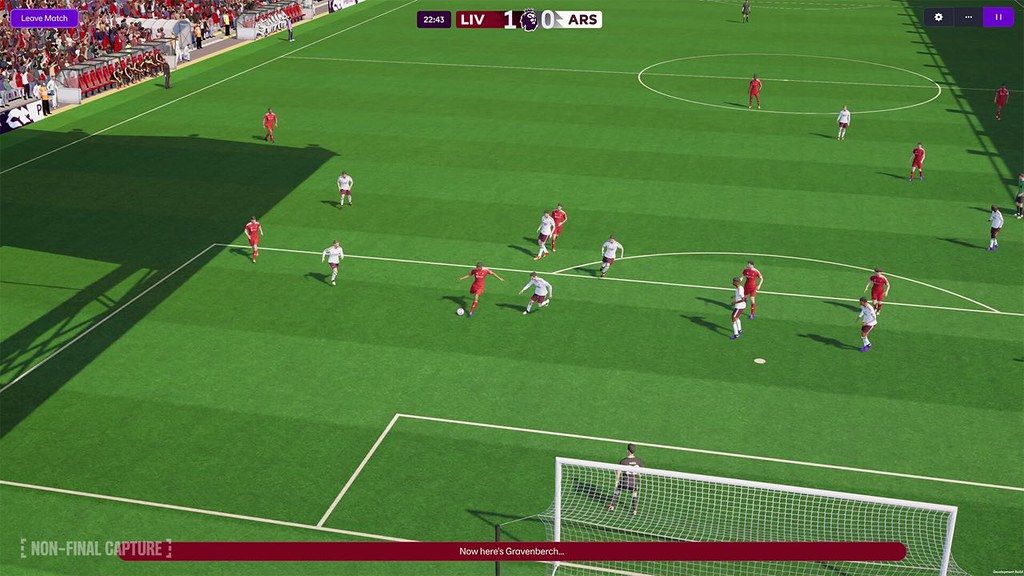
A reimagined interface and more immersive match day experience brings you closer to the action and combine to elevate every match-defining moment.
Transform your squad with advanced transfer tools and craft your footballing philosophy like never before with new innovations that deliver unrivalled game-changing tactical realism.
OUR RICHEST MATCH DAY EXPERIENCE
Savour the richest Match Day experience in series history, bringing new levels of depth and drama to every match with enhanced player movement and greater on-pitch detail.
Feel the adrenaline of a weaving run, inch-perfect through ball and unforgettable, last-gasp title winner with more personality thanks to fresh motion capture and volumetric animations.
THE PREMIER LEAGUE JOINS THE ACTION
Compete at the pinnacle of English football as the Premier League debuts with fully-licensed club badges, kits and official player photos.
Authenticity reaches new heights as you pursue the biggest prize in domestic football with the full broadcast experience from the best seat in the house.
ADVANCED TACTICAL INNOVATION
Exercise unparalleled control over how your team plays across every area of the pitch with the introduction of distinct In and Out of Possession formations.
Redefined player roles and a dynamic visualiser that shows how your team shapes up in different scenarios levels up your pre-match prep game in, game out.
TOTAL FOOTBALL, TOTAL CONTROL
An overhauled UI primed for the modern manager offers a cleaner look-and-feel, with the new Portal bringing together every aspect of your footballing world..
Tailor your game to your priorities with the introduction of quick link Bookmarks and learn more about the beautiful game with an overhauled Search and new FMPedia glossary.
INTRODUCING: WOMEN’S FOOTBALL
Explore a new world of possibi
Editor-checked details
Recommended for data analysis, recruitment, tactical experiments and long football careers, not direct-action football. On Mac prefer Ventura or later, Apple M1 and 12 GB; use a small database/2D matches on older Intel. Workflow: reserve 30 GB; back up games and every custom folder; record 26.3.2/SHA-256; create a default-skin/database small save; test Portal/match/save; copy the old save; restore graphics/skins/editor data in batches; verify identical online builds. Compare Out of the Park Baseball for another management simulation, or choose an action football game after separately checking Mac support.
Pros
- Database, scouting, transfers, contracts, training, tactics and dressing-room relationships form a detailed club-management loop. League/database scale is selectable for time and performance, supporting youth-only challenges or long multi-country careers. Version 26.3.2 completes all 48 World Cup teams for richer international saves. Matches offer 3D, 2D or highlights for different hardware/pace, while in/out-of-possession shapes and role feedback aid tactical planning. Apple M1 and Intel are both in minimum specs, and cloud/store compatibility helps preserve long careers.
Cons
- The Unity UI/Portal workflow differs sharply from older entries, requiring adjustment to hierarchy, clicks and reworked/missing features. Four GB only suits a small database; long multi-league saves, graphics packs and 3D matches benefit from 12 GB. Large face/logo/kit/skin packs increase startup, cache and storage and may break UI after updates. Licensing limits some leagues/players, while squads do not live-update after June 1. Dense data and repetitive seasons will not suit players wanting direct football action; long online saves demand identical versions/editor data.
Installation steps
- This page covers Football Manager 26 26.3.2. Official Mac minimum is an updated Big Sur 11 through Sequoia 15, Apple M1 or Intel Core M, 4 GB RAM, Apple M1/GeForce GT 750M/Intel HD 5000/AMD FirePro D300-class graphics and 20 GB; recommended is Ventura 13 through Sequoia 15, Apple M1, 12 GB and 1 GiB VRAM. Reserve 30 GB. Back up games, tactics, shortlists, set pieces, skins, graphics and editor data; record 26.3.2 and SHA-256. First disable skins/graphics/database edits and test Portal, search, transfers, tactics, matches, save/load and online lobby in a small-league new save, then restore additions individually.
Uninstallation steps
- Before uninstalling, create a new manual save outside match day, deadline, registration, draw or online synchronization. Back up games, tactics, shortlists, set pieces, views, filters, skins, graphics and editor data under Sports Interactive/Football Manager 26. Label 26.3.2, club/nation, date, database, leagues, online/dual-manager state and SHA-256. The official default Mac save path is Library/Application Support/Sports Interactive/Football Manager 26/games. Test an offline copy. After reinstalling, create a default-database/skin test save before restoring the old save and identical editor data. Preserve both cloud-conflict copies.
Common errors and fixes
- Launch crash, blank Portal or slow matches: confirm Big Sur 11, 20 GB and SHA-256, move skins/graphics/editor data out, preserve then clear preferences/cache, and test a default small database. Failed old save: confirm 26.3.2 and original editor data; never overwrite it. 26.3.2 fixes crashes assigning squad numbers, clicking Wnt on a clubless player and editing Contract Expires Date; it also addresses far-future online-save crashes, a space-bar softlock in dual management and Portal appearing after halftime in Hotseat. For speed reduce playable leagues, player count and 3D detail. Four GB is only minimum; 12 GB suits long large databases. Online users need identical build/editor data.
What changed in this version
- Version 26.3.2 is the second International Management update. All 48 FIFA World Cup 2026 qualified teams are manageable with licensed tournament kits, and saves can start with confirmed 26-player squads. Those squads are accurate to June 1; later injury, suspension or selection changes are not reflected. Technical fixes cover three UI/database crashes, several far-future online-save crashes, a dual-management space-bar softlock and Portal incorrectly appearing after halftime in Hotseat. Other builds and Touch/Mobile-only content are excluded.
File verification






Alternatives

Screenshots