Entity Pro
Entity Pro is the ultimate Unicode and Emoji Finder for macOS. Search smart, copy fast and learn digital typography.FeaturesSmart & fast...
Description
Entity Pro is the ultimate Unicode and Emoji Finder for macOS. Search smart, copy fast and learn digital typography.
Features
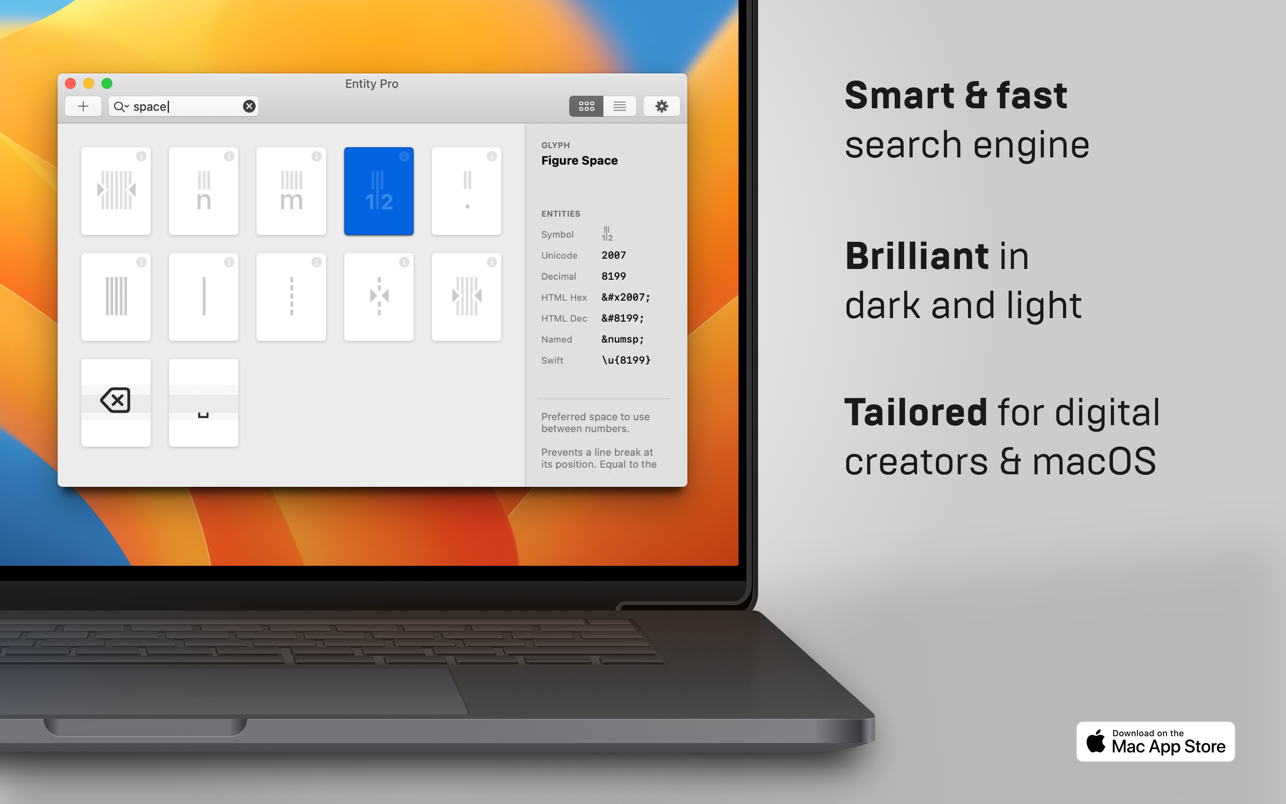
• Smart & fast search engine
• Finds Unicodes, Hex, Decimal, HTML and Swift entities
• Helpful typography advice: Learn how to use your glyphs right
• Curated: Choose from over one hundred glyph collections
• Detail View: Inspect glyph metrics like ascender, descender and x-heights
• Collect your favourite characters
• Spotlight extension: Find your favourites super fast through macOS Spotlight
• Touchbar support for MacBook Pros
• Quick access to your frequently used characters
• Brilliant in dark and light
• Works 100 % offline
Explore new glyphs by browsing through Entity Pros beautiful Card or List View—or use its powerful search to find Unicodes, Hex, Decimals, named HTML and Swift entities. On-point advice teaches you on how to use your glyphs in a typographically appropriate way.
Tailored for designer, developer, authors and digital creators.
WHAT’S NEW
Version 1.5:
• This update contains improvements and minor bug fixes.
REQUIREMENTS
• Intel, 64-bit processor
• macOS 11.0 or later
ScreenShots
If you are using Adblocker!! Please support this website by adding us to your whitelist. Ads are what helps us bring you premium content! Or read this to know how you can support us. Thank you!
Size
– 6.8MB
Previous Versions
Editor-checked details
Recommended for designers, editors, front-end and Swift developers who repeatedly need punctuation, spaces, maths/currency symbols, emoji and entities. A controlled workflow: search by meaning, not shape alone; read the Unicode name and typography note; record the full code-point/grapheme sequence; decide literal character versus HTML entity/language escape; test the target font, browsers, app and PDF; check NFC/NFD, ZWJ/variation selectors and fallback; visualise invisible/bidi/confusable characters; add approved items and purpose to a version-controlled team sheet; review pasted code and screen-reader output; record SHA-256 and review date. For occasional emoji use macOS Character Viewer. For broader Unicode conversion compare UnicodeChecker or Codepoint. Inspect a professional font’s full glyph/OpenType repertoire in Glyphs, Font Book or a font editor. Security-sensitive repositories need a dedicated bidi/confusable linter.
Pros
- It goes beyond the system emoji panel by presenting Unicode, hex, decimal, HTML and Swift forms together—useful across design, web/native development, editing and technical writing. Curated collections and typography notes distinguish curly quotes, apostrophe, prime, hyphen, en/em dash and specialised spaces. Detail View visualises baseline, ascender, descender and x-height for type discussions. Favourites, recents and Spotlight reduce repeat lookup; Touch Bar helps equipped older MacBook Pros. Fully offline use reduces reliance on character websites and avoids intentionally submitting queries to a remote service. Card/List and Light/Dark modes support browsing. Searching by code point, name or entity covers both “I recognise the shape” and “I know the encoding” workflows.
Cons
- A Unicode catalogue is not font coverage: a found character can render as tofu, fall back to another font or disappear in PDF/web output. One visible grapheme may contain several code points, so a single entity record may not fully describe ZWJ emoji, combining accents, flags or variation selectors. Typography advice does not replace brand type rules, language editing or accessibility testing. Emoji art and Unicode-version support vary by platform, so the same sequence changes across devices. The offline database is bounded by data shipped with 1.5 and cannot be assumed to include later characters. Favourites/Spotlight are personal workflow, not a team terminology repository, version control or approval system. Invisible spaces, bidi controls and confusables create code-review, domain and identity-spoofing risk; this is not a security scanner. Touch Bar benefits only limited hardware.
Installation steps
- The site build is Entity Pro 1.5, officially requiring macOS 11 or later and published by App ahead GmbH. Start with em dash, ellipsis, non-breaking space, copyright and common emoji; compare the character, Unicode code point, hex, decimal, named HTML entity and Swift representation. Paste into plain TextEdit, browser HTML, a code editor and the destination design app to distinguish a literal character from entity text. Then test combining sequences, emoji skin-tone/ZWJ/variation selectors, invisible spaces and bidirectional controls. These can contain multiple code points, so one number is not the whole grapheme. Favourite approved characters and validate Spotlight, recents and offline use; Touch Bar only applies to equipped Macs. Ascender, descender, baseline and x-height in Detail View are typographic guidance—the destination font controls actual rendering. Maintain a reviewed character sheet with character, NFC/NFD normalisation, target encoding, purpose, font, copy date and SHA-256. Never paste unknown invisible or bidi controls into security-sensitive source code.
Uninstallation steps
- Before uninstalling, export or manually document favourites, frequent characters and the team character sheet. Preserve the visible glyph, full code-point sequence, Unicode name, HTML/Swift form, normalisation, target font and usage—not merely a screenshot. Inspect favourites for zero-width joiners, no-break spaces, bidi controls and combining marks; generate a machine-readable hex manifest and SHA-256. Confirm Spotlight results are no longer needed, quit and remove the app. If desired, clear its Spotlight index, preferences and container without deleting the team sheet. Uninstalling cannot remove Unicode already pasted into documents, code, clipboard history, templates or cloud files and cannot reverse normalisation. Repositories exposed to confusable or bidi-control risk still require an independent scanner.
Common errors and fixes
- A box/blank means the selected font lacks a glyph even if Entity Pro knows the code point; choose a font covering the block and test fallback in final PDF/web/device. Emoji, flags, skin tones and families may paste as multiple code points using ZWJ, regional indicators, modifiers or variation selectors; inspect the full UTF-8/code-point sequence and destination support. If HTML prints “&name;”, use a valid entity with semicolon in an HTML parsing context; plain text, JS or Swift may need a literal or escape. If a spaced query fails, try the formal Unicode name, one keyword, hex or decimal. For missing Spotlight favourites, confirm they were saved and the extension/indexing is enabled; test in-app search before rebuilding an index. Visually identical strings can differ through NFC/NFD, compatibility characters, Latin/Cyrillic confusables or invisible controls. If source appears reordered, scan bidi override/isolate characters—never approve security-sensitive code by visual appearance alone.
What changed in this version
- The site version is Entity Pro 1.5. Its public release text says only that the update contains improvements and minor bug fixes, without verifiable itemised detail, so no affected module is guessed. The official App Store confirms the build’s scope: smart Unicode/emoji search; hexadecimal, decimal, named HTML and Swift entities; 100+ curated collections; typography advice; ascender/descender/x-height detail; favourites; Spotlight extension; Touch Bar; frequent characters; Light/Dark appearance; and fully offline operation. This page is pinned to 1.5 and does not mix another product or release.
File verification






Alternatives



Screenshots