Codepoint
70,000+ Unicodes in your pocket. Search Unicodes, Glyphs, SF Symbols and Emojis in a blink. Codepoint helps you to find the exact...
- Intel, 64-bit processor
- macOS 13.5 or later
Description
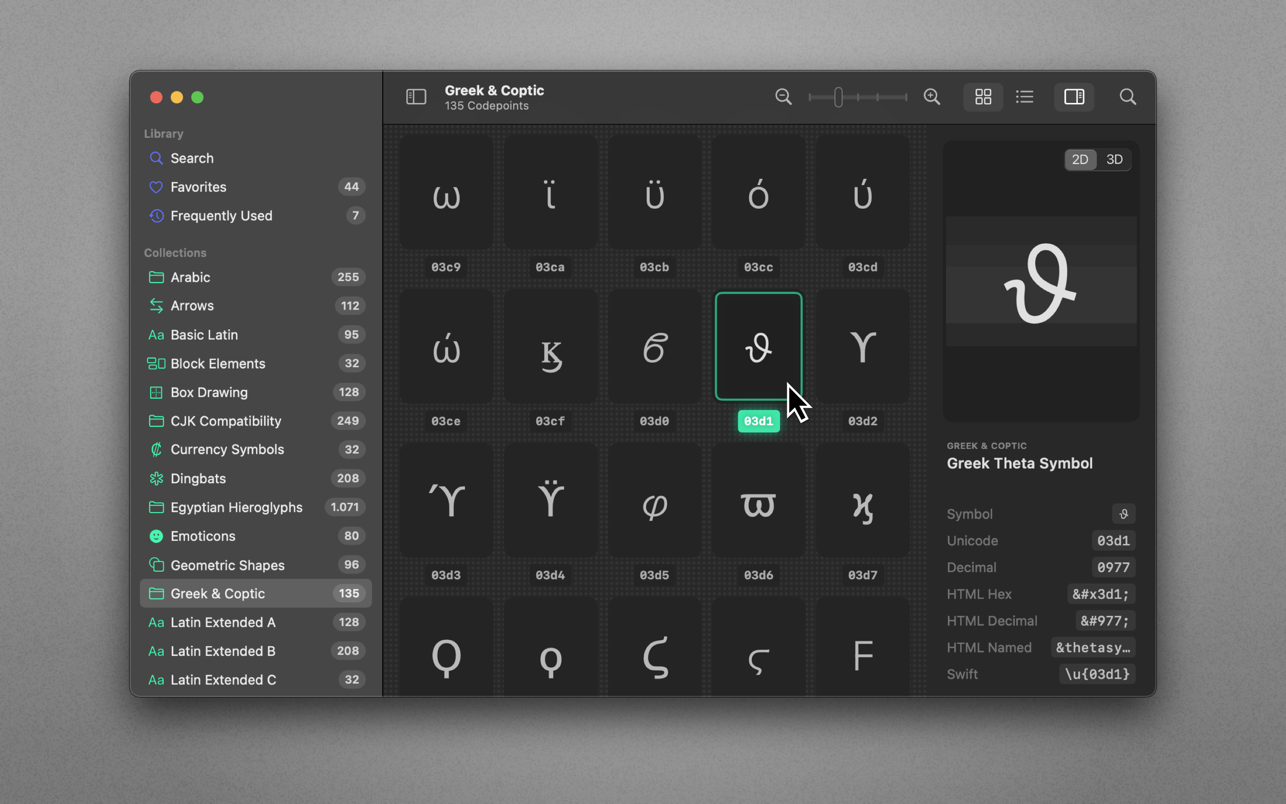
70,000+ Unicodes in your pocket. Search Unicodes, Glyphs, SF Symbols and Emojis in a blink. Codepoint helps you to find the exact characters you need and supports you in discovering new glyphs. Export them as Symbols, Strings, Hexadecimals, HTML entities or even Swift code. Save Favourites in iCloud. Remember your Frequently Used symbols. Codepoint is tailored for you—a creative, ambitious professional.
Features
• Explore, search and share Unicodes
• Search Engine: Lightning fast, surprisingly smart
• Find Unicodes, Hex, Decimals, HTML and Swift entities
• Favourites synced across all your devices
• Typography Advice for selected characters
• 3D Glyph Preview
• Supports SF Symbol names
• Works offline
• Looks brilliant in dark and light
• Optimised for Macs with Apple Silicon (M1, M2)
• Works great on macOS 13 Ventura
WHAT’S NEW
Version 1.23:
• Minor refinements throughout, so the app stays as reliable as you’re used to.
REQUIREMENTS
• Intel, 64-bit processor
• macOS 13.5 or later
ScreenShots
If you are using Adblocker!! Please support this website by adding us to your whitelist. Ads are what helps us bring you premium content! Or read this to know how you can support us. Thank you!
•
Size
– 64.6MB
Previous Versions
Editor-checked details
Recommended for Mac/iOS developers, designers, typographers and technical editors who regularly locate Unicode, emoji or SF Symbols for code, web, UI and publishing. Use: semantic search; inspect official name/block; copy the complete sequence; choose literal/HTML/Swift/UTF bytes; read back with the real font and target platform; record font/OS/Unicode version; add to Favorites/project manifest. For security-sensitive strings, separately check normalization, bidi controls, zero-width characters and confusables. Choose Glyphs/FontLab for font creation, Typeface/RightFont for font browsing, a UnicodeChecker-class tool for normalization/split/diff, and PopChar for fast insertion. Review Apple HIG/licensing before product use of SF Symbols; copyability is not cross-platform commercial permission.
Pros
- A native interface centralizes 73,000+ Unicode, emoji and SF Symbols with fast offline search for development, typography, design and technical writing. Official names, blocks, encodings, glyph metrics and selected usage notes make reusable inventories easier than the system character viewer. One selection converts to HEX, decimal, UTF, HTML and Swift, reducing manual conversion errors; multi-codepoint sequences go beyond a single scalar. Favorites sync across Apple devices and support import/export; widgets surface frequent symbols; USDZ turns glyphs into quick AR assets. Core search works offline across Mac, iPhone, iPad and Vision Pro.
Cons
- It is a finder/converter, not full font management, font creation, Unicode normalization, mojibake repair or string diff. Preview alone cannot prove font coverage, NFC/NFD equivalence, shaping, bidi behavior or database collation. SF Symbols are Apple assets—not universal Unicode—and depend on license/platform version. Emoji sequences/artwork change by OS, and 73,000+ entities do not mean every device has a glyph. Core lookup is offline, but Favorites needs iCloud and install/update needs Apple services. USDZ is quick conversion rather than professional 3D modeling; holes, curves, material and units need inspection. macOS below 13.5 is unsupported. Teams needing CLI/API, regex properties, normalization and versioned Unicode data still need ICU/Unicode databases or specialist tools.
Installation steps
- Codepoint 1.22 requires macOS 13.5+ and installs through the Mac App Store; it supports Intel and Apple silicon. Establish a verification set: U+0041, a multi-codepoint flag, skin-tone/ZWJ emoji, combining marks, invisible spaces and an SF Symbol. Copy each as literal character, Unicode/HEX, decimal, UTF-8/16/32, HTML entity and Swift code, then read it back in the destination editor, browser and terminal—do not trust preview alone. Search/data work fully offline, while Favorites synchronization needs iCloud. Before USDZ export, verify font glyph, extrusion, orientation, material and AR scale; geometry does not retain font shaping. In development records, keep the encoded literal, display font and semantic name together.
Uninstallation steps
- Before uninstalling, export Favorites with the app’s import/export feature and retain a screenshot or list of critical groups; iCloud alone is not an auditable backup. For development/type projects, export UTF-8 text or CSV recording visible character, complete U+ sequence, official Unicode name, HTML/Swift representation, font, purpose and review date. Preserve every emoji ZWJ/variation-selector component. Store USDZ files in the project and reopen them in Quick Look/Reality Composer. Copy lists, models and source to a second medium before removal. Existing copied characters remain, but future system fonts, SF Symbols or Unicode data can change rendering, so archive font versions and reference renders.
Common errors and fixes
- A box/missing glyph means a codepoint exists but the selected font lacks it; choose a covering font and distinguish LastResort placeholders from real glyphs. Split/different emoji require the full sequence, ZWJ, skin tone and variation selector; platform emoji artwork differs. If a recent character is absent, update to 1.22—1.21 added 1,000+ codepoints, but Unicode publication and system-font support arrive separately. HEX/UTF/HTML confusion often mixes codepoints with bytes: U+1F600 is not the same layer as UTF-8 F0 9F 98 80; verify endianness and escape syntax. Visually identical strings may be precomposed versus NFD; use a normalization/diff tool alongside Codepoint. SF Symbols are Apple assets with usage restrictions, not universal Unicode. For Favorites sync, verify Apple ID, iCloud Drive and app permission. Blank USDZ may indicate a missing font glyph; test basic Latin first.
What changed in this version
- Codepoint 1.22 is a compatibility maintenance release whose official note says it keeps the app running smoothly on the latest macOS; it does not claim a major new feature. It builds on 1.21’s 1,000+ new Unicode codepoints and the existing 73,000+ offline Unicode/Emoji/SF Symbols database, block browsing, fast search, glyph metrics, typography notes and multi-codepoint support. It converts/copies Unicode, decimal, HEX, UTF-8/16/32, HTML entities and Swift; widgets show emoji, SF Symbol and Codepoint of the Day; Favorites import/export and sync through iCloud; 3D preview exports glyphs to USDZ for AR/VR and Vision Pro. No detailed compatibility-fix list is published, so it should not be overstated as a new engine.






Alternatives





Screenshots