CrossOver
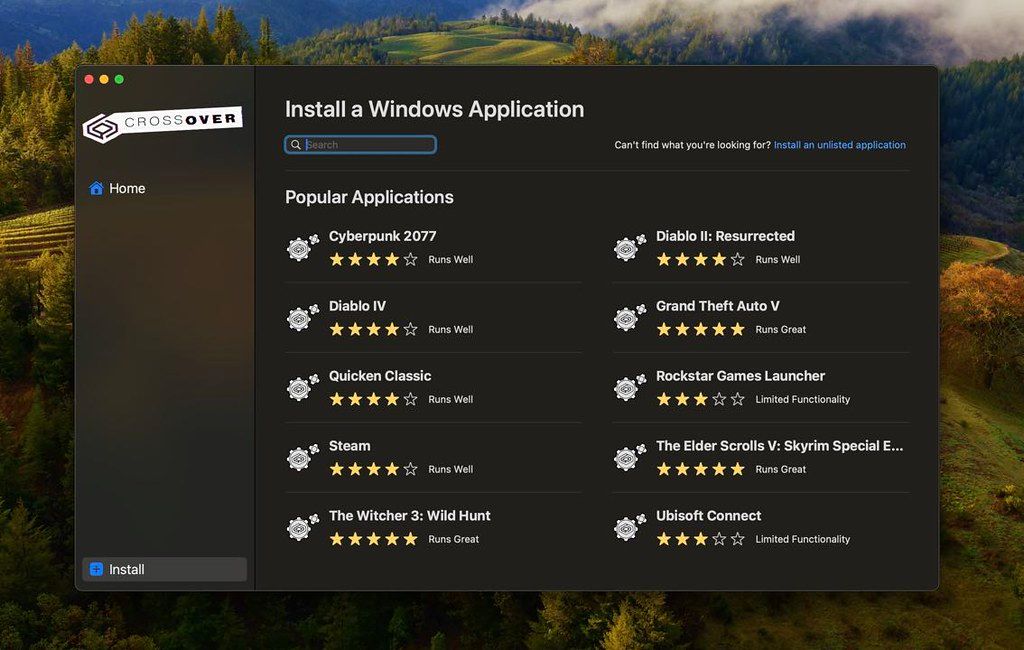
CrossOver allows you to install many popular Windows applications on your Mac. Your applications integrate seamlessly in OS X; just click...
- Intel, 64-bit processor
- macOS 10.15 or later
Description
CrossOver allows you to install many popular Windows applications on your Mac. Your applications integrate seamlessly in OS X; just click and run. No rebooting, no switching to a virtual machine, and no Windows Operating System license required. CrossOver is capable of running a wide range of Windows software.
To see if your favorite application works with CrossOver, please check What Runs, or search for it using the search box at Codeweavers .
Thousands of Titles!
CrossOver can run many different Windows applications. Use this database to find out if your favorite software works under CrossOver.
Easy Installs!
Many Windows titles can be installed using our CrossTie technology. If you have CrossOver installed, and have the installer for your Windows software, simply click the button in our Compatibility Database, and CrossOver will automatically install your application for you!
Compatibility Center Statistics
• 10,961 applications in database.
• 1,761 gold medal applications in database.
• 1,261 1-click install via CrossTie applications in database.
• 544,231 total CrossTie downloads to date.
• eSword is the top downloaded CrossTie with 109,071 downloads.
• Star Wars: The Old Republic is the top voted application with 319 votes.
WHAT’S NEW
Version 26.3.0:
Bug fixes :
• Fix for Diablo IV not launching after game update.
• Fix for Epic Games Launcher downloads not working on Mac after update.
• Fix for GOG Galaxy client not loading after update.
REQUIREMENTS
• Intel, 64-bit processor
• macOS 10.15 or later
ScreenShots
If you are using Adblocker!! Please support this website by adding us to your whitelist. Ads are what helps us bring you premium content! Or read this to know how you can support us. Thank you!
•
Size
– 388.8MB
Previous Versions
Editor-checked details
Best for Mac users who need a few verified Windows apps or games without maintaining a full VM. Prefer Parallels Desktop or VMware Fusion for higher compatibility, drivers or enterprise software; compare Whisky for a free gaming-focused option. Check the official Compatibility Center and test the exact app before buying. Verified from CodeWeavers' site, guide and changelog
Pros
- No full Windows installation; relatively native macOS integration; isolated bottles are easy to test and archive; actively maintained profiles for popular games and productivity apps; Intel and Apple Silicon support.
Cons
- Compatibility varies by exact app and version; anti-cheat, drivers and hardware-dependent software are major limitations; complex apps still need tuning; paid, and not equivalent to a real Windows environment.
Installation steps
- CrossOver 26 supports Intel and Apple Silicon Macs. Apple Silicon requires macOS 11.1+, while macOS 26 requires CrossOver 25.1.1 or newer. Allow at least 1 GB plus space for Windows apps.
- Extract and move CrossOver to Applications. Check the Compatibility Center, then let the assistant create a separate bottle. Keep unlisted apps out of important existing bottles and archive working bottles before upgrades.
Uninstallation steps
- To remove a Windows app, right-click it in Bottle Details and choose Uninstall; do not delete shared dependencies blindly. Deleting a bottle permanently removes its apps, registry and possibly user data, so export or duplicate it first.
- Before removing CrossOver, quit all bottles and archive any you need, then move the app to Trash. Remove its Library data only after confirming the backups.
Common errors and fixes
- Install or launch fails: check the compatibility rating and use a separate bottle with the recommended Windows version and dependencies; unlisted software is not guaranteed.
- Installer appears frozen: look for a Windows dialog behind other windows before canceling, as cancellation can corrupt the bottle.
- Launcher does nothing: use Clear and Rebuild Programs; use Repair Bottles if security software removed files.
- For black screens or poor performance, test the app-specific D3DMetal, DXMT or MSync settings. Anti-cheat, DRM, drivers and some peripherals may remain incompatible. Duplicate the bottle first.
What changed in this version
- CrossOver 26.3.0 (July 21, 2026) fixes Diablo IV failing to launch after a game update, Epic Games Launcher downloads failing on Mac after its update, and GOG Galaxy failing to load after an update.






Alternatives


Screenshots