CorelCAD 2023

CorelCAD 2023

· v2022.3.1.4090 Free

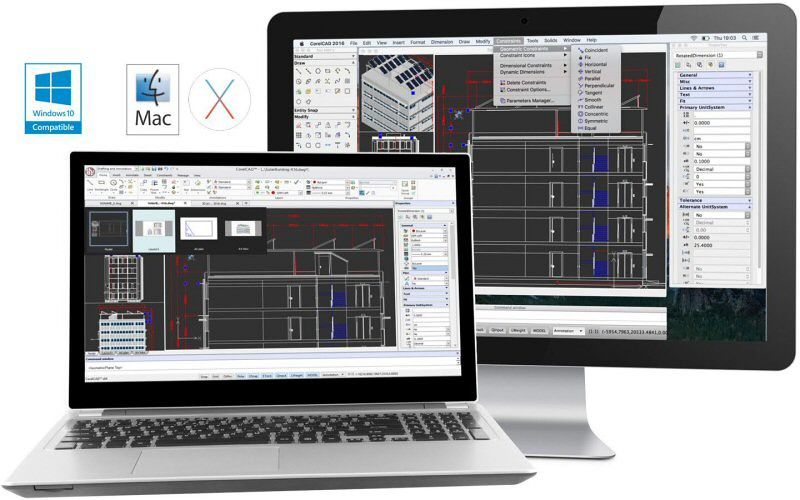
With CorelCAD experience powerful and affordable CAD software with industry-standard features and 2D drafting and 3D design tools. Improve...

Description

With CorelCAD experience powerful and affordable CAD software with industry-standard features and 2D drafting and 3D design tools. Improve your design productivity and performance with interactive In-Place text editing, layout and table editing tools. Open, edit and share files in .DWG format for easy collaboration with colleagues and suppliers.

Enjoy the benefits of full customization and automation capabilities that deliver impressive speed and 64-bit performance on Mac OS X.


Feature Highlights

• Native .DWG file support, including latest AutoCAD® R2013 .DWG

• Precision 2D drafting tools, including drawing constraints for parametric drawing

• 3D design tools for advanced modeling

• Design Resources for accessing design components like blocks, styles, drawings and images

• Unique annotation capabilities with VoiceNotes recording in drawings

• Automation and custom enhancements with LISP interface and plug-in support

• Output to 3D printers (.STL export)

• Support for ESRI Shape (.SHP) GIS files

WHAT’S NEW

Version 2023 2022.3.1.4090:

• Release notes were unavailable when this listing was updated.

REQUIREMENTS

• Intel, 64-bit processor

• macOS 10.15 or later

ScreenShots

:


If you are using Adblocker!! Please support this website by adding us to your whitelist. Ads are what helps us bring you premium content! Or read this to know how you can support us. Thank you!

Size

– 306.8MB

Previous Versions

✓ Checked against source material

Editor-checked details

Editor: macv.net Editorial Team · Last reviewed: 2026-08-07
macOSmacOS 10.15 or later (site channel requirement for CorelCAD build 2022.3.1.4090)
Apple SiliconThe site channel package is Intel 64-bit; on M1 / M2 / M3 / M4 validate Rosetta, activation, graphics acceleration, plotting, LISP/plugins and large-DWG round trips; native status is not claimed
Intel MacCompatible
Why we recommend it

Recommended for individuals/small teams centred on standard 2D DWG, plotted Layouts and occasional 3D/STL who want a traditional CAD command flow on Mac. A dependable process: obtain the author’s project package and reference PDF; clone a read-only baseline; inspect DWG version, units, coordinates, fonts, Xrefs, CTB/STB and proxies; Save As a working copy; compare dimensions, layers, lineweights, hatches, text and viewports per Layout; run controlled AUDIT and log repairs; reopen in the originating CAD; overlay vector/pixel plots made with identical output settings; accept-test LISP, SHP and STL separately; generate dependency manifest, PDF, DWG/DXF, SHA-256 and approval record; use dual sign-off. For full AEC/Civil/Mechanical objects prefer the corresponding AutoCAD toolset. Compare ARES Commander or BricsCAD for cross-platform DWG, AutoCAD LT/DraftSight for 2D, and LibreCAD/QCAD for open basic drafting—always round-trip a real project first.

Pros

  • A DWG-centred workflow handles common 2D drafting, Layouts, dimensions, constraints and plotting on Mac without converting basic collaboration to an intermediate format. Commands, layers, blocks, Xrefs and Layout concepts reduce migration cost for mainstream CAD users. 3D solids plus STL support light mechanical/architectural printing workflows; SHP offers basic GIS interchange. LISP/plugins automate repetitive drafting and Design Resources reuse blocks, styles and drawing components. VoiceNotes attach spoken context. Its desktop-CAD scope suits teams that do not require a full industry toolset. Intel Macs are supported; Apple silicon can be assessed through an explicit Rosetta validation path. DWG/PDF/DXF/STL deliverables support durable archives.

Cons

  • Opening DWG does not guarantee equivalence with every AutoCAD vertical. Proprietary AEC/Mechanical/Civil objects, dynamic blocks, data links, fields, fonts and plot styles may become proxies or change on round-trip. Mac differs from Windows in plugins, LISP paths, shortcuts, drivers and deployment; Corel explicitly provides no managed Mac deployment. The channel package is Intel 64-bit and native Apple-silicon status is unconfirmed, so Rosetta, graphics and peripherals need per-machine testing. Large Xrefs, dense hatches, 3D and high-resolution Layouts consume RAM/GPU. SHP support is not a full GIS and STL is unitless and provides neither slicing nor mesh repair. Activation and product lifecycle affect sustainability. Exact build notes are unavailable. High-risk engineering still needs round-trip acceptance in the originating industry CAD.

Installation steps

  1. The site build is CorelCAD 2022.3.1.4090 (branded CorelCAD 2023), with macOS 10.15 minimum and an Intel 64-bit channel package. Corel’s deployment guide says the Mac edition has no managed deployment mechanism: install each Mac from DMG/media and activate it. Never begin with the only production DWG. Copy a benchmark project containing Model, several Layouts/viewports, Xrefs, images, SHX/TTF fonts, CTB/STB, tables, blocks, dynamic/proxy objects, constraints, 3D solids, SHP and LISP. Verify UNITS, INSUNITS, coordinates, precision, layers, linetype and annotation scales; open and Save As a new file, then reopen it in the originating CAD. Preserve the source before AUDIT/RECOVER/PURGE. Inspect substitutions, Xref paths, attributes, dimensions, hatches, lineweights, viewport locks and plot scales sheet by sheet. Produce reference PDF/prints with fixed device, paper and plot style and overlay-compare them. Test 3D booleans/views and STL units/normals; SHP attributes/coordinates; and LISP/plugins in an isolated profile. On Apple silicon confirm Rosetta, then test launch, GPU views, plotting, scripts and a large DWG. Record hardware, OS, architecture, licence, DWG version, dependencies, outputs and SHA-256.

Uninstallation steps

  1. Before uninstalling, package each approved project into a read-only archive containing DWGs, every Xref, raster, licence-permitted fonts, plot styles/configurations, materials, LISP/plugins and notes; add reference PDFs and required DXF/STL plus block/table manifests. Reopen each DWG in the originating CAD and an independent viewer, verifying Layout count, Xref status, substitutions, proxy objects, coordinates, units and plots; generate a file tree and SHA-256. Record serial/account, deactivation and seat-return status, stop background processes, then remove the app. Clear preferences, templates, autosave and recovery only after proving no unique edit remains. Uninstalling does not delete projects, recall shared files or repair damaged/upgraded DWGs; cloud, mail and backups need retention handling. If LISP, plugins or proprietary proxy objects remain essential, migrate and validate another CAD before retiring the final working environment.

Common errors and fixes

  1. If geometry moves or scales, inspect UNITS, INSUNITS, insertion scale, UCS/WCS, origin and geospatial coordinates—never repair by visual scaling alone. For missing fonts/reflow, install licensed SHX/TTF or a documented substitution map and verify bigfonts, text styles and PDF embedding. Missing Xrefs/images require relative paths or a package plus case, mounted-volume and permission checks. Wrong lineweight/plot colour usually involves CTB versus STB, search paths, paper/device, viewport scale or “plot object lineweights”. Proprietary objects/dynamic blocks may appear only as proxies; ask the authoring tool to export a base DWG or save proxy graphics and do not promise lossless editing. For slow/corrupt display, unload unnecessary Xrefs, simplify hatches, test acceleration/Rosetta and AUDIT a copy; never PURGE the sole file first. Mac LISP/plugin APIs, paths and permissions differ from Windows. STL is unitless, so state units separately. A shifted SHP usually has a CRS/projection mismatch, not merely an offset.

What changed in this version

  1. The site channel is build 2022.3.1.4090, branded CorelCAD 2023. Corel does not currently publish verifiable itemised notes for this exact build, so established features are not presented as new and later release changes are not cited. Confirmed scope includes native DWG editing, precision 2D drafting/constraints, Layout/table/in-place text work, 3D modelling, Design Resources, VoiceNotes, LISP/plugins, STL and ESRI SHP. Corel’s official CorelCAD 2023 deployment guide also states that macOS has no enterprise deployment mechanism and must be installed per machine from DMG/media. This article stays pinned to 2022.3.1.4090 and transparently records that specific notes were unavailable.

File verification

Security scanTreat CAD files and automation as active project inputs: preserve read-only originals, inventory Xrefs/fonts/scripts/plugins, isolate LISP, compare reference plots and record DWG/PDF SHA-256 View report

Alternatives

Screenshots

CorelCAD 2023 截图