CorelCAD 2023
透過 CorelCAD,體驗功能強大且價格實惠的 CAD 軟體,具備產業標準功能以及 2D 繪圖與 3D 設計工具。提升……
軟體介紹
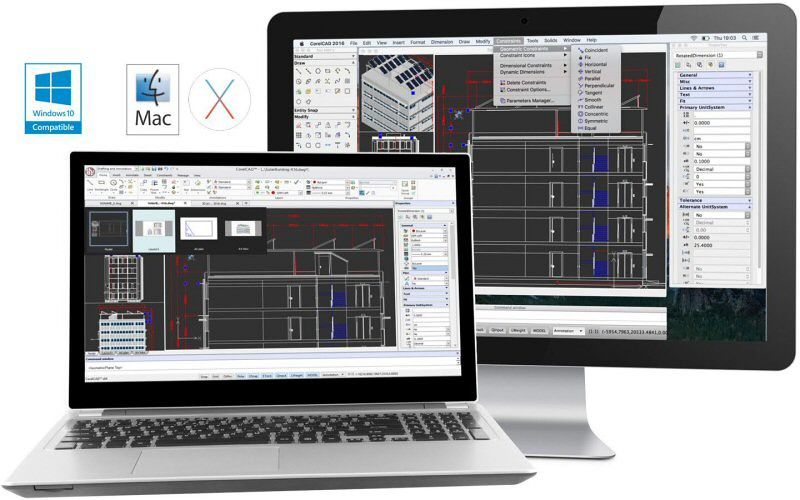
透過 CorelCAD,體驗功能強大且價格實惠的 CAD 軟體,具備產業標準功能以及 2D 繪圖與 3D 設計工具。藉由互動式「就地文字編輯」、「版面配置」與「表格編輯」工具,提升您的設計生產力與效能。輕鬆開啟、編輯與分享 .DWG 格式檔案,便於與同事及供應商順暢協作。享受完整客製化與自動化功能所帶來的優勢,讓 macOS 平台發揮驚人的執行速度與原生 64 位元效能。
特色亮點:
• 原生支援 .DWG 檔案格式(包含最新 AutoCAD® R2013 .DWG)
• 精確的 2D 繪圖工具,內建參數化繪圖所需的「繪圖約束」功能
• 專為進階建模設計的 3D 設計工具
• 「設計資源」功能,可快速存取圖塊、樣式、圖面與影像等設計元件
• 獨特的註解功能,支援於圖面中錄製 VoiceNotes 語音備註
• 搭配 LISP 介面與外掛程式支援,實現自動化與客製化增強
• 直接輸出至 3D 列印機(支援 .STL 匯出)
• 支援 ESRI Shape(.SHP)地理資訊系統(GIS)檔案
最新版本(2023 版本 2022.3.1.4090):
本項目更新時,官方尚未提供該版本的發行說明。
系統需求:
• Intel 64 位元處理器
• macOS 10.15 或更新版本
螢幕截圖說明:
若您正在使用廣告攔截器,請將本網站加入白名單以示支持。正是廣告收入,支撐我們持續為您提供高品質內容!
或閱讀此說明,了解如何支持我們。謝謝您!
檔案大小:306.8 MB
舊版下載
編輯核對資料
推薦給以 standard 2D DWG、Layout plot 及少量 3D/STL 為主、希望在 Mac 保留傳統 command flow 的個人/小團隊。可靠流程:author package/reference PDF→read-only baseline→DWG version、unit、座標、font、XRef、CTB/STB、proxy→working copy→逐 Layout 比較 dimension、layer、lineweight、hatch、text、viewport→controlled AUDIT log→原 CAD 回開→同一 output overlay→LISP、SHP、STL 獨立 acceptance→dependency manifest、PDF、DWG/DXF、SHA-256、approval→雙人簽核。完整 AEC/Civil/Mechanical 用對應 AutoCAD toolset;cross-platform DWG 比較 ARES Commander/BricsCAD;2D 用 AutoCAD LT/DraftSight;open 基本繪圖用 LibreCAD/QCAD,但必須先做真實 project round-trip。
優點
- 以 DWG 為核心,可在 Mac 做 2D drafting、Layout、dimension、constraint 及 plot,基本協作毋須中間格式。command、layer、block、XRef、Layout 概念有利主流 CAD 使用者遷移。3D solid/STL 適合輕量 print workflow,SHP 作基本 GIS 交換,LISP/plugin 自動化,Design Resources 重用元件,VoiceNotes 加入口述背景。適合不需完整 industry toolset 的團隊。支援 Intel,Apple silicon 可透過 Rosetta 驗證。DWG/PDF/DXF/STL 組合有利長期 archive。
不足
- 可開 DWG 不代表與所有 AutoCAD vertical 等價。AEC/Mechanical/Civil object、dynamic block、data link、field、font、plot style 可變成 proxy 或 round-trip 改變。Mac 與 Windows 的 plugin、LISP path、shortcut、driver、deployment 不同,官方亦不支援 managed deployment。Intel package 的 native Apple silicon 未確認,Rosetta、graphics、peripheral 須逐機測試。大型 XRef、hatch、3D、high-res Layout 消耗資源;SHP 不是完整 GIS,STL 無 unit 且不做 slicer/repair。activation/product lifecycle 及 build notes 缺失亦是限制。高風險工程須以原 industry CAD 做 round-trip acceptance。
安裝步驟
- 站內版本為 CorelCAD 2022.3.1.4090(介面稱 CorelCAD 2023),最低 macOS 10.15,渠道包標示 Intel 64-bit。官方 deployment guide 指 Mac 不支援集中部署,須逐機由 DMG 安裝及啟用。不要直接開唯一 production DWG;複製含 Model、Layout/viewport、XRef、image、SHX/TTF、CTB/STB、table、block、proxy、constraint、3D solid、SHP、LISP 的基準專案。核對 UNITS、INSUNITS、座標、精度、layer、linetype、annotation scale,另存新檔後以原 CAD 回開;AUDIT/RECOVER/PURGE 前保留原件。逐 sheet 檢查 font substitution、XRef path、attribute、dimension、hatch、lineweight、viewport lock、plot scale,以固定 printer/PDF、paper、plot style 做 overlay 比較。測試 STL unit/normal、SHP attribute/coordinate 及隔離 profile 的 LISP。Apple silicon 先確認 Rosetta,再測 launch、GPU、plot、script、大 DWG,記錄環境、licence、DWG、dependency 及 SHA-256。
解除安裝步驟
- 把每個 project 的 DWG、全部 XRef、raster、獲准 font、plot style/config、material、LISP/plugin 及 note 打包成 read-only archive,加入 reference PDF、所需 DXF/STL、block/table manifest。以原 CAD 及獨立 viewer 回開,核對 Layout 數、XRef、substitution、proxy、座標、單位、plot,建立 file tree 與 SHA-256。記錄 serial/account、deactivation、seat return 後移除程式。preference、template、autosave、recovery 只在沒有 unique edit 時清理。卸載不會處理 project、shared file 或損壞/upgrade DWG。若仍依賴 LISP/plugin/proxy,須先在替代 CAD 遷移驗證再退役最後環境。
常見錯誤及解決方法
- geometry 移動/scale 錯誤要查 UNITS、INSUNITS、insert scale、UCS/WCS、origin、geo coordinate,不可只以視覺縮放。font/reflow 應用獲准 SHX/TTF 或 substitution map,查 bigfont、text style、PDF embed。XRef/image 要用 relative path/package 並查大小寫、volume、permission。lineweight/plot colour 查 CTB/STB、path、paper/device、viewport scale。proprietary object 可只顯示 proxy,應由原 CAD 輸出 base DWG/proxy graphics。卡頓時減少 XRef/hatch,測 acceleration/Rosetta,在副本 AUDIT,勿先 PURGE 唯一檔。Mac LISP/plugin 的 API/path/permission 不同。STL 無單位;SHP 錯位要查 CRS/projection。
本次版本更新內容
- 站內渠道是 2022.3.1.4090,產品名稱為 CorelCAD 2023。官方沒有可核實此 build 的逐項 notes,因此不把既有功能當新增,亦不引用較高版本。確認範圍包括 native DWG、precision 2D/constraint、Layout/table/in-place text、3D、Design Resources、VoiceNotes、LISP/plugin、STL、ESRI SHP。官方 deployment guide 亦明確指出 macOS 不支援 enterprise deployment,須逐機由 DMG 安裝。本頁只對應 2022.3.1.4090,並如實記錄「具體 notes 未提供」。
檔案校驗與安全資訊






同類替代軟體

截圖預覽