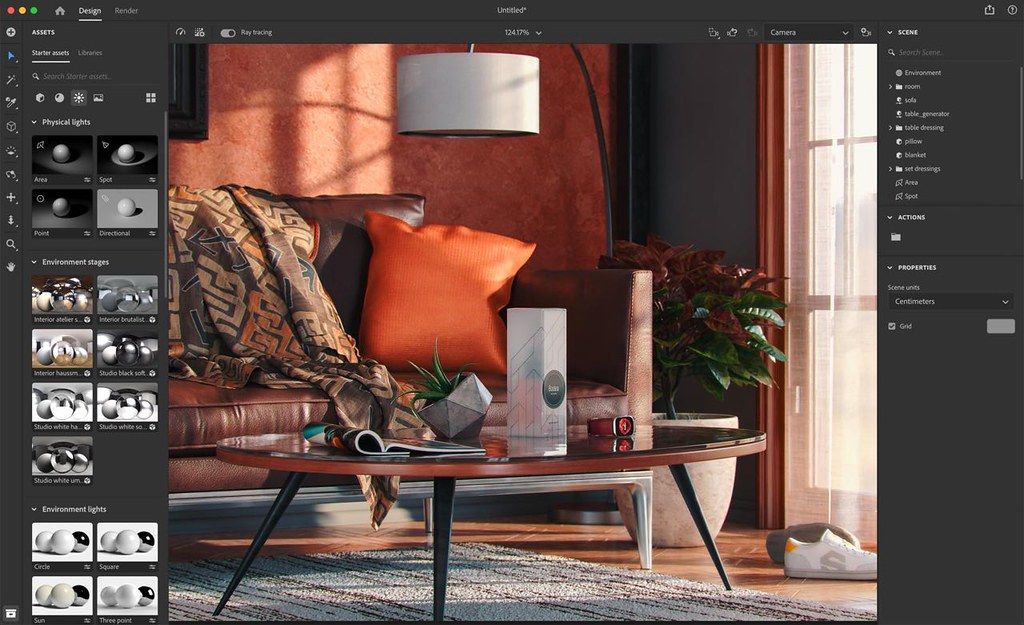
Adobe Substance 3D Stager
Build and assemble 3D scenes in this intuitive staging tool. Set up assets, materials, lights, and cameras. Export and share media ...
Description
Build and assemble 3D scenes in this intuitive staging tool. Set up assets, materials, lights, and cameras. Export and share media, from images to web and AR experiences.
Work on your final image.
Substance 3D Stager lets you make creative decisions in context. Refine and adjust your composition in real time. Visualize and edit advanced materials with complex lighting and shadows. (Stager is not yet available on Macs with Apple M1 chips.)
Tools to flesh out your ideas.
Build your realistic 3D scenes with quick and efficient smart tools. Block out shapes, snap elements, activate physics to avoid collisions between models, and generate simple lights.
Access a vast network of resources.
Stager comes with models, materials, and lights to get started. Or explore and use the thousands of high-end assets made by our 3D experts and included with your Substance 3D Collection plan.
Connect to your 3D toolset.
Leverage the full power of Creative Cloud: import elements from Modeler, Painter, Designer, and Sampler. Edit images in Illustrator and Photoshop, and instantly see your modifications in Stager.
WHAT’S NEW
Version 2.0.1:
• Release notes were unavailable when this listing was updated.
REQUIREMENTS
• Intel, 64-bit processor
• macOS 10.14 or later
ScreenShots
If you are using Adblocker!! Please support this website by adding us to your whitelist. Ads are what helps us bring you premium content! Or read this to know how you can support us. Thank you!
Size
– 1.75GB
Previous Versions
Editor-checked details
Recommended for designers who already have models/materials and need rapid product visuals, packaging displays, scene proposals and layered post-production images. Workflow: clean geometry, units, up axis, normals, UVs, names and material slots in Blender/Maya/CAD; author standard PBR/SBSAR in Painter/Designer/Sampler; import and version-save; arrange with collision/snapping; lock composition; create camera, backplate, HDRI and a few physical lights; inspect silhouette, contact, reflection and exposure in real time; run a low-sample CPU ray-trace for noise/transparency/displacement; render layered PSD and PNG per camera; composite in Photoshop; export USD/glTF as exchange copies and reopen downstream; archive scene, dependencies, references, settings, manifest and SHA-256. Compare Blender/Cinema 4D for animation/node rendering, Twinmotion for architectural real time and Adobe Dimension for simpler brand visuals.
Pros
- Models, Substance materials, decals, backplates, environment/physical lights and cameras share a composition-oriented interface, making product shots, packaging, concept displays and quick virtual photography easier than a full DCC. Snapping, collision/physics, primitives and generated lighting accelerate layout. Real-time and ray-traced modes share the scene/settings, so users compose interactively before refining reflections, shadows and translucency. Assets flow from Painter, Designer, Sampler, Modeler and Photoshop/Illustrator workflows. OBJ, FBX, glTF/GLB, USD, SKP, SBSM/SBSAR and HDR/EXR cover common inputs. Layered PSD aids compositing, PNG final delivery, and USD/glTF can continue into DCC or real-time tools.
Cons
- Mac has no GPU ray tracing, so final CPU renders can be slow with high resolution, displacement, transparency and many lights; Apple silicon also uses emulation in this generation and needs real benchmarking. Stager is for staging/rendering, not deep modelling, topology, UV, animation, rigging or advanced material painting—use Modeler, Blender, Maya and Painter/Designer. USD round trips can lose/change animation, triplanar projection, backgrounds, DOF, pivots and some lighting/material evaluation; glTF/OBJ can bake or simplify effects. Security-driven SVG/PCX removal in 2.0.1 requires legacy conversions. Large textures and CAD/complex models consume RAM/SSD rapidly. Subscription, Adobe login and asset licensing add cost; remote desktop/VM configurations are unreliable.
Installation steps
- The site build is Adobe Substance 3D Stager 2.0.1, with an Intel 64-bit, macOS 10.14+ and roughly 1.75 GB source baseline. This generation uses emulation on Apple silicon, which can reduce performance. Mac supports CPU ray tracing; GPU ray tracing is Windows-only. Back up Stager scenes, models, textures, SBSAR, HDR/EXR, backplates, cameras and renders; verify Adobe licensing, RAM/SSD headroom and supported graphics. Benchmark a small scene: import OBJ/FBX/glTF/USD/SKP, inspect units, up axis, pivots, normals, UVs and paths; stage materials, decals, background, environment/physical lights, camera and collision; compose in real time, then make a low-sample CPU-ray-traced preview. Test layered PSD and PNG for alpha, shadows, reflections, DOF and camera resolution. SVG/PCX import is intentionally disabled in 2.0.1. Benchmark the same scene on the target M1/M2/M3/M4 or Intel Mac before production.
Uninstallation steps
- Before uninstalling, collect every model, material, texture, HDRI, font and backplate instead of retaining path references alone. Render layered PSD and PNG for each final camera and export an exchange OBJ, glTF/GLB or USD scene. USD round trips do not fully preserve animation, triplanar projection, background colour, DOF, pivots or all lighting/material evaluation, so reopen in Blender, Maya or the target tool. Record units, up axis, camera focal length/resolution, colour management, light intensity, material settings, samples and denoising. Generate a manifest and SHA-256 and preserve source scene, dependencies and previews. Stop the render queue, Stager and Creative Cloud, then uninstall through Creative Cloud. Do not delete shared Substance assets until checking Painter/Designer/Sampler/Modeler dependencies. For repair reinstall, save Help > Get logs output and preferences/caches first.
Common errors and fixes
- For a blank viewport, confirm AVX/AVX2 CPU capability and basic graphics operation, open a simple scene, and inspect Help > Get logs for Stager/driver information. If it worked previously, back up before clearing shader caches. “GPU Rendering Disabled” is normally not a Mac fault in this generation because Mac ray tracing is CPU-only; compose in real time, then test the CPU queue at low resolution/samples. Missing materials require checking relative texture paths, UVs, normals, material slots and unsupported nodes, baking standard PBR maps in Painter/Designer when needed. Wrong scale/orientation/pivots call for consistent units/up axis and frozen transforms. USD lighting/material changes are mapping limitations; retain a reference render and relight. For render stalls or memory pressure, reduce textures, displacement, resolution, samples and concurrent cameras. SVG/PCX rejection is an intentional 2.0.1 security change. If publishing fails, deliver local PSD/PNG and an exchange scene with logs.
What changed in this version
- Adobe records Substance 3D Stager 2.0.1 as released on 9 March 2023 and categorises it as a security-update and bug-fix release. It intentionally disables SVG and PCX import and resolves several security issues in USD, SKP, OBJ, glTF and FBX import/export types. It is not a feature overhaul, so no staging tools are invented from the old listing. The Apple-silicon boundary also needs correction: the earliest “unavailable” note was superseded within the generation; 2.0.1 can run on Apple ARM in emulation, with a performance cost. Mac ray tracing uses CPU, while GPU ray tracing is Windows-only. The page remains pinned to 2.0.1.
File verification






Alternatives

Screenshots