Adobe Premiere Rush
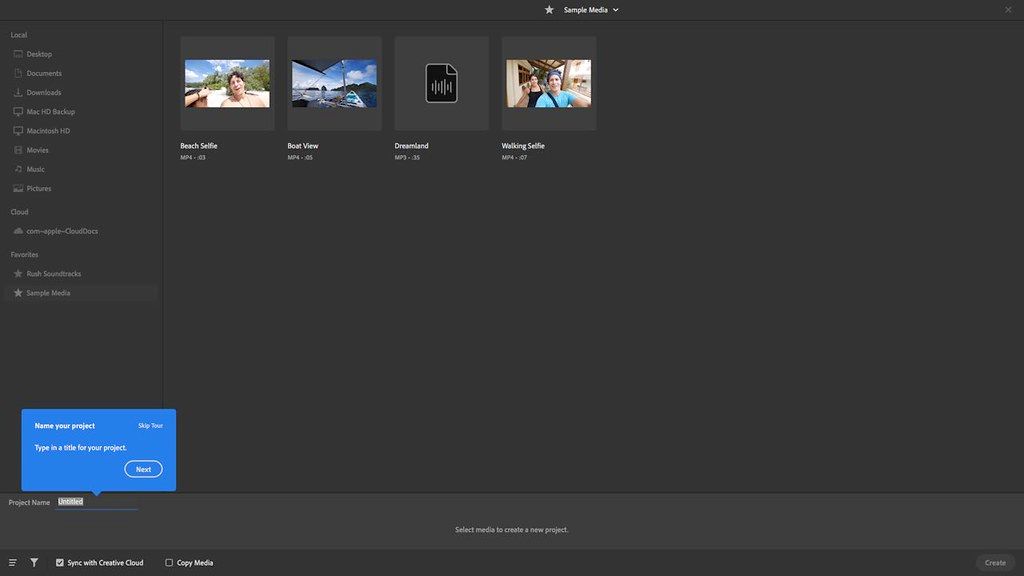
Feed your channels a steady stream of awesome with Premiere Rush, the all-new app for creating and sharing online videos. It's easy to use, works across all ...
Description
Feed your channels a steady stream of awesome with Premiere Rush, the all-new app for creating and sharing online videos. It’s easy to use, works across all your devices, and it’ll transform the way you create content.
All you need. All in one app
Go from shoot to showtime in record time. Built-in camera functionality helps you take pro-quality video on your mobile devices. Editing is easy, with simple tools for color, audio, motion graphics, and more. Share right from the app to favorite social channels like YouTube, Facebook, and lnstagram.
Make a bigger splash on social.
Make a bigger splash on social
Wow your followers with professionally designed Motion Graphics templates right in the app, or find hundreds more on Adobe Stock. Change the color,
size
, font, and more to match your personal brand. And take your videos from amateur to amazing.
Create your show on the road.
Create your show on the road
Premiere Rush works across all your devices. Capture footage on your phone, then edit and share to social channels on your phone, tablet, or desktop. Everything is synced to the cloud, so your latest edit is always at your fingertips, anywhere you are.
WHAT’S NEW
Version 1.5.62:
• Release notes were unavailable when this listing was updated.
REQUIREMENTS
• Intel, 64-bit processor
• macOS 10.12 or later
ScreenShots
:
If you are using Adblocker!! Please support this website by adding us to your whitelist. Ads are what helps us bring you premium content! Or read this to know how you can support us. Thank you!
Size
– 1.62GB
Previous Versions
Editor-checked details
Recommend it only to open, export and migrate existing Rush 1.5.62 projects, or temporarily finish simple social edits already near completion on a fixed legacy device. Prefer Premiere Pro for new work. Compare iMovie for simple free Mac editing, Wondershare Filmora for template-driven social work, Final Cut Pro for professional Mac editing and DaVinci Resolve Studio for full color/audio/post. From a device holding local media, migrate each project: copy every asset → export a high-quality master → open/archive in Premiere → validate offline → document title, font, transition, audio and aspect differences. Create a social-delivery matrix for 16:9/9:16/1:1, safe areas, cover, captions, loudness, bitrate, color space, filenames, copy, rights and publish date. Preserve a clean master, platform encode, thumbnail, caption text and licenses for every release; never depend on platform drafts or a Rush cloud project.
Pros
- Simpler than a professional NLE, with import, arrange, trim, titles, color, audio and export in a clear flow; magnetic timeline reduces gaps and track management; 16:9, 9:16 and 1:1 plus Auto Reframe support social repurposing; built-in Motion Graphics, transitions, Pan/Zoom, speed and color presets accelerate delivery; voiceover, automatic volume and Auto Ducking suit tutorials/talking-head clips; Mac/mobile/Premiere ecosystem offered convenient handoff; local masters can feed multiple platforms.
Cons
- The product is being discontinued, with defined limits for downloads, subscriptions, support and reliability on new systems, so it should not be the sole editor for a new business. Version 1.5.62 predates M2–M4, modern macOS, HDR phone workflows, newer codecs and changing social APIs. Creative Cloud Synced Files has ended, leaving projects offline when local media is absent. Track control, keyframes, mixing, noise reduction, color management, captions, proxies and multicam are far below professional tools. Direct publishing depends on network, authorization and platform APIs. Automatic audio and Auto Reframe need human review. Missing Motion Graphics/fonts alter output. Cloud-project ownership is easily confused with a true local backup.
Installation steps
- Premiere Rush 1.5.62 officially supports 64-bit multicore Intel or Apple M1, macOS 10.14+, 8 GB RAM, 8 GB installation space, 1280×800 and Core Audio; prefer 1920×1080, 16 GB, a supported GPU and fast SSD. M1 is explicitly listed. M2/M3/M4 are newer than this build, so test launch, decode, export and title fonts with a project copy. Copy originals into a stable local project folder—do not edit from a phone temp folder, camera card or cloud placeholder. Build a 15-second sample in 16:9, 9:16 or 1:1 and verify HEVC/H.264, variable-frame-rate phone footage, frame rate, rotation, color, audio and export. Standardize filenames before import and retain sources. Inspect sequence order, trims, transitions, titles, Auto Reframe, color, speed, voiceover and Auto Ducking. Export a local master before social upload; a successful direct publish is not the only deliverable.
Uninstallation steps
- Before uninstalling, open every Rush project and prove its media is not a cloud placeholder or offline. Use Project Manager/open in Premiere to copy all source video, images, audio, Motion Graphics, font-substitution notes and project media to an independent local archive. Creative Cloud Synced Files has ended; an old sync switch or UI does not prove files remain online. Export the highest-quality local master, platform variants, isolated audio and a reference movie with clip names/timecode for every final. Record aspect ratio, frame rate, resolution, bitrate, color, level, captions/titles, publication date and social copy. Reopen the archive offline, verify no Offline Media, and test migration in Premiere. Uninstall through Creative Cloud without deleting archives. Remove only reproducible cache/previews; if a folder cannot be proven to be cache, quarantine and document it first.
Common errors and fixes
- Offline Media after opening: locate local originals and restore names/folders or Relink in Premiere. Run Project Manager on an old device that still holds complete media; discontinued cloud sync cannot be expected to recover it. For M1/M2/M3/M4 crashes or export failures, duplicate the project, disable third-party fonts/templates, clear Media Cache and test a short H.264. M2–M4 lack period-specific validation for this old build. Phone VFR causing drift/stutter should be transcoded to constant-frame-rate intermediates while preserving originals. For HEVC black video/import failure, verify OS decode support or transcode to H.264/ProRes. For cropped vertical video/title overflow, inspect sequence aspect, Auto Reframe, Transform and safe areas, then preview in the target app. For uneven audio, inspect Auto Volume, Auto Ducking, Music/Voice classification, fades and peaks on headphones and phone speakers. For color shifts after export/upload, standardize SDR/color space, transform HDR phone footage and compare local output with platform transcode. Do not repeatedly toggle stuck sync and overwrite projects; export masters/local media first. Discontinuation makes new OS/device reliability uncertain, so migrate early.
What changed in this version
- Premiere Rush 1.5.62 belongs to the 2021 line. Adobe lists Intel and Apple M1 Macs, macOS 10.14+, 8 GB RAM and 8 GB installation space, grouping it with 1.5.58 for compatibility. It retains Rush's core: quick desktop/mobile import, magnetic timeline editing, aspect conversion, Auto Reframe, titles/Motion Graphics, transitions, Pan and Zoom, speed, basic color, voiceover, automatic volume/Auto Ducking, direct export and social publishing. Projects from this era often depend on Adobe ID and Creative Cloud sync. Creative Cloud Synced Files later ended, so an old UI can remain while functionality no longer works; Rush itself is under discontinuation. The practical purpose of 1.5.62 now is to archive and migrate legacy projects safely, not start a long-lived workflow dependent on cloud sync.
Related apps






Alternatives




Screenshots