Permute
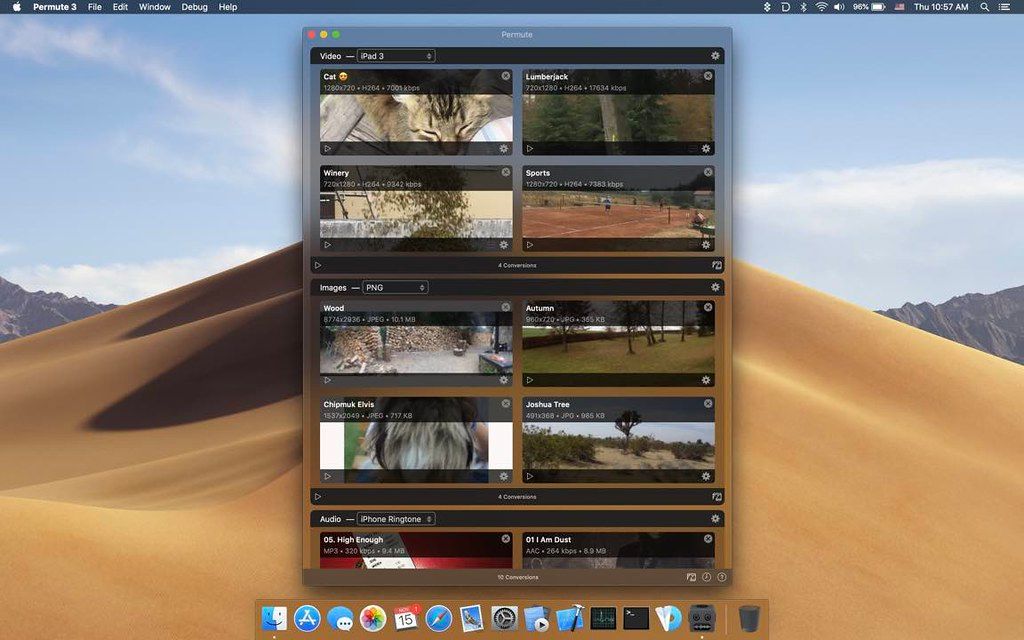
Permute offers easy-to-use drag-and-drop video conversion. Features: Easy to use, drag-and-drop video converting Dead sexy interface...
- Apple M1 chip or later
- macOS 26.0 or later
Description
Permute offers easy-to-use drag-and-drop video conversion.
Features :
• Easy to Use – built from the ground up, Permute is a perfect example of what a Mac app should be. With a gorgeous interface and drag & drop simplicity no need for complicated options.
• Insanely Fast – Permute was engineered to be incredibly fast. Let us take care of the hard stuff. Just select the video format you want and it’ll be done faster than you can say “hardware acceleration” – MP4 and HEVC presets now take advantage of your machine’s hardware acceleration capabitlities, speeding up HEVC conversions more than 3 times over
previous versions
of Permute!
• PDF Support – Permute 3 now includes support for stitching multiple images into a single PDF.
• Everything Included – It doesn’t matter if you’re converting home movies or processing images. Permute can do it all. We support nearly every format and have plenty of device presets to choose from.
• Looks Amazing – Whether you use dark mode or not, Permute will look amazing. Taking advantage of the modern technologies, Permute will even change its icon in dark mode.
• Keep the Schedule – Video re-encoding is quite demanding on computer resources. This is why you can now schedule Permute to convert videos e.g. at night when you’re not using your computer.
• And so much more ! – There are so many other great features in Permute – adjust volume of an audio file or an audio track in a video. Batch-resize, rotate and flip images and videos. And more!
WHAT’S NEW
Version 4.0.11:
•
macOS 27 compatibility release.
REQUIREMENTS
• Apple M1 chip or later
• macOS 26.0 or later
ScreenShots
If you are using Adblocker!! Please support this website by adding us to your whitelist. Ads are what helps us bring you premium content! Or read this to know how you can support us. Thank you!
•
Size
– 68.2MB
Previous Versions
Editor-checked details
Recommended for newer Apple Silicon Mac users who want simple batch conversion across many file types. Compare HandBrake for video-only work, FFworks for finer FFmpeg control, or Compressor for Apple pro workflows. Verified from the developer site, help center and release notes
Pros
- Native and approachable Mac interface; 100+ video, audio, image, PDF and text formats; batch groups, trim, crop, stitch, subtitles, OCR, hardware acceleration and advanced FFmpeg presets.
Cons
- Permute 4 has strict hardware and OS requirements and no Intel support; it is paid; the App Store build omits some features due to sandboxing; it is less suitable than pro tools for grading, timelines and fine codec control.
Installation steps
- Permute 4 requires Apple Silicon and macOS 26 or later. Intel Macs and macOS 11–15 should use Permute 3.
- Install and launch it, drag video, audio, images, PDFs or text into the window, choose an output preset, review resolution, codec, subtitles and destination, then start conversion.
- Test custom presets on a small sample and keep backups of important originals.
Uninstallation steps
- Finish or cancel active conversions, quit Permute and move it from Applications to Trash.
- For full cleanup, inspect preferences, caches and containers in your user Library. Export custom presets and preserve the license code first. Deactivate the license from Permute's menu before replacing a Mac.
Common errors and fixes
- Won't launch: confirm an Apple Silicon Mac running macOS 26 or later; Permute 4 cannot run on Intel.
- Conversion fails: reset the preset, check for corrupt input, free space and destination permissions; remove advanced options that show warnings.
- Incompatible subtitles: change subtitle format or encoding, or disable the track and retry. Version 4.0.5 added a suppressible warning.
- License rejected: Permute 3 and 4 use different codes. Check the major version and deactivate an old Mac if activation limits are reached.
What changed in this version
- Permute 4.0.5 adds a suppression option to incompatible-subtitle warnings, fixes negative values in the volume slider, and makes the preset-management sheet fully resizable.
Related apps






Alternatives


Screenshots