Adobe InCopy 2022
Adobe InCopy ideal for large team projects involving both written copy and design work, provides copywriters and editors with a powerful...
Description
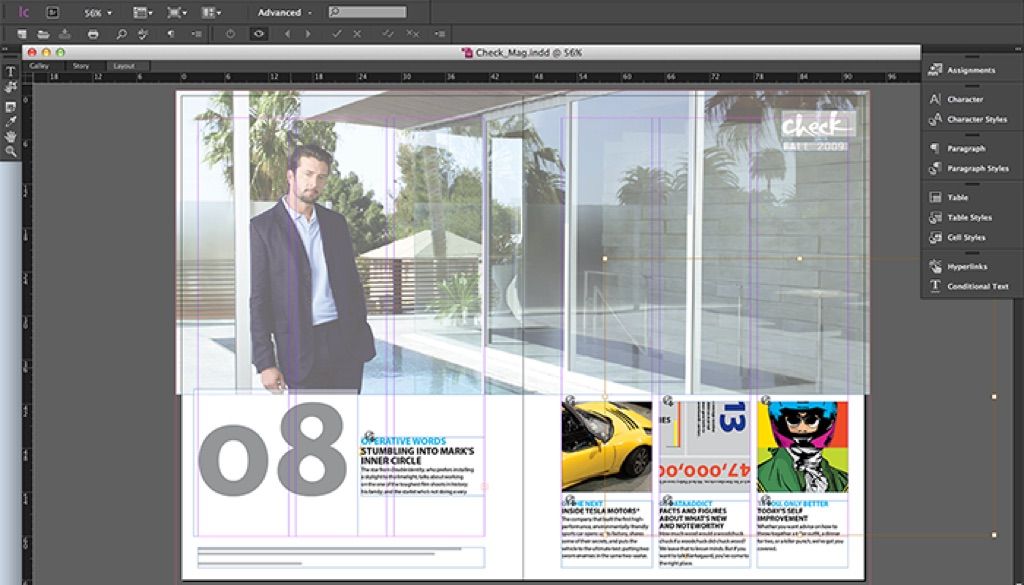
Adobe InCopy , ideal for large team projects involving both written copy and design work, provides copywriters and editors with a powerful tool to style text, collaborate through track changes, and make simple layout modifications that integrate effortlessly with InDesign.
WHAT’S NEW
Version 17.4:
• Release notes were unavailable when this listing was updated.
REQUIREMENTS
• Intel, 64-bit processor
• macOS 10.15 or later
ScreenShots
:
If you are using Adblocker!! Please support this website by adding us to your whitelist. Ads are what helps us bring you premium content! Or read this to know how you can support us. Thank you!
Size
– 878.3MB
Previous Versions
Editor-checked details
Recommended for magazine, newspaper, book, catalog and brand-content teams where designers own InDesign layouts and editors/proofreaders touch only assigned stories in InCopy. A solo writer-layout artist is usually better served by InDesign; compare Affinity Publisher or QuarkXPress for alternative desktop publishing, Scrivener for long-form organization, and Ulysses for text-first multi-device writing. Pilot one real article first and define file server, naming, versioning, permissions, Check Out/Check In, disconnect recovery, daily backup, PDF annotation and final sign-off rules. Create a RACI for who creates Assignments, edits styles, releases locks, updates layout and approves copyfit. At every deadline freeze a Package, IDML, ICML, approved PDF and verification log; automated backup does not replace human confirmation. For each story verify headline/body/caption ownership, word count, overset, tracked changes, notes, footnotes, tables, special characters, links, fonts, page numbers and print PDF before closing the Assignment.
Pros
- Editors revise copy in near-final layout context without owning or damaging the full InDesign layout; Check Out/Check In makes story ownership explicit and reduces overwrites; Galley/Story views focus on text while Layout view exposes images, columns and pagination; Copyfit precisely reports overset/underset, line and word differences; Track Changes, Notes, conditional text, tables, footnotes and styles support professional review; ICML/Assignments separate layout and content responsibilities; mature integration with InDesign, Adobe Fonts, Creative Cloud and publishing dictionaries/fonts.
Cons
- It depends heavily on InDesign, matched client versions, disciplined file structure and stable shared storage; InCopy alone cannot design pages. A mismatch in versions, fonts, plug-ins, paths or sync can cause locks, Out of Date state, broken links and reflow. Check Out demands team discipline, and disconnected/departed users can leave locks. Internet/VPN/consumer cloud latency and conflict copies can corrupt collaboration state. It is harder than a word processor because editors must understand styles, stories, copyfit, anchored objects and Track Changes. Real-time web collaboration, casual comments and mobile editing are weaker than modern online documents, and an older build requires careful validation on modern macOS.
Installation steps
- InCopy 17.4 supports 64-bit multicore Intel and native Apple silicon. Its period-appropriate Mac environments include Catalina 10.15, Big Sur 11 and Monterey 12. The baseline is 8 GB RAM, about 4.5 GB installation space and 1024×768; use 16 GB, SSD and 1920×1080 for long stories, many links and multilingual fonts. Install via Creative Cloud. Editorial teams must keep InCopy and InDesign on the same 17.x line and standardize fonts, plug-ins, dictionaries, color settings and workspaces. Prove the full workflow on a copy: create an Assignment/export ICML in InDesign → open it in InCopy → Check Out the story → edit/copyfit in Galley, Story or Layout view → save and Check In → update in InDesign. Use stable SMB/controlled sync storage where everyone reaches the same path. Never replace `.inca`, `.incx`, `.icma`, `.icml` or `.indd` files concurrently in Finder. Back up and vet external documents; do not check in production copy while fonts or links are unresolved.
Uninstallation steps
- Before uninstalling, stop all editors, complete every Check In, and ensure the Assignments panel has no Out of Date, Missing, Checked Out by Unknown or unsaved content. The layout owner should update all stories in InDesign and create a Package. Separately preserve `.indd/.idml`, `.icma/.icml`, `.inca/.incx`, Links, Document Fonts, proof PDFs, styles, dictionaries/AutoCorrect, Find/Change presets, shortcuts and workspaces. Do not back up only the Assignment shell; open sampled ICML and the packaged document, checking word counts, tracked changes, notes, footnotes, tables, anchored objects and copyfit. Record each story owner, final Check In time and approved PDF. Uninstall through Creative Cloud without deleting shared projects. For troubleshooting, back up Preferences, disable plug-ins and test a local copy; after reinstalling the same 17.x collaboration environment, validate Check Out/Save/Check In/Update and conflict handling before reconnecting production storage.
Common errors and fixes
- Cannot edit/story locked: identify the Check Out owner in Assignments; never delete lock files to seize it. Have the original user Check In normally, and for departed/offline users let the workflow owner back up everything before controlled lock recovery. For Out of Date assignments or stale content, close related files, confirm InDesign and InCopy are both 17.x and paths match, then update Design/Assignment on the layout side and Update Content on the editor side; prevent cloud storage from creating conflict copies. Missing links/fonts change line breaks and copyfit: install identical font/dictionary versions, restore Links/Document Fonts and compare the approved PDF; repaginate after any substitution. For an ICML/document crash or save failure, work on a local copy, disable third-party plug-ins, reset Preferences and isolate images/fonts/stories; treat external documents as untrusted. For overset/underset, use Copyfit Info and follow editorial rules rather than changing InDesign frames, tracking or type size. If Track Changes is absent, verify user identity, Show Changes, accept/reject permissions and story state. Version 17.4 is a security maintenance release addressing heap overflows/out-of-bounds reads that could permit code execution or memory leaks, so open only trusted documents and plug-ins.
What changed in this version
- Adobe InCopy 17.4 (September 2022) is a Windows/macOS security maintenance release. It addresses multiple vulnerabilities in 17.3 and earlier, including heap-based buffer overflows and out-of-bounds reads whose exploitation could result in arbitrary code execution or memory leaks. The 17.x line retains its paired InDesign Assignment/ICML workflow, story Check Out/Check In, Galley/Story/Layout views, Copyfit information, Track Changes, Notes, tables, footnotes, styles, glyph and spelling/dictionary tools. The 2022 generation also replaces some “Master Page” terminology with “Parent Page” in supported English UI/help contexts. The point of 17.4 is safer continuity for editorial–layout collaboration, not new standalone page-layout or image-design capability.






Alternatives





Screenshots