Cozy Cleaner
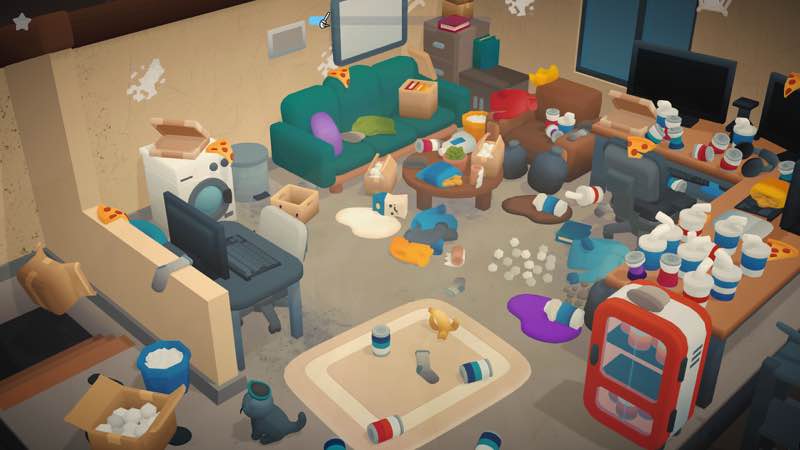
In Cozy Cleaner, you bring messy rooms back to order step by step. Each level takes you to a different room where you look around...
- Intel, 64-bit processor
- OS X 10.6 or later
軟體介紹
In Cozy Cleaner , you bring messy rooms back to order step by step. Each level takes you to a different room where you look around, collect scattered items, and place them where they belong. Open boxes to find new objects, sweep up crumbs, wipe spills, polish windows, water the plants, and finish with a refreshing room spray. With every action, the space feels lighter, and so do you.
There are no timers, scores, or pressure, just a cozy journey where order slowly comes to life. To move on to the next level, you must completely clean and organize the room.
In Cozy Cleaner, different tools help you make each room spotless. Use your hand tool to collect trash and organize scattered books, bottles, and vases. Mop up spills, use the dustpan to clear away crumbs, dust, and cobwebs. Polish windows and walls with a cloth, water the plants with a watering can, and finish by spraying a cozy scent into the air.
At the start of each level, a truck delivers new items you can unpack and arrange to complete the space. Once you’ve used all your tools and cleaned the room entirely, the door to the next level opens.
WHAT’S NEW
Version 1.0.2:
• Release notes were unavailable when this listing was updated.
REQUIREMENTS
• Intel, 64-bit processor
• OS X 10.6 or later
ScreenShots
If you are using Adblocker!! Please support this website by adding us to your whitelist. Ads are what helps us bring you premium content! Or read this to know how you can support us. Thank you!
•
Size
– 485.9MB
編輯核對資料
推薦給喜歡無壓力整理、完成清單及觀看房間前後對比者,適合每次清一間房。按「拆箱/垃圾—大型物件—由高到低除塵—擦窗牆—簸箕—拖地—澆花—噴香」進行,避免移動物件遮住已清區域。進度停住時不要亂點,逐一切換工具並由門口順時針檢查。樓梯與家具附近先保留寬路,小物件最後放。每關後返回選單重進一次。安全順序:雙備份→1.0.2/SHA-256→新檔一房→開門→重進→Steam Cloud→舊檔。
優點
- 整理和清潔被拆成清楚的小動作,沒有計時、分數或懲罰,可按自己的節奏看房間恢復秩序。拾取、拆箱、拖地、掃碎屑、擦拭、澆花及噴香各自對應不同目標,形成完整的「雜亂到收尾」流程。每關徹底完成才開門,為不喜歡半成品者提供明確閉環。貓造成的混亂和柔和畫面降低家務負擔感,操作直觀,適合短時放鬆或邊聽節目邊玩。Steam Cloud、成就、交易卡及約 485.9 MB 套件也較輕量。
不足
- 熟悉工具順序後,各關核心循環變化有限,主要差別是房間配置與物件位置;期待劇情、經營、自由裝修或複雜謎題者會覺得較薄。必須清到百分之百才能繼續,最後一個小污點或隱藏物件可能變成逐角搜索。物理碰撞會令小物件彈開或擺放偏移,狹窄處工具也可能卡住。部分動作偏向點擊,不是持續手動模擬。官方沒有完整 Mac 效能分級或明確 Apple Silicon 路徑,渠道只確認 Intel 64 位元;1.0.2 也沒有逐項記錄。
安裝步驟
- 本頁對應 Cozy Cleaner 1.0.2。渠道標示 Intel 64 位元、OS X 10.6 以上,套件約 485.9 MB;官方商店確認有 Mac 版,但沒有完整可交叉驗證的 Mac 記憶體與圖形分級,因此不補寫未知配置。備份關卡完成度、已歸位物件、工具步驟、成就、控制與 Steam Cloud,記錄 1.0.2/SHA-256。新檔依次測試手拾垃圾、拆箱、整理書本/瓶子/花瓶、拖地、簸箕、除塵/蛛網、擦窗牆、澆花與房間噴霧;用完工具並開門後重進確認完成狀態。
解除安裝步驟
- 移除前先結束物件拖動或工具動畫,完成目前房間並等待下一關門開啟;不要在拆箱、清潔結算、物件歸位或雲端同步時強制退出。分別備份本機與 Steam Cloud,保留關卡、房間完成狀態、物件配置、成就、設定及 1.0.2/SHA-256。重裝後關同步,以新檔完成並重進一間小房;確認工具、目標檢測、開門和儲存正常再複製舊檔。恢復同步前比較最後關卡、完成房間數和時間。
常見錯誤及解決方法
- 房門不開表示仍有步驟:逐一切換工具,檢查家具後、牆角、窗框、樓梯下、植物及未拆箱。物件不能歸位時先放下,換角度拖向目標輪廓中心並避免碰撞。吸塵器或工具卡進樓梯/家具時不要繼續推,重進關卡並從開闊方向接近,保留存檔副本。拖把、簸箕和抹布有不同目標,工具錯誤不會增加進度。動畫結束後再點擊。卡頓可降解析度並關背景程式。雲端異常先關同步確認本機最後關卡。Apple Silicon 官方路徑未明確,不能保證;Intel 需 64 位元環境。
本次版本更新內容
- 站內版本為 1.0.2,渠道明確寫明更新時沒有可用發布說明,因此不虛構修正,也不披露更高版本。可核實範圍包括被貓弄亂的多個房間、無計時/分數/壓力的逐步清潔、手拾垃圾和歸位、拆箱、拖把、簸箕、抹布、除塵/蛛網、擦窗牆、澆花、房間噴霧,以及完成全部任務後開下一關;另有單人、Steam 成就、交易卡及 Cloud。驗收版本、新檔完整房間、所有工具、開門、重進儲存及雲端;沒有記錄便不歸因物理、關卡或效能變化。
檔案校驗與安全資訊






同類替代軟體


截圖預覽