Palworld
In this game, you can peacefully live alongside mysterious creatures known as Pals or risk your life to drive off a ruthless poaching...
- Apple M1 chip or later
- macOS 14.0 or later
软件介绍
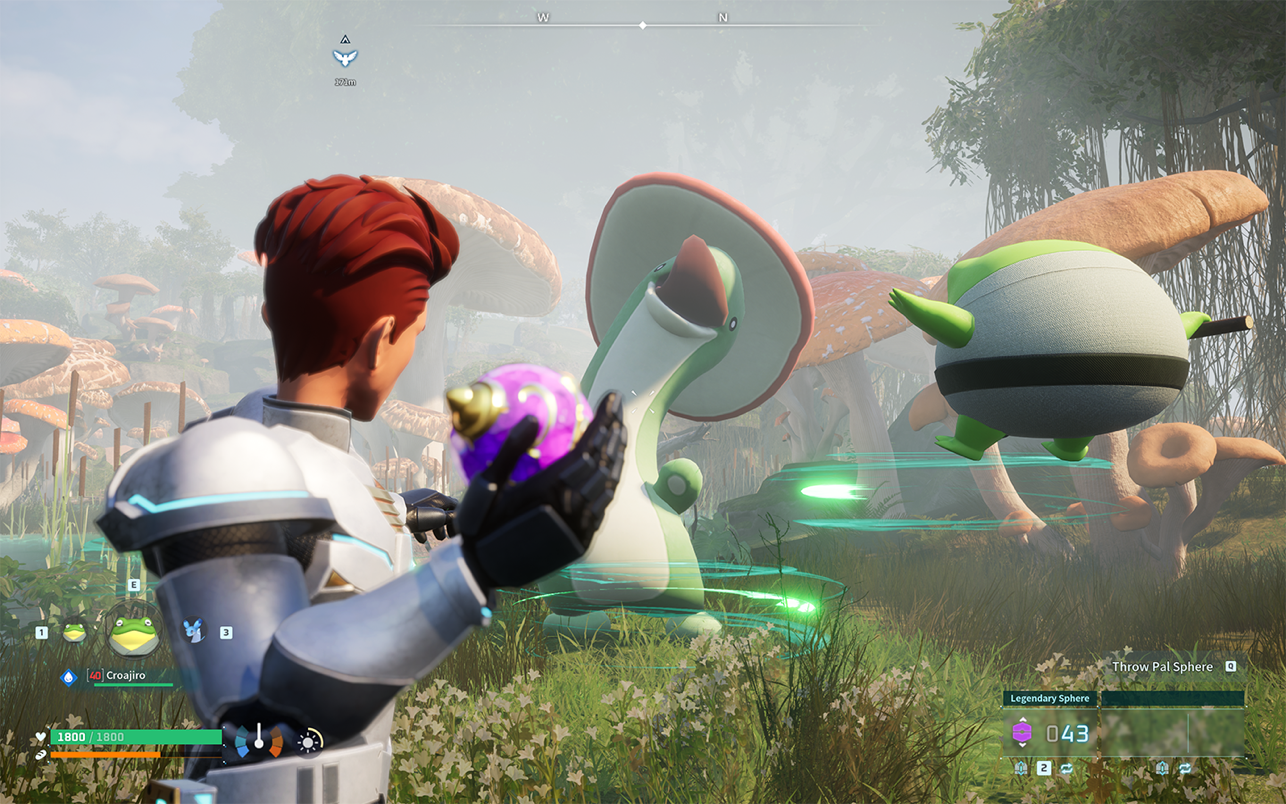
In this game, you can peacefully live alongside mysterious creatures known as Pals or risk your life to drive off a ruthless poaching syndicate.
Pals can be used to fight and breed, or they can be made to work on farms or factories.
You can even sell them or eat them.
Survival
In a harsh environment where food is scarce and vicious poachers roam, danger waits around every corner. To survive, you must tread carefully and make difficult choices…even if that means eating your own Pals when the time comes.
Mounts & Exploration
Pals can be mounted to traverse the land, sea and sky—allowing you to traverse all kinds of environment as you explore the world.
Building Structures
Want to build a pyramid? Put an army of Pals on the job. There are no labor laws for Pals, so exploit them to your heart’s content.
Production
Find a variety of useful Pals to make fire, generate electricity, or mine ore so that you can live a life of comfort.
Farming
Some Pals are good at planting seeds, while others are skilled at watering or harvesting crops. Work together with your Pals to create an idyllic farmstead.
Factories & Automation
Letting Pals do the work is the key to automation. Build a factory, place a Pal in it, and they’ll keep working as long as they’re fed—until they’re dead, that is.
Dungeon Exploration
With Pals on your side you can tackle even the most dangerous areas. When the time comes, you might have to sacrifice one to save your skin. They’ll protect your life—even if it costs their own.
Breeding & Genetics
Breed a Pal and it will inherit the characteristics of its parents. Combine rare pals to create the strongest Pal of them all!
Poaching & Crime
Endangered Pals live in wildlife sanctuaries. Sneak in and capture rare Pals to get rich quick! It’s not a crime if you don’t get caught, after all.
Multiplayer
Multiplayer is supported, so invite a friend and go on an adventure together! And of course you can battle your friends and trade Pals, too.
编辑核对资料
推荐给喜欢收集生物、搭建基地和优化自动化生产线,并愿意花较长时间经营世界的 Apple Silicon 用户。购买或安装前不要只按商店容量判断:建议 macOS 14+、至少 60GB 可用空间,并优先选择 16GB 或更大统一内存。稳妥流程是:备份旧存档→核对 1.0.1.100619 和 SHA-256→默认画质运行测试世界→验证保存与重新载入→逐项提高设置→最后再进入多人服务器。偏重纯建造可比较 Minecraft,偏重安静探索与种植可比较 Stardew Valley,重视完整生存制作和团队服务器可比较 Terraria;选择时先核对各产品当前的 Mac 与芯片支持。
优点
- 把开放世界生存、收集养成、自动化生产、基地建造与战斗组合在同一循环中;不同 Pal 的工作适性让采矿、发电、浇水、播种和搬运形成可观察的生产链。单人可按自己的节奏探索,多人可合作建造、挑战地下城并交换 Pal。Mac 版为 Apple Silicon 原生兼容,支持简体中文、繁体中文、日文、韩文和英文等多种语言;Apple 列表同时提供 Game Center 与家庭共享信息。世界设置较丰富,可调整难度、资源和损失规则,适合生存新手与追求效率的玩家。
不足
- 只支持 Apple Silicon,Intel Mac 完全无法运行;33.3GB 只是商店显示容量,实际安装、更新和缓存需要更多空间。大型基地、较多 Pal、远视距和多人服务器会明显提高 CPU、GPU 与内存压力,基础 M1 或内存较小的 Mac 需要降低画质与帧率目标。存档由世界、角色和服务器状态共同构成,错误覆盖、主机退出或版本不一致都可能导致进度异常。游戏包含枪械、捕捉、劳作与生存机制,题材并不适合所有玩家。模组可带来扩展,也会增加更新后崩溃、多人不一致及存档损坏风险。
安装步骤
- 本页对应 Palworld 1.0.1.100619。安装前确认 Mac 使用 Apple M1、M2、M3、M4 或更新的 Apple 芯片,并运行 macOS 14.0 或更高版本;Intel Mac 不受支持。Apple 商店显示安装包约 33.3GB,考虑解压、更新、存档和着色器缓存,建议至少保留 60GB 可用空间。先备份现有世界、角色与服务器连接信息,并记录安装文件 SHA-256。安装后首次用默认或中等画质启动,先建立测试世界,依次验证移动、捕捉、建造、Palbox、保存退出和重新载入。多人游戏前核对客户端与主机版本完全一致;连接专用服务器时保存服务器地址、端口和密码,但不要把凭据写入公开日志。确认单人存档稳定后,再逐项提高分辨率、视距、阴影和帧率上限。
卸载步骤
- 卸载前退出游戏并等待存档写入完成。分别备份单人世界、角色资料、多人世界或专用服务器存档,以及世界设置;不要只依赖同步服务。给备份标注 Palworld 1.0.1.100619、日期、角色名和 SHA-256,并离线复制到另一位置。重新打开复制出的世界,确认地图、Palbox、基地建筑和物品状态正常后再删除应用。若只是排查故障,先把配置与缓存目录改名而不是删除,便于区分配置损坏和存档损坏。卸载客户端不会自动删除远程专用服务器资料,也不会取消服务器订阅或开放端口;相关服务需单独关闭。
常见报错及解决办法
- 无法安装或启动:检查 Apple Silicon、macOS 14+、可用空间和文件 SHA-256,重启 Mac 后用默认设置再试;Intel Mac 无法通过调整设置解决兼容性。启动黑屏或着色器阶段停滞:先等待首次编译,关闭录屏、overlay 与第三方模组,验证文件后重建缓存。帧率低、机身发热或内存压力高:接通电源并关闭低电量模式,降低分辨率比例、阴影、视距和帧率上限,基础 M1 与低内存机型应优先稳定而非最高画质。存档回滚或世界打不开:立即停止覆盖保存,复制整个存档目录,用最近的离线副本测试;多人世界还要核对 host/server 实际持有的存档。无法加入服务器:确认双方都是 1.0.1.100619、服务器已更新、端口可达且模组清单一致。Pal 卡在基地或任务状态异常:先召回 Palbox、重新放出并离开区域后返回;在备份完成前不要反复强制退出。
本次版本更新内容
- Apple 的版本记录将 1.0.1 标注为 2026-06-15 发布,官方说明为错误修复。本页渠道构建号是 1.0.1.100619,可视为该 1.0.1 Mac 构建。为避免把其他平台或更高版本内容误写进来,本页不把后续版本的新功能、平衡调整或修复归到 1.0.1;用户升级或连接服务器前应以双方显示的完整构建号为准。
文件校验与安全信息






截图预览