Palworld
In this game, you can peacefully live alongside mysterious creatures known as Pals or risk your life to drive off a ruthless poaching...
- Apple M1 chip or later
- macOS 14.0 or later
Description
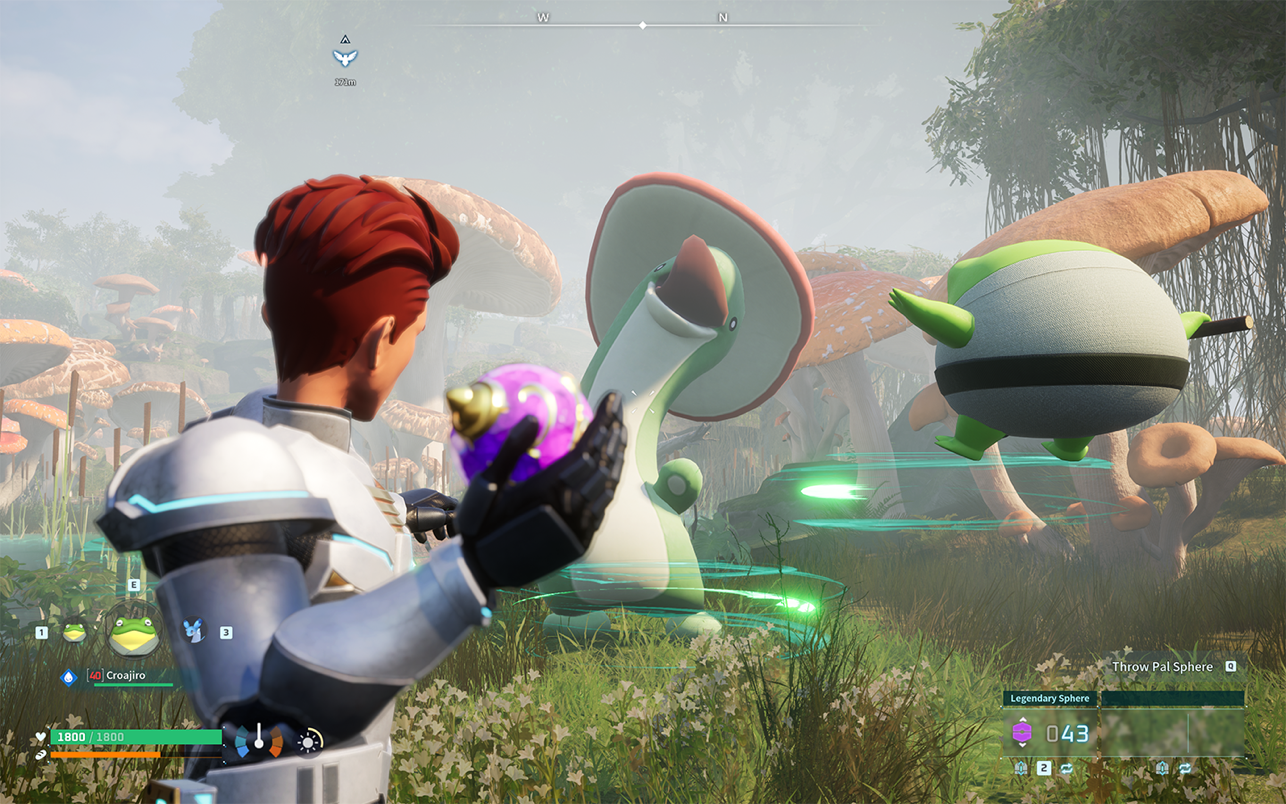
In this game, you can peacefully live alongside mysterious creatures known as Pals or risk your life to drive off a ruthless poaching syndicate.
Pals can be used to fight and breed, or they can be made to work on farms or factories.
You can even sell them or eat them.
Survival
In a harsh environment where food is scarce and vicious poachers roam, danger waits around every corner. To survive, you must tread carefully and make difficult choices…even if that means eating your own Pals when the time comes.
Mounts & Exploration
Pals can be mounted to traverse the land, sea and sky—allowing you to traverse all kinds of environment as you explore the world.
Building Structures
Want to build a pyramid? Put an army of Pals on the job. There are no labor laws for Pals, so exploit them to your heart’s content.
Production
Find a variety of useful Pals to make fire, generate electricity, or mine ore so that you can live a life of comfort.
Farming
Some Pals are good at planting seeds, while others are skilled at watering or harvesting crops. Work together with your Pals to create an idyllic farmstead.
Factories & Automation
Letting Pals do the work is the key to automation. Build a factory, place a Pal in it, and they’ll keep working as long as they’re fed—until they’re dead, that is.
Dungeon Exploration
With Pals on your side you can tackle even the most dangerous areas. When the time comes, you might have to sacrifice one to save your skin. They’ll protect your life—even if it costs their own.
Breeding & Genetics
Breed a Pal and it will inherit the characteristics of its parents. Combine rare pals to create the strongest Pal of them all!
Poaching & Crime
Endangered Pals live in wildlife sanctuaries. Sneak in and capture rare Pals to get rich quick! It’s not a crime if you don’t get caught, after all.
Multiplayer
Multiplayer is supported, so invite a friend and go on an adventure together! And of course you can battle your friends and trade Pals, too.
Editor-checked details
Recommended for Apple-silicon players who enjoy creature collecting, base design and optimising automated production over a long-running world. Do not plan around store size alone: use macOS 14+, keep at least 60 GB free and prefer 16 GB or more unified memory. A safe sequence is backup, verify 1.0.1.100619 and SHA-256, run a default-quality test world, validate save/reload, raise settings one by one, then join multiplayer. Compare Minecraft for freer construction, Stardew Valley for gentler exploration/farming, or Terraria for survival crafting and shared servers; confirm each alternative’s current Mac and chip support before choosing.
Pros
- It combines open-world survival, creature collection, automation, base building and combat in one loop. Pal work suitability creates visible production chains for mining, power, watering, planting and transport. Solo play supports self-paced exploration, while multiplayer enables shared construction, dungeons and Pal trading. The Mac release is native to Apple silicon and supports English, Simplified/Traditional Chinese, Japanese, Korean and other languages; Apple also lists Game Center and Family Sharing. Extensive world rules let newcomers or optimisation-focused players tune difficulty, resources and death penalties.
Cons
- It excludes Intel Macs entirely. The 33.3-GB store figure does not include all extraction, patch and cache headroom. Large bases, many active Pals, long view distance and multiplayer servers increase CPU, GPU and memory pressure; base M1 or lower-memory Macs may need conservative quality and frame targets. Progress spans world, character and server state, so wrong overwrite, host departure or build mismatch can disrupt a session. Guns, capture, labour and survival themes will not suit everyone. Mods add variety but increase post-update crashes, multiplayer mismatch and save-corruption risk.
Installation steps
- This page is pinned to Palworld 1.0.1.100619. Before installation, confirm an Apple M1, M2, M3, M4 or later Apple chip and macOS 14.0 or later; Intel Macs are unsupported. The Apple listing is about 33.3 GB, so keep at least 60 GB free for extraction, patches, saves and shader cache. Back up worlds, characters and server details, and record the installer SHA-256. Start with default or medium graphics, create a test world, and verify movement, capture, building, Palbox, save/quit and reload. Before multiplayer, ensure client and host builds match exactly. Retain dedicated-server address, port and password privately, never in public diagnostics. Only after the local save is stable should resolution, view distance, shadows and frame cap be raised one setting at a time.
Uninstallation steps
- Quit the game and wait for save writes to finish. Back up single-player worlds, character data, multiplayer/dedicated-server saves and world settings separately; do not rely on sync alone. Label copies with Palworld 1.0.1.100619, date, character and SHA-256, then store an offline copy elsewhere. Open the copied world and verify map, Palbox, base structures and inventory before removing the app. For troubleshooting, rename configuration and cache folders instead of deleting them so configuration corruption can be separated from save corruption. Removing the client does not delete remote dedicated-server data, cancel hosting or close exposed ports; handle those services separately.
Common errors and fixes
- For install or launch failure, check Apple silicon, macOS 14+, free space and SHA-256, restart the Mac and retry with defaults; settings cannot make an Intel Mac compatible. For black screen or shader stalls, allow first compilation, disable recording, overlays and mods, verify files and rebuild cache. For low FPS, heat or memory pressure, connect power, disable Low Power Mode and reduce resolution scale, shadows, view distance and frame cap; base M1 or low-memory systems should favour stability. For rollback or an unreadable world, stop overwriting immediately, copy the entire save tree and test the newest offline backup; multiplayer progress may live on the host/server. If a server cannot be joined, match 1.0.1.100619 on both ends, update the server, check ports and use the same mod list. For stuck base Pals or mission state, return the Pal to Palbox, deploy it again and reload the area; avoid repeated force-quits before backup.
What changed in this version
- Apple records version 1.0.1 as released on 2026-06-15 with the official note “Bug fixes.” The site channel build is 1.0.1.100619 and is treated as that Mac 1.0.1 build. To avoid mixing platforms or later releases, no subsequent feature, balance change or fix is attributed to 1.0.1 here. Before upgrading or joining a server, compare the full build shown by both client and host.
File verification






Screenshots