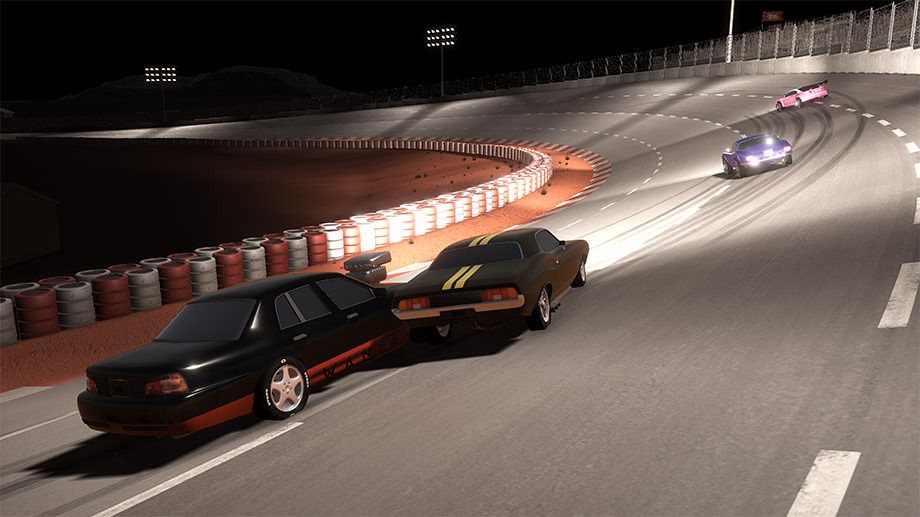
Revhead
Revhead is a car racing simulation game, where you have to build your own race car. You have a friend Charlie, who is busy with building...
- Intel, 64-bit processor
- OS X 10.11 or later
소개
Revhead is a car racing simulation game, where you have to build your own race car.
You have a friend Charlie, who is busy with building race cars. He would need some help from you and he invites you to Australia. You start your journey somewhere in a small town in Australia, where the only way to get recognised if you are able to build the fastest and best racing car around. You have Charlie, his expertise and his garage. The rest is up to you!
You have to think as a real Revhead! You can buy or sell cars and components, fix and tweak your car to make it the fastest around. However, a good race car is not always about the fastest or strongest, but the one which matching with it’s driver. Set your car the way it fits for your driving skills and racing conditions.
Revhead is about to build and race with your dream car and while all of your racing skills will be required to beat others on a track, you also have to master mechanical skills to be able to fix, maintain or re-build your car.
A real car is built up from thousands of components. Each connected to each-others and they are working together as a car. In this game, every car is built up from dozens of individual components, connected to each-other the same way as in reality. Each component can be removed, replaced and swapped between other cars.
This way, you can not only customise your paint work and outlook, but the handling and performance of the car as well.
Understand your car!
Watch your car when driving, how is it handling, how smoky is it or what noise coming from the hood. All these can help you to identify the real problem.
You need a 4×4 but you don’t have the budget? Buy a wreck cheap car and transfer it to a 4×4 supercharged racing beast, using wrecked cars and used components from the newspaper.
You engine is strong, but your car don’t reach the speed you need? Make sure your gears and differential also matching with your goals!
Racing and what is behind it
In the reality, racing i
편집자 확인 정보
기계 문제를 직접 진단하고 폐차 구매→부품 회수→수리→튜닝→레이스→재판매 순환을 즐기는 플레이어에게 추천하며 슈퍼카를 바로 골라 달리고 싶은 사람에게는 맞지 않습니다. 첫 차는 순정에 가깝게 두고 같은 짧은 코스에서 기준 랩타임, 최고 속도, 제동 거리, 회전수, 온도를 기록합니다. 한 번에 하나만 바꾸고 이전 부품을 보관하십시오. 과급과 최고 출력보다 신뢰성, 타이어, 브레이크, 맞는 기어비를 먼저 삽니다. 판매 전 별도 저장하고 거래 후 입력 포커스를 확인합니다. 안전 순서: Intel 시대 사양→이중 백업→1.9.11728/SHA-256→새 커리어 차고→주행/판매→재로드→기존 저장입니다.
장점
- 레이싱과 정비 경영이 실제로 연결됩니다. 엔진, 변속기, 차동, 서스펜션, 타이어, 차체 부품을 교환하고 소리, 연기, 핸들링, 랩타임으로 상태를 진단합니다. 신문, 폐차, 수리, 재판매가 저예산 경제 순환을 만들어 단순 업그레이드 상점에 그치지 않습니다. 호주 도로, 서킷, 드래그, 오프로드에 맞춰 기어비, 구동계, 서스펜션을 바꿔야 합니다. 운전과 진단이 똑같이 중요하며 출력만으로 나쁜 셋업을 가릴 수 없습니다. 공식 언어는 영어 전체 음성/UI와 일본어 UI/자막이며 한국어는 없습니다.
단점
- 기계 자유도만큼 진입 장벽도 높습니다. 기어비, 차동 특성, 마모 증상 설명이 부족해 잘못 산 부품이 초반 자금을 묶습니다. 차고와 다층 메뉴는 오래된 느낌이며 드래그, 포커스, 패드 탐색이 현대 레이싱 게임보다 불편하고 1.9.11728 자체도 판매 포커스 수정입니다. 주행은 인디 시뮬레이션 성향이지만 그래픽, 인물, 환경 표현은 강점이 아니며 상점과 트랙 왕복도 반복됩니다. Mac 사양은 신형 하드웨어 기준으로 갱신되지 않았고 Apple Silicon 보장이 없습니다. 한국어와 중국어 공식 UI도 없습니다.
설치 방법
- 이 페이지는 Revhead 1.9.11728용입니다. 공식 Mac 최소 사양은 OS X 10.11, 2GHz 듀얼 코어, RAM 4GB, 1GB 그래픽 메모리의 Intel Iris, 약 2GB 공간이며 권장은 OS X 10.13, i5, RAM 8GB, 외장 그래픽입니다. Intel Mac 시대 사양으로 Apple Silicon 네이티브 또는 Rosetta 실행은 공식 보장되지 않으므로 백업 후 시험하십시오. 커리어, 차고 차량, 부품, 자금, 튜닝, 키와 그래픽 설정을 보관하고 1.9.11728/SHA-256을 기록합니다. 기본 설정과 키보드/마우스로 차량 구매, 부품 교체, 수리, 시험 주행, 판매, 신문/메뉴 재진입, 저장 재로드와 컨트롤러를 확인합니다.
제거 방법
- 삭제 전 차고로 돌아가 현재 레이스, 시험 주행, 부품 거래를 끝내고 저장 표시가 사라질 때까지 기다립니다. 차량이 리프트 위에 있거나 판매 처리·온라인 광고 제출 중일 때 강제 종료하지 마십시오. 커리어 백업 두 세대를 유지하고 차량, 주행 거리, 엔진, 변속기, 구동계, 주요 마모, 튜닝, 현금, 차고 위치와 1.9.11728/SHA-256을 기록합니다. 재설치 후 새 커리어로 신문, 리프트, 부품 장착, 주행, 판매 후 포커스를 검증한 뒤 기존 저장을 복사합니다. 이상이 있으면 유일한 백업을 덮지 말고 조작 설정부터 분리 점검합니다.
자주 발생하는 오류와 해결 방법
- 판매 후 키보드나 패드가 멈추면 메뉴를 클릭하거나 입력 장치를 한 번 전환합니다. 1.9.11728은 판매 후 UI 포커스 누락을 명시적으로 수정하므로 재발하면 버전을 확인하고 차고로 재시작합니다. 부품 장착 실패는 출력보다 차종 규격, 구동 방식, 엔진/변속기 조합, 공간, 상태를 봅니다. 고회전인데 최고 속도가 낮으면 기어비, 차동, 타이어 크기, 구동계 손상을 확인하고 쏠림·제동 불안은 서스펜션, 타이어 마모, 좌우 부품을 비교합니다. 검은 화면·저프레임은 화질/해상도를 낮추고 추가 패드를 분리합니다. Apple Silicon 문제는 공식 Intel 지원과 같지 않습니다. 온라인 거래 재시도 전 로컬 저장을 보존합니다.
이번 버전 변경 사항
- 공식 Update 56은 2026-04-16의 1.9.11728입니다. 차량 판매 후 UI 포커스가 돌아오지 않는 문제를 수정하고, 세부 목록이 없는 소규모 버그 수정과 현지화 갱신을 포함합니다. 차고에서 마우스·키보드·패드 경로로 차량을 판매해 포커스가 조작 요소로 돌아오는지, 신문 재진입, 차량 전환, 저장 재로드를 확인합니다. 개발사가 소규모 수정 항목을 공개하지 않았으므로 추측하지 않으며 사이트 버전보다 높은 번호도 표시하지 않습니다.
파일 검증






대체 소프트웨어

스크린샷