Prison Escape Simulator: Dig Out
The day has come when the book is no longer enjoyable, the jokes of the cellmates next door are no longer funny, and it's time to...
- Intel, 64-bit processor
- macOS 11.0 or later
소개
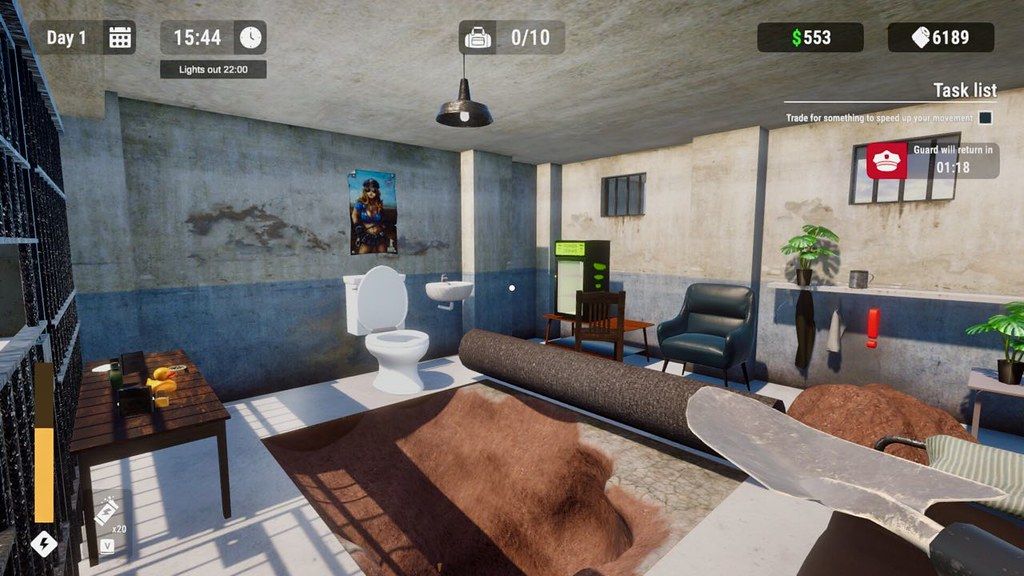
The day has come when the book is no longer enjoyable, the jokes of the cellmates next door are no longer funny, and it’s time to break out of this boring prison. Get some tools and start digging.
Ways to survive in prison.
Maybe you can trade with the guard for some goodies, maybe the guys will give you something better to dig in exchange for toilet paper.
Watch out for the guard’s inspections, cover the carpet, remove the sand you dig up in the toilet, don’t get caught. Get food, better shoes, and bigger shovels. Exercise to have more strength and energy, buy better backpacks to dig more valuable items from the ground.
Pimp the pad.
Maybe you can buy something from Mrs. Dorothy in the prison warehouse? Buy furniture, glow sticks, more beautiful carpets, and better toilets to remove the sand faster.
Get respect or get buried.
In Prison Escape Simulator, gambling isn’t just a pastime — it’s a way to gain influence. Money and reputation are all on the line. Every bet carries risk: you might get rich or end up in debt. Play smart, because in this prison, bluffing can be just as powerful as digging.
So, will you survive behind bars and prepare for the grand escape?
Read the letters with hints on how deep and in which direction to dig, and maybe one day you’ll get out of prison?
In Prison Escape Simulator: Dig Out you can mine, trade, upgrade your cell and have tons of fun when no one is watching. A few hours of excitement for the price of a burger. Will you escape?
WHAT’S NEW
Version 1.1.0:
• Release notes are available here .
REQUIREMENTS
• Intel, 64-bit processor
• macOS 11.0 or later
ScreenShots
If you are using Adblocker!! Please support this website by adding us to your whitelist. Ads are what helps us bring you premium content! Or read this to know how you can support us. Thank you!
•
Size
– 5GB
Previous Versions
편집자 확인 정보
짧고 반복적인 운영/업그레이드와 황당한 유머를 좋아하는 사람에게 권합니다. 초반에는 장식에 돈을 다 쓰지 말고 가방과 기본 도구를 먼저 올립니다. 파기 전 검사 남은 시간을 계산하고 돌아오면 카펫, 모래 처리, 거래 순서로 합니다. 고가 물품은 팔고 음식/핵심 도구는 남기며 도박은 다음 업그레이드에 영향 없는 돈만 씁니다. 편지의 깊이/방향을 단계별로 기록해 무작정 넓히지 않습니다. 안전 순서: 이중 백업→1.1.0/SHA-256→새 하루 순환→검사/거래→강화→재로드→기존 저장.
장점
- “숟가락으로 파기”를 분명한 위험/보상 순환으로 만들어 폐품과 단서를 얻는 대신 모래, 피로와 검사 위험이 생깁니다. 교도관/죄수 거래, 도구, 가방, 신발, 음식, 운동과 가구가 수입 투자처를 나눕니다. 편지는 깊이/방향 목표를 주고 야광봉, 변기, 카펫과 다이너마이트가 준비를 탈출 효율로 바꿉니다. 도박은 돈과 평판을 거는 다른 고위험 성장로입니다. 대상 5개 언어 중 간체 중국어, 일본어, 한국어 공식 UI를 지원합니다.
단점
- 핵심은 파기, 운반, 모래 처리, 거래와 수면의 반복이며 업그레이드는 효율만 높여 복잡한 이야기나 많은 대형 탈옥안을 기대하면 순환이 빨리 보입니다. 가방, 체력과 검사 시간이 동시에 제한해 초반 약한 도구로는 느립니다. 1인칭 물체 운반과 좁은 터널은 멀미/충돌 문제를 일으키고 일부 스크립트는 저장 재로드가 필요합니다. 공식 “Mac OS X 10+”는 너무 넓고 Apple Silicon 네이티브 설명이 없어 64비트, 그래픽과 최신 OS를 따로 검증해야 합니다. 번체 중국어 UI는 없습니다.
설치 방법
- 이 페이지는 Prison Escape Simulator: Dig Out 1.1.0 기준입니다. 공식 Mac 최소 사양은 2.0GHz, RAM 4GB, Intel UHD Graphics 630 1536MB와 12GB 공간이며 권장은 2.4GHz, 8GB와 15GB입니다. 터널 깊이/방향, 도구, 가방, 힘/에너지, 돈, 평판, 감방 가구, 도박, 힌트 편지와 도전 과제를 백업하고 1.1.0/SHA-256을 기록합니다. 새 저장에서 카펫 들기, 숟가락 파기, 구멍 숨기기, 변기 모래 처리, 검사 한 번, 교도관/죄수 거래, 식사와 저장 재로드를 시험하고 도구/가방 하나를 업그레이드해 용량, 체력과 시간 진행을 확인합니다.
제거 방법
- 삭제 전 감방으로 돌아가 파기, 도박이나 거래를 끝내고 자동 저장을 기다립니다. 교도관 검사, 다이너마이트 카운트다운, 터널 이동이나 구매 중에는 강제 종료하지 않습니다. 수감 일수, 구멍, 방향/깊이, 가방, 도구, 돈, 평판과 1.1.0/SHA-256을 기록한 순환 저장 두 개를 만들고 로컬/Cloud를 따로 백업합니다. 재설치 후 동기화를 끄고 새 저장에서 파기–모래 처리–수면과 재로드를 확인한 뒤 스크립트, 재고와 시간이 정상이면 기존 저장을 복원합니다.
자주 발생하는 오류와 해결 방법
- 파기가 지연되면 개발자 권장 Low End Mode를 켜고 그림자, 시야, 물리 물체와 해상도를 낮춥니다. 임무, 커피 포트나 상호작용 스크립트가 멈추면 새 슬롯에 저장하고 재로드하세요. 개발자는 대부분의 스크립트 오류가 저장/재로드로 회복된다고 안내하며 실패하면 저장과 재현 단계를 지원팀에 보냅니다. 검사 전 카펫을 덮고 모래를 치우며 돌아올 시간을 남깁니다. 가방이 차면 저가 물품이 도구/음식 공간을 차지하지 않게 고가 폐품부터 팝니다. 다이너마이트는 퇴로 확인 뒤 씁니다. Apple Silicon 네이티브 공식 등급은 없고 Intel UHD 630이 기준입니다.
이번 버전 변경 사항
- 사이트 빌드는 1.1.0입니다. 전체 번호와 정확히 일치하는 공식 항목별 로그가 없어 다른 날짜 수정이나 공지를 이 버전 신규 사항으로 쓰지 않고 상위 버전도 공개하지 않습니다. 확인 범위는 감방 파기, 카펫 은폐, 검사, 변기 모래 처리, 죄수/교도관 거래, 도구/가방, 힘/에너지 훈련, 가구, 도박 평판, 힌트 편지, 야광봉과 다이너마이트입니다. 1.1.0 표시, 새 파기 순환, 검사, 거래, 강화와 재로드를 검수합니다.
파일 검증






대체 소프트웨어



스크린샷