Super Movie Tycoon
Become a movie mogul in Super Movie Tycoon! From script to screen, build your dream team and create blockbusters to conquer...
- Intel, 64-bit processor
- macOS 14.2 or later
概要
Become a movie mogul in Super Movie Tycoon! From script to screen, build your dream team and create blockbusters to conquer Hollywood!
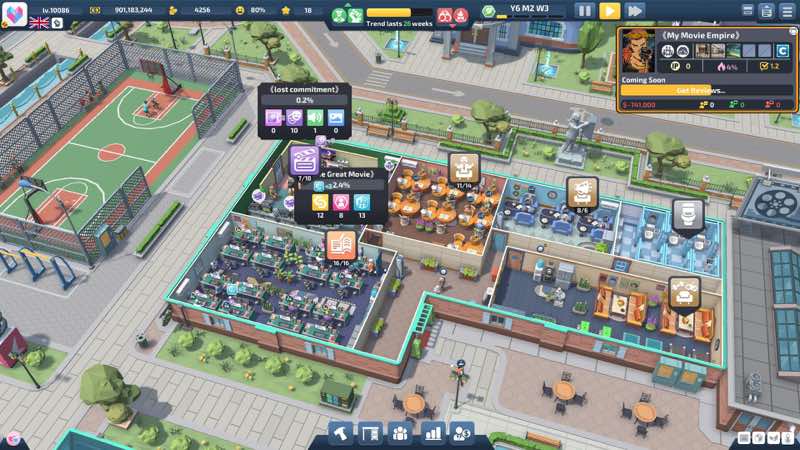
Through your creative designs, build a unique cinematic world! From scriptwriting to set construction, from character development to special effects, every detail is crafted by your own hands. Here, you are the director, screenwriter and producer – use your boundless imagination to create your own blockbusters!
Unlock new land plots and carefully plan each professional department to create a highly efficient film production pipeline. Maximize the value of every piece of land and witness the rise of your dream film studio from scratch!
Recruit top-tier film talents to build your dream team! From genius screenwriters to ace directors, from veteran crew members to special effects experts, strategically allocate human resources for every position. With professional HR management, inject endless creativity into your film kingdom!
Build a Hollywood-level production empire. From budget control to scheduling, use data-driven refined management to optimize every operation. Make your film company stand out in fierce industry competition and create your own entertainment legend!
Let your film empire dominate the global cinema scene, sweeping all honors at international top-tier film festivals. Create timeless masterpieces and make every production the biggest winner during awards season, achieving legendary status in film history!
WHAT’S NEW
Version 1.2.5:
• Release notes are available here .
REQUIREMENTS
• Intel, 64-bit processor
• macOS 14.2 or later
ScreenShots
If you are using Adblocker!! Please support this website by adding us to your whitelist. Ads are what helps us bring you premium content! Or read this to know how you can support us. Thank you!
•
Size
– 1.26GB
Previous Versions
編集部確認情報
Film Theme、Department Layout、Talent、Budget/Schedule が好きで Generative-AI Art 開示を受け入れる経営 Sim 向け。序盤に Land を過剰解放せず最短 Script→Production→Release を作り、Bottleneck にだけ採用。Film ごとに Cost、Staff、Platform、Return を記録し Award 前に Cash を確保。安全順:Backup→macOS 14.2+/Space→1.2.5/SHA-256→仮 Studio→Furniture/Fire→Release/Quick View→Reload→旧 Save。Chip Architecture 非明記のため Intel/Apple silicon とも Test Save で先に検証します。
長所
- Script、Character、Set、Filming、VFX、Release、Award を連結し、Director/Writer/Producer/Manager の判断を扱います。Land Unlock と専門 Department は空間計画、Writer/Director/Crew/VFX の採用は Role Matching、Budget/Schedule/Wage/Revenue は経営 Feedback を形成。Genre/Poster が作品ごとの成果を見せ、Global Release/Film Festival が長期目標。Single-player、95 Achievement、Cloud、Stats、5言語を公式対応し、1.2.5 Quick View は後半管理を改善します。
短所
- Mac 要件は低い一方 Frequency/Graphics Memory のみで Intel、Apple silicon、Graphics API が不明、macOS 14.2 最低も旧 Mac を除外。Department、Talent、Budget、Schedule、Construction、Staff Need の通知が同時発生し、大規模 Studio は Micro-management/UI 往復になり得ます。Production の最適解が反復し、序盤 Cash Mistake が Hire/Release まで波及。Poster、Icon、Environment Texture に Generative AI 使用を開発元が明記し、全手作業 Art を望む人には重要。Voice 対応なしで Text 中心です。
インストール手順
- 本ページは Super Movie Tycoon 1.2.5 用。公式 Mac 最低は macOS 14.2、2.0 GHz、2 GB、Graphics 128 MB、空き1 GB、推奨は macOS 15.3、2.5 GHz、4 GB、256 MB、2 GB。公式は Intel/Apple silicon Architecture を明記せず、配布元 Intel 表示は開発元説明ではありません。Cloud/Local Studio/Film Save を Backup し 1.2.5/SHA-256 を記録。仮 Studio で Land、Hire、Script、Filming、Platform Release、Quick View、Reload を確認後に旧 Company を開きます。
アンインストール手順
- 削除前に Production/Construction を Pause し Film Release、Staff Task、Finance、Cloud 完了を待ち、Save 中は強制終了しません。Studio Layout、Department、Staff/Skill、Script、Film、Platform、Award、Finance、Setting、1.2.5/SHA-256、Mac/OS/時刻を保存。再導入後は Cloud/Local 時刻を比較し、Copy で Furniture Upgrade、Firefighting 後 Staff、Film Quick View、UI を確認してから長期 Save を戻します。
よくあるエラーと解決策
- Launch Failure/Black Screen は macOS 14.2+、Space、Permission、File、Overlay、Windowed を確認。Chip Architecture は非明記なので Mac Model/Crash Log を保存。旧 Save Load Failure は原本を上書きせず Copy で Optional Overlay/Modification と Cloud 時刻を確認。消火後 Staff が停止する場合は 1.2.5、Pause、Task Cancel/Reassign を試し、再現時は Furniture、Fire、Staff、時刻を記録。Cash Flow は Idle Department、Wage、Land、Budget、Revenue。Platform Film は Quick View/Filter、UI ずれは Scale/Resolution を初期化します。
今回の更新内容
- 公式 1.2.5 公告は4点:一部 Character/Cover Art 更新、Platform 公開済み Film の Quick View 追加、Furniture Upgrade 後に消火した Staff が Reset されない問題の修正、一部 UI Display 修正。これらは Build 固有ですが Mac Chip、System Requirement、Save Format、Economy Balance の変更は述べず推定しません。Art、Quick View、消火後 Staff、UI、旧 Save Reload を確認します。
ファイル検証






代替ソフト


スクリーンショット