Super Movie Tycoon
Become a movie mogul in Super Movie Tycoon! From script to screen, build your dream team and create blockbusters to conquer...
- Intel, 64-bit processor
- macOS 14.2 or later
Description
Become a movie mogul in Super Movie Tycoon! From script to screen, build your dream team and create blockbusters to conquer Hollywood!
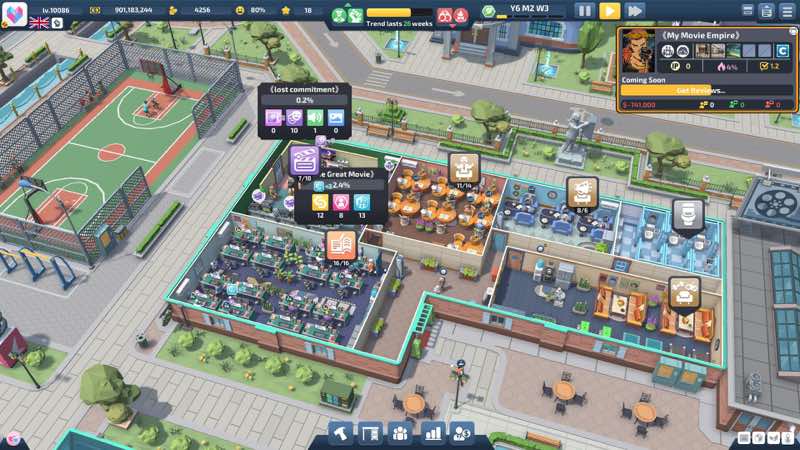
Through your creative designs, build a unique cinematic world! From scriptwriting to set construction, from character development to special effects, every detail is crafted by your own hands. Here, you are the director, screenwriter and producer – use your boundless imagination to create your own blockbusters!
Unlock new land plots and carefully plan each professional department to create a highly efficient film production pipeline. Maximize the value of every piece of land and witness the rise of your dream film studio from scratch!
Recruit top-tier film talents to build your dream team! From genius screenwriters to ace directors, from veteran crew members to special effects experts, strategically allocate human resources for every position. With professional HR management, inject endless creativity into your film kingdom!
Build a Hollywood-level production empire. From budget control to scheduling, use data-driven refined management to optimize every operation. Make your film company stand out in fierce industry competition and create your own entertainment legend!
Let your film empire dominate the global cinema scene, sweeping all honors at international top-tier film festivals. Create timeless masterpieces and make every production the biggest winner during awards season, achieving legendary status in film history!
WHAT’S NEW
Version 1.2.5:
• Release notes are available here .
REQUIREMENTS
• Intel, 64-bit processor
• macOS 14.2 or later
ScreenShots
If you are using Adblocker!! Please support this website by adding us to your whitelist. Ads are what helps us bring you premium content! Or read this to know how you can support us. Thank you!
•
Size
– 1.26GB
Previous Versions
Editor-checked details
Recommended for management players who enjoy film themes, department layout, talent assignment and budget/scheduling and accept disclosed generative-AI art assets. Do not unlock too much land initially; establish the shortest script-production-release loop, then hire for measured bottlenecks. Track production cost, staff occupancy, platform and return for each film, preserving cash before awards season. Safe order: backup; confirm macOS 14.2+/space; 1.2.5/SHA-256; temporary studio; furniture upgrade/fire; platform release/quick view; save reload; old save. With no official chip architecture stated, validate both Intel and Apple-silicon Macs on a test save first.
Pros
- Film production is divided into connected script, character, set, filming, effects, release and awards stages, making the player director, writer, producer and company manager. Land unlocks and specialist departments add spatial planning; recruiting writers, directors, crew and VFX talent creates role matching, while budgets, schedules, wages and release income provide management feedback. Genres and posters give each completed film an identity, with worldwide distribution and festivals as long-term goals. Official support includes single-player, 95 achievements, Cloud, stats and all five target languages; 1.2.5 quick view improves late-game film management.
Cons
- Official Mac requirements are low but state only frequency and graphics memory, not Intel, Apple silicon or graphics API, leaving compatibility opaque; a macOS 14.2 floor excludes many older Macs. Departments, talent, budgets, schedules, construction and staff needs can generate simultaneous notifications, becoming micromanagement and UI switching as the studio grows. Production-chain optimal paths may repeat, and early cash mistakes propagate into hiring and distribution. The developer explicitly discloses generative AI for movie posters, icons and environmental textures—an important tradeoff for players wanting entirely human-made art. No voice language is listed, so play is text-led.
Installation steps
- This page covers Super Movie Tycoon 1.2.5. Official Mac minimum is macOS 14.2, 2.0 GHz CPU, 2 GB RAM, 128 MB graphics memory and 1 GB storage; recommended is macOS 15.3, 2.5 GHz, 4 GB RAM, 256 MB graphics memory and 2 GB storage. The official specification names neither Intel nor Apple silicon, so the source Intel label is not a developer statement. Back up Steam Cloud plus local studio/film saves and record 1.2.5/SHA-256. Use a temporary studio to test land, hiring, script, filming, platform release, quick view and save reload before opening an established company.
Uninstallation steps
- Before uninstalling, pause production/construction and wait for film releases, staff tasks, finance settlement and Steam Cloud; never force-quit while save/autosave is active. Separately back up studio layout, departments, staff/skills, scripts, films, platform releases, awards, finances and settings, recording 1.2.5/SHA-256, Mac/OS and timestamps. After reinstalling, compare Cloud/local times and use a copy to check furniture upgrades, staff state after firefighting, film quick view and interfaces before restoring the long save.
Common errors and fixes
- For launch failure or black screen, confirm macOS 14.2+, space and permissions, verify files, disable overlays and retry once in windowed mode. Because no chip architecture is stated, preserve the Mac model and crash log. Never overwrite an old save that fails to load; test a copy after disabling optional overlays/modifications and compare Cloud times. If staff remain stuck after firefighting, confirm 1.2.5, pause, cancel the current task and reassign; if repeatable, record upgraded furniture, fire, employee and timestamp. For poor cash flow inspect idle departments, wages, land, production budgets and release revenue. Use the new quick view and reset filters for missing platform films. Reset scaling/resolution for displaced UI.
What changed in this version
- The official 1.2.5 announcement lists four changes: updated some character and cover-art resources; added quick view for films already released on platforms; fixed staff failing to reset after extinguishing fires following furniture upgrades; and fixed display issues in some interfaces. These are directly attributable to this build. The announcement does not claim changed Mac-chip support, system requirements, save format or core economy balance, so none is inferred. Validate the revised art, quick view, post-fire staff state, affected UI and old-save reload.
File verification






Alternatives


Screenshots