Neon Curves Racing
Burn rubber through glowing city circuits where speed, style, and attitude collide. Neon Curves Racing is a fast-paced top-down...
- Intel, 64-bit processor
- macOS 15.0 or later
概要
Burn rubber through glowing city circuits where speed, style, and attitude collide.
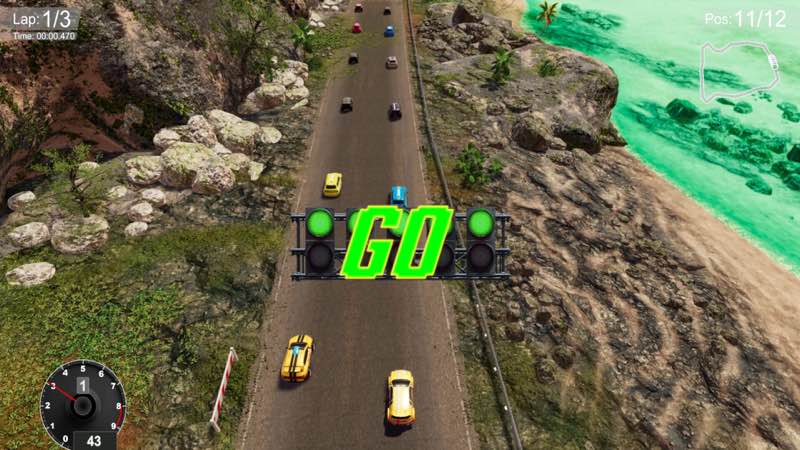
Neon Curves Racing is a fast-paced top-down arcade racer wrapped in a vibrant kawaii neon aesthetic, blending tight racing mechanics with flashy customization and playful personality.
Race hard, win big, and return to your garage to celebrate victories in true neon-soaked style.
Arcade Racing, Refined
• Fast, responsive top-down racing designed for pure fun
• Drift through sharp corners and master precision lines
• Short, adrenaline-fueled races perfect for quick sessions or long grinds
Deep 3D Car Customization
• Fully 3D customizable car liveries
• Change colors, materials, decals, and glow effects
• Build rides that shine under neon lights and stand out on every track
Your car isn’t just fast — it’s a statement.
Kawaii Pit Crews & Garage Vibes
• Meet your cute, stylized kawaii pit crews
• Watch them dance and cheer in your garage after races
• A playful, mature atmosphere inspired by anime, nightlife, and arcade culture
Tasteful, stylized, and all about charm — no explicit content.
A World of Neon & Curves
• Detailed race tracks drenched in style, action, and electric glow
• Smooth visuals designed for clarity, speed, and style
• A soundtrack that keeps the energy high lap after lap
Progress, Unlock, Repeat
• Unlock new cars, cosmetic options, and garage visuals
• Improve lap times, master tracks, and build your ultimate neon racer
• Style and skill go hand in hand
WHAT’S NEW
Version 1.1:
• Release notes are available here .
REQUIREMENTS
• Intel, 64-bit processor
• macOS 15.0 or later
ScreenShots
If you are using Adblocker!! Please support this website by adding us to your whitelist. Ads are what helps us bring you premium content! Or read this to know how you can support us. Thank you!
•
Size
– 744.4MB
編集部確認情報
短い Top-down Arcade、Drift/Lap、Neon Customize が好きで Compatibility Test を受け入れる人向けです。唯一の Cloud Save をすぐ Import せず、Default Car 3 Lap で FPS、Deadzone、Collision、Save を確認。Livery は単色から Effect を一つずつ追加し描画不具合を分離します。安全順:Backup→1.1/SHA-256→Windowed Default→3 Lap→Controller→Reload→Simple Livery→Glow→Unlock。日本語・韓国語・繁体字中国語のゲーム内対応はありません。
長所
- Top-down で Corner、Rival、Line が読みやすく、短い Race と Responsive Drift は短時間と Lap 改善に向きます。3D Livery は Colour、Material、Decal、Glow を個別調整し、Car/Cosmetic/Garage Unlock が収集目標に。Neon City、Anime/Nightlife、Pit Crew Animation、Music が統一 Style を作り、Single-player Arcade は複雑な Tuning なしで直接的です。
短所
- 最大の Risk は矛盾する Mac 表で、macOS 15 と MC68030/Nvidia GTX 1080 から信頼できる互換表を作れません。Solo Short Race、Unlock、Lap Chase が中心で Multiplayer、Career Season、Deep Tuning がなく長期性は限定的。Glow/Post-process は弱い機種の Clarity/FPS に影響し、Drift は Controller 調整が必要です。公式6言語に日本語・韓国語・繁体字中国語はなく、1.1 項目別 Note もありません。
インストール手順
- 本ページは Neon Curves Racing 1.1 用です。重要:Steam は macOS 15、8 GB RAM、6 GB を示す一方、MC68030 と Nvidia GTX 1080/AMD Radeon RX も記載し、macOS 15 と矛盾するため Intel/M1/M2/M3/M4 互換を判断できません。配布は約744.4 MB。最低 macOS 15、8 GB、6 GB を用意し、初回起動を Compatibility Gate にします。Cloud、Car、Lap、Unlock、Livery Colour/Material/Decal/Glow、Garage、Control を保存し 1.1/SHA-256 を記録。Default Car の短い Race で Launch、Controller、Steer、Brake、Drift、Collision、Timing、Save を確認後 Customize/Unlock を試します。
アンインストール手順
- 削除前に Race を終えて Garage に戻り、Reward、Car Unlock、Lap、Cloud を待ちます。Finish Timing、Purchase、Livery Save、Garage Animation 中は強制終了しません。Car、Best Lap、Progress、Colour/Material/Decal/Glow、1.1/SHA-256、Mac Model、macOS を記録。再導入後は Default Car の短い Race と再起動保存を確認してから長期 Garage を開き、要件矛盾のため Mac/OS 変更直後に唯一の Cloud Save を上書きしません。
よくあるエラーと解決策
- macOS 15 で起動/描画不能でも矛盾する MC68030/GTX 1080 組合せを満たそうとせず、System Update、Metal/Graphics、File、6 GB、Overlay、Window/低 Resolution を確認。失敗なら Model を記録し Save 上書きを止めます。Steering/Drift は Deadzone/Sensitivity を同一 Track で調整。Livery は単色保存後 Material、Decal、Glow を一つずつ。FPS は Shadow、Glow、Post-process、Resolution を下げます。Lap/Unlock は Cloud/Local 時刻を比較。日本語・韓国語・繁体字中国語は公式6言語外で、ページ翻訳はゲーム内対応を意味しません。
今回の更新内容
- 配布 Version は 1.1 です。公開 Store/Announcement に 1.1 と一対一対応する項目別 Note はなく、Car、Track、Livery、Handling、Performance、Crash、Save 変更を断定できません。他 Build 情報は転用しません。Menu Version、Default Car Race、Drift/Timing、Car Unlock、3D Livery 4要素、Garage、Save Reload を確認します。
ファイル検証






代替ソフト

スクリーンショット