Neon Curves Racing
Burn rubber through glowing city circuits where speed, style, and attitude collide. Neon Curves Racing is a fast-paced top-down...
- Intel, 64-bit processor
- macOS 15.0 or later
Description
Burn rubber through glowing city circuits where speed, style, and attitude collide.
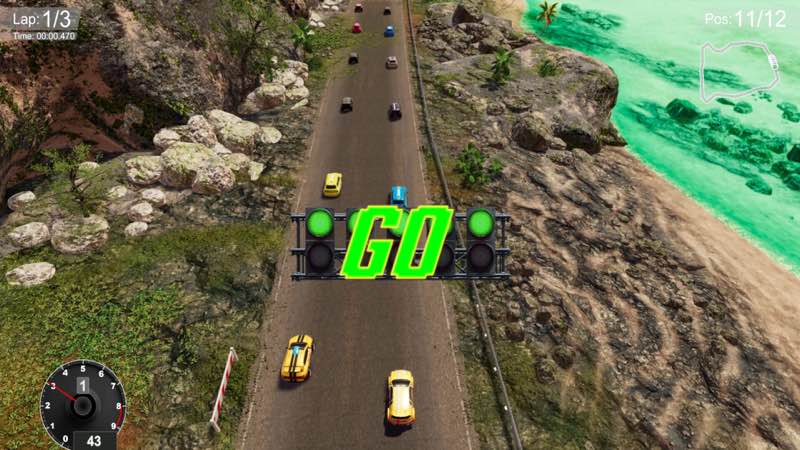
Neon Curves Racing is a fast-paced top-down arcade racer wrapped in a vibrant kawaii neon aesthetic, blending tight racing mechanics with flashy customization and playful personality.
Race hard, win big, and return to your garage to celebrate victories in true neon-soaked style.
Arcade Racing, Refined
• Fast, responsive top-down racing designed for pure fun
• Drift through sharp corners and master precision lines
• Short, adrenaline-fueled races perfect for quick sessions or long grinds
Deep 3D Car Customization
• Fully 3D customizable car liveries
• Change colors, materials, decals, and glow effects
• Build rides that shine under neon lights and stand out on every track
Your car isn’t just fast — it’s a statement.
Kawaii Pit Crews & Garage Vibes
• Meet your cute, stylized kawaii pit crews
• Watch them dance and cheer in your garage after races
• A playful, mature atmosphere inspired by anime, nightlife, and arcade culture
Tasteful, stylized, and all about charm — no explicit content.
A World of Neon & Curves
• Detailed race tracks drenched in style, action, and electric glow
• Smooth visuals designed for clarity, speed, and style
• A soundtrack that keeps the energy high lap after lap
Progress, Unlock, Repeat
• Unlock new cars, cosmetic options, and garage visuals
• Improve lap times, master tracks, and build your ultimate neon racer
• Style and skill go hand in hand
WHAT’S NEW
Version 1.1:
• Release notes are available here .
REQUIREMENTS
• Intel, 64-bit processor
• macOS 15.0 or later
ScreenShots
If you are using Adblocker!! Please support this website by adding us to your whitelist. Ads are what helps us bring you premium content! Or read this to know how you can support us. Thank you!
•
Size
– 744.4MB
Editor-checked details
Recommended for players who enjoy short top-down arcade races, drift/lap chasing and neon car customization, and accept a compatibility test first. Do not import the only long cloud save immediately: run three default-car laps to validate stable FPS, steering deadzone, collision and persistence. Start liveries with plain colour and add effects one by one to isolate rendering faults. Safe order: backup; 1.1/SHA-256; default car windowed; three timed laps; controller calibration; save reload; simple livery; complex glow; unlock progression. Japanese/Korean/Traditional-Chinese users must accept no corresponding in-game language.
Pros
- Top-down view makes corners, rivals and racing lines readable. Short races and responsive drifting suit quick play while supporting repeated lap optimization. 3D liveries separately control colour, material, decal and glow; car/cosmetic/garage unlocks convert results into collection goals. Neon cities, anime/nightlife inspiration, animated pit-crew celebrations and energetic music form a consistent identity. Its single-player arcade focus is direct, without a complex tuning barrier.
Cons
- The self-contradictory Mac table is the largest purchase/install risk: macOS 15 cannot form a credible compatibility matrix with MC68030 and Nvidia GTX 1080 statements. Solo short races, unlocks and lap chasing are the main loop; no multiplayer, career season or deep tuning limits longevity. Neon glow/post-processing may hurt clarity and FPS on weaker hardware, and top-down drift may need controller fine-tuning. Only six languages are supported, excluding Japanese, Korean and Traditional Chinese. Version 1.1 has no verifiable itemized note.
Installation steps
- This page covers Neon Curves Racing 1.1. Important: Steam lists macOS 15 Sequoia, 8 GB RAM and 6 GB storage, but also an MC68030 CPU and Nvidia GTX 1080/AMD Radeon RX—hardware statements that conflict with macOS 15 and cannot establish Intel or M1/M2/M3/M4 compatibility. The channel package is about 744.4 MB. Prepare at least macOS 15, 8 GB and 6 GB free, and treat first launch as a compatibility gate. Back up Steam Cloud, cars, lap times, unlocks, livery colours/materials/decals/glow, garage and controls, then record 1.1/SHA-256. Use the default car in a short race to validate launch, controller, steering, braking, drift, collisions, timing and persistence before testing 3D customization and unlocks.
Uninstallation steps
- Before uninstalling, finish the race, return to garage and wait for rewards, car unlocks, lap time and Steam Cloud. Do not force-quit during finish timing, purchase, livery save or garage celebration. Export/screenshot cars, best laps, event progress, colour/material/decal/glow combinations, 1.1/SHA-256, Mac model and macOS. After reinstalling, finish a short default-car race and restart to verify persistence before opening the long garage. Because official requirements conflict, do not overwrite the only cloud save immediately after changing Mac or OS.
Common errors and fixes
- If macOS 15 fails to launch or renders incorrectly, do not try to satisfy the impossible MC68030/GTX 1080 combination. Verify system updates, Metal/graphics state, files and 6 GB free, disable overlays and start windowed/lower resolution; if it still fails, record the model and stop before overwriting saves. For twitchy steering/drift calibrate deadzone/sensitivity on one track. If a livery does not persist, save a plain colour from the garage, then add material, decal and glow one at a time. Lower shadows, glow, post-processing and resolution for FPS. Compare cloud/local timestamps for lost laps/unlocks. Japanese, Korean and Traditional Chinese are not among the six official languages; translated pages do not imply in-game support.
What changed in this version
- The channel version is 1.1. Public developer store material and accessible announcements provide no itemized release note uniquely mapped to 1.1, so no car, track, livery, handling, performance, crash or save change can be confirmed; notes from another build are not reused. Acceptance covers the menu version, a default-car short race, drift/timing, car unlock, all four 3D livery parameter types, garage return and save reload.
File verification






Alternatives

Screenshots