Vellum
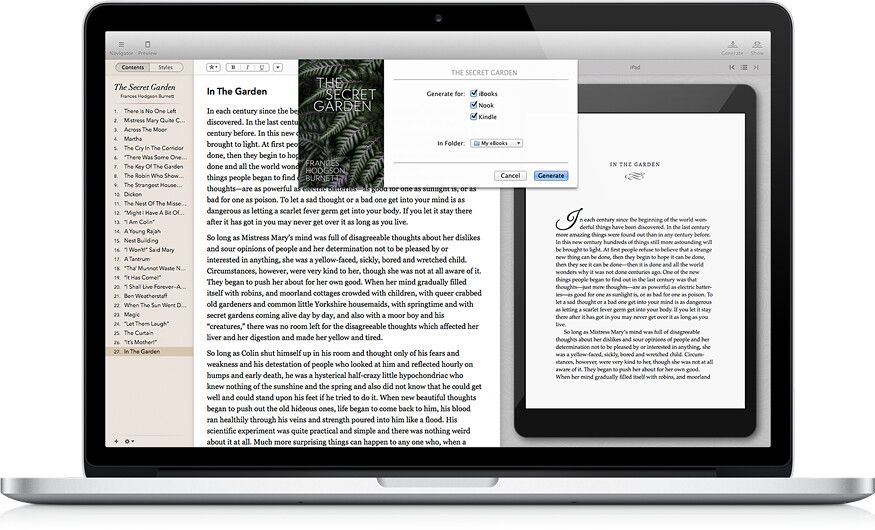
Vellum is a powerful eBook generating tool that lets you easily create an eBook from a text manuscript, or create an eBook from scratch...
- Intel, 64-bit processor
- macOS 13.5 or later
Description
Vellum is a powerful eBook generating tool that lets you easily create an eBook from a text manuscript, or create an eBook from scratch within the application. Choose the appropriate style from several options, view instant previews of the finished product, and easily generate and regenerate eBooks with a single click to avoid disaster upon finding mistakes.
EBOOKS EVERYWHERE
Create ebooks for every platform: Kindle, Kobo, Apple Books, and more. Each specialized file can guide readers to buy your next book in their favorite store.
Completed a series? Combine everything into a box set in just a few steps.
PAINLESS PRINT
Choose your trim
size
, and Vellum does the rest, with automatic setup of margins, page numbers, and headers and footers.
Vellum even handles complex tasks like widow-handling and spread-balancing, giving you a professional result every time you generate.
EFFORTLESS STYLE
Use drop caps, embedded fonts, and flourishes, all with a click to select your favorite Style.
Add your own touch with custom ornaments and backgrounds.
WHAT’S NEW
Version 4.1.5:
• Vellum 4.1.5 improves compatibility with macOS 27 Golden Gate.
REQUIREMENTS
• Intel, 64-bit processor
• macOS 13.5 or later
ScreenShots
If you are using Adblocker!! Please support this website by adding us to your whitelist. Ads are what helps us bring you premium content! Or read this to know how you can support us. Thank you!
•
Size
– 106.9MB
Previous Versions
Editor-checked details
Recommended for indie authors and small presses producing professional fiction, nonfiction and business-book ebooks plus print interiors, especially repeat series. Compare Adobe InDesign or Affinity for complex illustrated books, textbooks or magazines, and Sigil for an open-source EPUB workflow. Before publishing, inspect navigation, links, images, page breaks, headers/footers and fonts in the target store previewer, a real device and a physical proof. Verified from Vellum help, update blog and legacy compatibility table
Pros
- Highly focused book-production workflow; generates ebook formats and print PDF from one manuscript; live preview, automatic chapters/front matter, reusable elements and large-print support save substantial layout work; outputs target major stores.
Cons
- Mac-only and aimed at text-centric books rather than complex magazines, textbooks or highly custom design; paid license required for production output; Word import does not preserve arbitrary complex formatting; legacy releases cannot open newer files; dependent on Kindle Previewer and store-rule changes.
Installation steps
- Current Vellum 4.1.4 requires macOS Ventura 13 or later and supports Intel and Apple silicon. Older systems stop at Monterey 3.9.3, Big Sur 3.7.5 or Catalina 3.5.4; legacy versions cannot open files made by newer releases.
- Move Vellum to Applications and import a cleanly styled Word manuscript or create a book. Set title, author, element types, front/back matter and ebook/print specifications. Install Kindle Previewer for Kindle conversion, or generate EPUB only.
Uninstallation steps
- Back up all .vellum files, source Word manuscripts, covers, images, fonts, reusable-element sources and generated EPUB/PDF files. Autosave is not an off-device backup; keep a cloud or external copy.
- Quit and move Vellum from Applications to Trash. A license can be restored after reinstalling or moving Macs. Do not delete a reusable-element source still linked by other books.
Common errors and fixes
- Old version says up to date: macOS is below the current requirement. Upgrade macOS or use the official matching legacy release; never force a legacy app to open a newer file.
- Bad Word chapters/indents: normalize heading/body/list/footnote/image styles in Word and re-import. 4.1.4 restores indentation in exported Word files.
- Kindle generation fails: update/reinstall Kindle Previewer and check admin permission/free space, or Generate EPUB Only and validate with store tools.
- Large or malformed EPUB/PDF: optimize images and check fonts, pagination, widows/orphans, bleed and trim size. Proof each chapter in Kindle Previewer, Apple Books and real devices. Relocate or detach a reusable element with Missing Source.
What changed in this version
- Vellum 4.1.4 (July 15, 2026) restores text indentation in exported Word files, reduces PDF size for books containing black-and-white images, and includes fixes for the macOS 27 beta plus other minor improvements.
Related apps






Alternatives

Screenshots