Supermarket Simulator
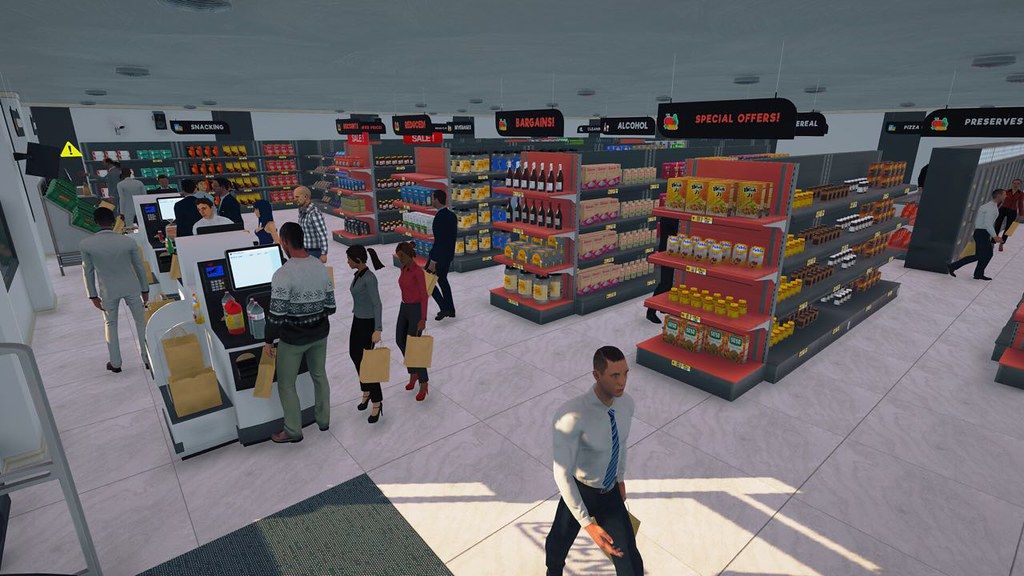
"Supermarket Simulator" is a chill first-person simulation where every detail of running a supermarket comes alive. Design your...
- Intel, 64-bit processor
- macOS 10.15 or later
Description
“ Supermarket Simulator ” is a chill first-person simulation where every detail of running a supermarket comes alive.
Design your store, optimizing for efficiency and aesthetics. Determine where products are displayed, manage your aisles, and ensure a smooth shopping experience for your customers.
Order stock using an in-game computer. Unpack goods, organize them in your storage room and place them on shelves, fridges, and freezers.
Scan items, take cash and credit card payments, and ensure customers leave satisfied with their shopping and checkout experience.
Navigate the complexities of a real-time market. Buy products when prices dip and determine the best-selling prices to balance customer satisfaction with profit margins.
As you accumulate profits, consider reinvesting. Expand your store’s physical space, upgrade interiors, and continually adapt to the evolving demands of the retail world.
Personalize your shop to make it unique. Customize the floors, paint the walls, put up category signs, and more.
Not every customer visits your store in person. Receive online orders, prepare the packages, and deliver them yourself.
Tired of paying delivery fees or searching for discounts? Visit local markets to find the best deals.
Make your store shine. Clean the floor, take out the trash, and polish the windows to keep everything squeaky clean.
Not everyone is a paying customer. Use security tools like cameras and alarm sensors, or hire security guards to protect your store from shoplifters.
In “Supermarket Simulator”, every decision matters. Will you rise to the occasion, transforming a modest establishment into a retail powerhouse, all while balancing customer satisfaction, and finances?
WHAT’S NEW
Version 1.6.0:
• Release notes are available .
REQUIREMENTS
• Intel, 64-bit processor
• macOS 10.15 or later
ScreenShots
If you are using Adblocker!! Please support this website by adding us to your whitelist. Ads are what helps us br
Editor-checked details
Recommended for players who enjoy personally executing retail tasks, expanding gradually and tracking light business data. Intel i5/8 GB should begin with a small store/low traffic; M1 is official recommendation, while M2/M3/M4 can follow the same validation. Use 16 GB for long-term large stores. Safe 1.5.1 workflow: dual backup; record SHA-256; duplicate old layout; test Grid/save on a new store; reposition furniture only on the copy; verify two-player co-op; then continue the main save. Split 2–4 players across purchasing, storage, checkout and delivery. Compare Big Ambitions for deeper pricing/logistics or Gas Station Simulator for another hands-on shop.
Pros
- First-person ordering, unpacking, shelving, pricing, checkout, cleaning and expansion form an intuitive loop with strong short-term feedback. Market prices, margins, loans, licenses and satisfaction create tradeoffs; staff can handle checkout, restocking, baking and security. Snap/Grid organizes large aisles. Online orders, personal delivery, local markets, theft and security add layers, while up-to-four-player co-op supports roles. Floors, walls, signs and departments are extensively customizable.
Cons
- Mid/late restocking, pricing, trash, cleaning and staff work becomes repetitive and micromanagement scales with store size. Grid dimension changes may damage old layouts; 1.5.1 fixes defined issues but cannot guarantee automatic shelf restoration. Multiplayer physics/interaction is latency-sensitive and host saves matter. Although official Mac minimum/recommendation says 8 GB, large stores, DLC, crowds and co-op favor 16 GB. Bakery, ice cream, electronics and other systems are split across DLC and must be separated from base features. The current site external link points to Steam news rather than an installer, so its purpose must be verified before downloading.
Installation steps
- This page covers Supermarket Simulator 1.5.1. Official Mac minimum is Catalina 10.15, Intel Core i5, 8 GB RAM and 5 GB storage; recommended is Catalina 10.15, Apple M1, 8 GB and 5 GB. Reserve 15 GB for a large store, multiplayer and DLC. Back up local/cloud stores, shelf/storage layout, licenses, prices, staff, loans, online orders, vehicles, DLC and settings, and record SHA-256. Because 1.5.0 changed some furniture dimensions for Snap/Grid, duplicate the old save. First use a new store to test ordering, restocking, checkout, Snap/Grid, save/load and four-player co-op, then open only a copy of the old layout and resolve overlaps.
Uninstallation steps
- Before uninstalling, finish the business day/online orders, let clients leave and have the host save manually. Back up cloud/local stores separately, pre-grid/post-grid layout copies, stock, licenses, prices, staff/rosters, loans, vehicles and DLC state. Label 1.5.1, date and SHA-256; keep both cloud-conflict sides. After reinstalling, order stock, run checkout and save in a clean store before restoring old data. Match DLC first and inspect refrigerators, freezers, produce shelves, switches and security antennas; adjust a damaged layout only on a copy.
Common errors and fixes
- For missing/clipped/immovable shelves or freezers in an old store, treat 1.5.0 grid dimension changes as the key risk: preserve the original, disable Snap on a copy, reposition items and reopen aisles. Never overwrite the only save. For launch failure/low FPS, verify Catalina 10.15, 8 GB, space and SHA-256; reduce resolution, customers and shadows, and disable unnecessary DLC/overlays. Stuck restockers may indicate corrupt boxes, blocked racks or trunks. For co-op desync, match 1.5.1/DLC, reduce latency and let the host save. Patch 1.5.1 fixes labels, ice-cream stand, storage light switch, multiplayer pavement clipping, hint UI, security antenna and sign background—not every layout issue.
What changed in this version
- Patch 1.5.1 is a fix release following the large 1.5.0 Snap/Grid update. Official notes confirm fixes for product-label interaction on furniture, ice-cream-stand alignment, storage light-switch placement, pavement clipping into storage in multiplayer, multiplayer ice-cream-stand interaction, incorrect hint UI text, security-antenna placement and a missing shop-sign background on one entrance. Version 1.5.0 introduced configurable grid/snap, rendering optimizations and controller vibration; furniture dimensions changed to fit the grid, so old stores may need repositioning. Player reports of missing shelves are not misrepresented as confirmed fixed.
File verification






Alternatives


Screenshots