Stacks
Stacks is a new way to create pages in RapidWeaver. It's a plugin designed to combine drag-and-drop simplicity with the power of fluid ...
Description
Stacks is a new way to create pages in RapidWeaver. It’s a plugin designed to combine drag-and-drop simplicity with the power of fluid layout.
Features
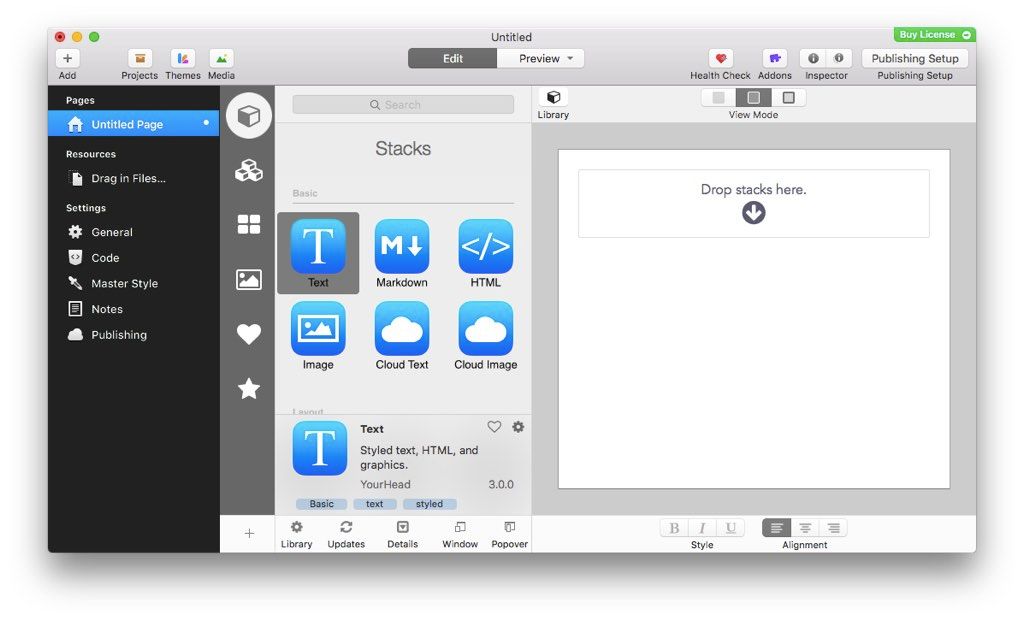
• Fluid Layout: Stacks lets you build pages that flow text to the dimensions of a theme even if the theme has a variable width. You can build flowing columns, flexible rows, and tiles of images.
• Nesting Objects: Build columns within columns within rows within columns. Or group a stack of objects inside a box. Almost anything is possible with Stacks.
• Download More Stacks:There are hundreds of professionally designed free and low cost stacks ready for download. Easily add amazing content to your site.
• Live Image Editing: Resize, rotate, and style your images with an easy to use HUD and see the changes happen right in the layout.
• Pros Welcome: Because Stacks builds layout with relative positioning from a simple two-div structure, the HTML is clean and valid. Pros can use Stacks to prototype difficult layout and add their own HTML to the mix.
• Stacks API: You can build your own components for Stacks or even publish them for others to use. The Stacks API reference covers how to build and configure a stack and even build a custom UI for the Stacks HUD.
WHAT’S NEW
Version 4.3.0:
• Release notes were unavailable when this listing was updated.
REQUIREMENTS
• Intel, 64-bit processor
• macOS 10.12 or later
ScreenShots
:
If you are using Adblocker!! Please support this website by adding us to your whitelist. Ads are what helps us bring you premium content! Or read this to know how you can support us. Thank you!
Size
– 21.6MB
Previous Versions
Editor-checked details
Recommended for existing RapidWeaver users building small or medium marketing sites, portfolios or information sites through visual components. Use a fixed release gate: duplicate the project; pin RapidWeaver, Stacks, theme and component versions; build a representative test page; inspect responsive behaviour, keyboard access, alt text, forms and SEO; audit network calls and third-party scripts; export to staging; compare file manifest and performance; back up and publish; record review date and SHA-256. Update only one dependency at a time and retain its rollback package. Choose WordPress for a full CMS and multi-user approval, Blocs for a more self-contained visual Mac builder, or Hype for animation-heavy interactive prototypes.
Pros
- Its strength is a visual, nestable and reusable responsive component model for RapidWeaver users who do not want to author every template from scratch. Partials, templates and externals standardise repeated sections, while the library and third-party ecosystem cover navigation, galleries, forms and layouts. The official API permits property definitions, HTML, CSS, JavaScript, PHP and assets, giving the system broad extensibility. Output can be exported as ordinary site files for source review, conventional hosting and static archiving. Official requirements cover both Intel and Apple silicon.
Cons
- It is coupled to macOS, RapidWeaver, the theme and every third-party Stack; editability depends on the whole chain. Older components may be abandoned, and bulk updates can change styling, scripts or generated code. Third-party bundles may execute JavaScript or PHP, adding supply-chain, security and privacy review. Deep nesting can inflate DOM, CSS and JavaScript, so performance, accessibility and semantic quality vary by author and editor. It is not a full CMS, live collaboration platform, Git review system, deployment audit or server operations tool; forms, databases, membership and dynamic functions require external services. Long-term preservation needs the project, plug-in, components, licences and static output.
Installation steps
- Stacks 4.3.0 is a RapidWeaver plug-in, not a standalone app. Back up the .rapidweaver project and inventory RapidWeaver, the theme, and every third-party Stack with author, version and licence. Close documents, double-click the plug-in in Finder, quit and reopen RapidWeaver; YourHead specifies RapidWeaver 8 and macOS 10.12 Sierra or later. Duplicate the project and build a test page containing text, images, links, forms, custom HTML, nested Stacks, Partials and templates. Check desktop and mobile breakpoints, then preview, export and publish to staging. Review generated HTML/CSS/JavaScript, image paths, HTTPS, forms/PHP, canonical metadata, keyboard focus, alt text and performance. Third-party Stacks may contain HTML, CSS, JavaScript or PHP: use trusted authors, archive installers and SHA-256 values, and never update every component directly on production. Compare the staging file manifest and confirm rollback backups before release.
Uninstallation steps
- Before uninstalling, export a self-contained static site and archive the RapidWeaver project, Stacks plug-in, every third-party Stack, theme, licences, fonts, assets, form backend and server configuration. Record dependency versions, a published-file manifest and SHA-256 values, and prove the static copy works elsewhere. Pages using the Stacks page type may no longer be editable after removal, so do not remove the plug-in before recovering content. Quit RapidWeaver, back up its plug-in directory, then remove Stacks. Check containers and caches for unique bundles, recovery files or licences before cleanup. Uninstalling does not remove content already published to a server, CDN, form service or domain; retire those separately under the retention plan.
Common errors and fixes
- If the Stacks page type is missing, confirm installation in the current macOS user’s RapidWeaver plug-in folder, fully quit and relaunch. For a missing Stack, restore the same author, version and licence rather than a similarly named component. If preview works but published layout or images fail, check case-sensitive paths, relative/absolute URLs, base directory, mixed HTTPS content, CDN and caches. For broken forms, inspect hosting PHP, permissions, mail/API credentials and server logs. For responsive failures, work inward from the outer container and inspect fixed widths, nesting, visibility rules and breakpoints. After an update, use the dependency inventory to roll back one third-party Stack, theme or plug-in at a time and reproduce on staging. Restore source projects and references for broken Partials, templates or externals; editing exported files is not a durable fix.
What changed in this version
- The site build is Stacks 4.3.0. Official Stacks 4 material documents a customisable dark interface, externals and templates, text-editing UI, organised library groups, multiple selection, Site Images, reusable Partials and responsive nested layouts. A verifiable itemised 4.3.0 changelog was not available, so fixes from other 4.x builds are not attributed to 4.3.0. Validate third-party Stacks, themes, preview, export and publishing individually on a project copy.
File verification






Alternatives


Screenshots