SoundSource
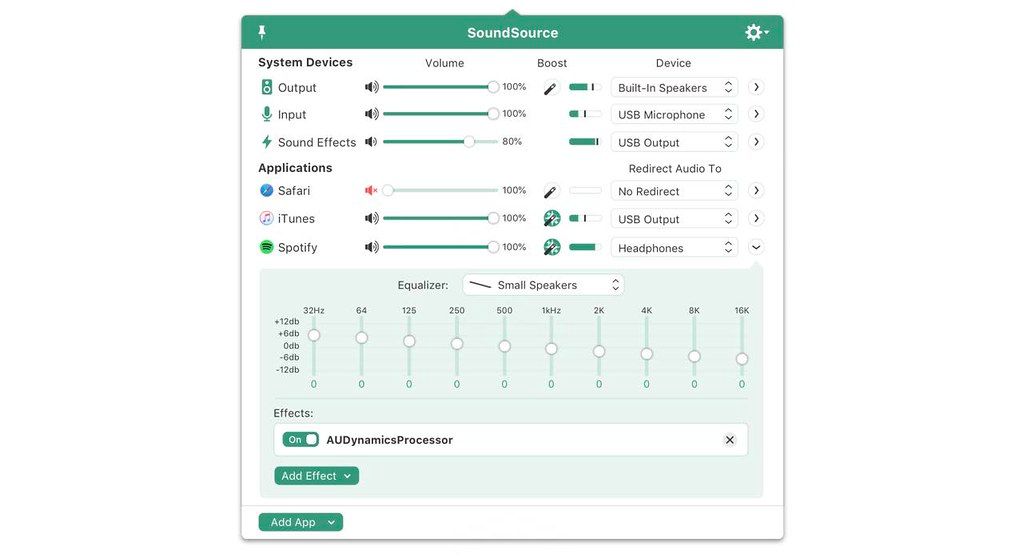
SounceSource lets you adjust your input, output, and sound-effects devices and volume settings in mere moments, right from the menu bar...
- Intel, 64-bit processor
- macOS 15.0 or later
Description
SounceSource lets you adjust your input, output, and sound-effects devices and volume settings in mere moments, right from the menu bar. Enable soft play-thru of input devices to your desired output, so you can hear sound coming in through any microphone or other source. With SoundSource, you get fast access to your Mac’s most important audio settings.
• Instant Audio-Device Switching – With just two clicks, you can switch the audio devices your Mac is using for input, output, and even sound effects.
• Fast Volume Control – SoundSource provides easy access to the volume controls for your audio devices as well.
• Audio Play-Thru, Too – SoundSource’s Play-Thru window makes it easy to monitor the audio coming from any input device.
• Comprehensive – SoundSource gives you one place to go for all Mac’s most important audio controls.
• At Your Fingertips – With SoundSource running in your menu bar, your audio controls are always available.
• Lightweight – When you don’t need SoundSource, it stays out of your way.
WHAT’S NEW
Version 6.1.0:
• An Optional Quick Config Menu Bar Icon — Access your quick configs right from the menu bar, by toggling on “Show Quick Configs in Menu Bar” in the “Manage Quick Configs” sheet.
• Updated Volume Pips in the Menu Bar — The volume indicator in the application’s menu bar has been updated from sometimes-confusing dots to aesthetically-pleasing bars.
Bluetooth Refinements
Several enhancements have been made for Bluetooth devices.
• Multiple changes have been made to reduce glitches and dropouts.
• Device iconography has been updated for several Apple and Beats devices, including AirPods 4 (with ANC), and Beats Pill.
• Unnecessary drift correction is no longer applied to Bluetooth devices, resulting in fewer glitches.
• SoundSource now only shows Bluetooth devices that are either already connected, or available to be connected to, rather than all paired devices.
Audio Unit Refinements
Enhancements have been made for Audio Unit effect






Screenshots