PowerPhotos
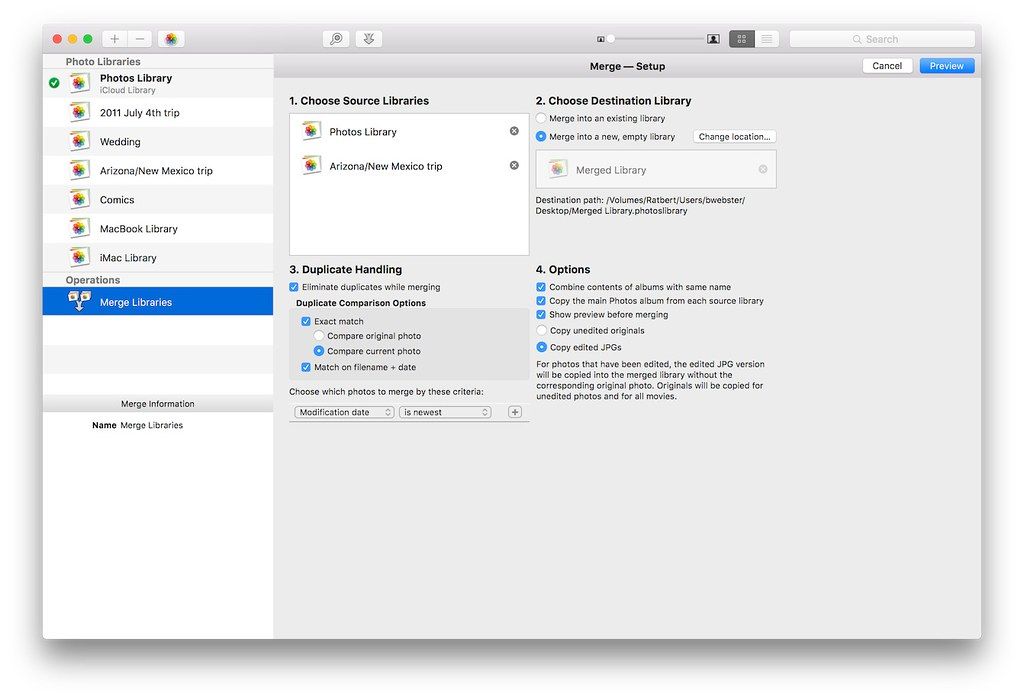
PowerPhotos allows you to break up your Photos.app images among multiple Photos libraries, rather than having to store all of them in...
- Intel, 64-bit processor
- macOS 14.0 or later
Description
PowerPhotos allows you to break up your Photos.app images among multiple Photos libraries, rather than having to store all of them in one giant library. You can easily switch between libraries, or just browse the photos in your libraries directly from PowerPhotos, without having to open each library in Photos.
PowerPhotos also supports searching across all your libraries at once to help track down a particular photo. If you use iCloud Photo Library to sync photos with your other devices, splitting up your library can help save on iCloud storage costs.
Use a single library to hold a smaller collection that you sync with iCloud, while keeping the bulk of your photos in separate libraries so they don’t take up space on iCloud. PowerPhotos can analyze your libraries for duplicate photos, showing them to you side-by-side and letting you get rid of extra copies of photos that you no longer need.
WHAT’S NEW
Version 3.4.8:
• Undoing a library deletion now also moves the library back out of the trash.
• When dragging multiple libraries from the Finder to the library list, if some of the libraries are already in PowerPhotos, they will now be moved to the drop location along with any newly added libraries.
• Pressing option + up/down arrow in the photo browser no longer causes a crash.
• Fixed the help link in an alert shown when copying into your iCloud library.
• You can now cancel an in progress submission from the Contact Support window.
• Clicking the “X” button to dismiss viewing a full
size
photo now works properly on macOS 27.
• The duplicate browser now remembers its zoom setting between sessions.
• Fixed a crash that could occur with certain libraries that contained an invalid file
size
for a photo.
• Improved duplicate analysis to avoid Photos returning errors when trying to retrieve image data from an optimized iCloud library.
• Fixed a problem where copying certain photos/videos edited by a third party plugin would fail in combination with disabling the “
Editor-checked details
Best for users managing multiple Photos libraries that need merging, duplicate detection or batch organization. A single-library user may be served by Photos alone. Details were checked against Fat Cat Software’s downloads, help and release notes.
Pros
- Manages, searches and merges multiple Photos libraries.
- Includes duplicate finding, metadata editing and batch export.
- Supports both Intel and Apple Silicon Macs.
Cons
- The current version requires macOS 14 or later.
- Merge and deletion operations require a reliable backup.
- Initial indexing can take time on very large libraries.
Installation steps
- Installation steps:
- Unzip the downloaded PowerPhotos archive.
- Drag PowerPhotos to Applications.
- On first launch, grant Full Access under Privacy & Security > Photos.
- Create a separate library backup before merging or deleting photos.
Uninstallation steps
- Quit PowerPhotos.
- Move PowerPhotos from Applications to the Trash.
- Optionally revoke Photos access in System Settings.
- Removing the app does not automatically delete photo libraries; manage library files separately.
Common errors and fixes
- Library not visible: grant PowerPhotos Full Access to Photos and reopen it.
- External library cannot be added: official documentation warns against ExFAT; prefer APFS or Mac OS Extended.
- Cannot delete from a non-system library on macOS 15.2: update to 15.3 or later.
- Large search or merge appears stuck: let indexing finish and verify free local storage and backups.
What changed in this version
- No verifiable itemized 3.4.2 note is public. Record version/SHA-256 and retest library connection, duplicate detection, merge/copy, metadata, permissions and Photos round-trip.






Alternatives

Screenshots