Exhibeo
Exhibeo creates stunning, modern, and responsive HTML5 image presentations for the web. And fast! It's a Mac app for web designers...
- Intel, 64-bit processor
- macOS 10.13 or later
Description
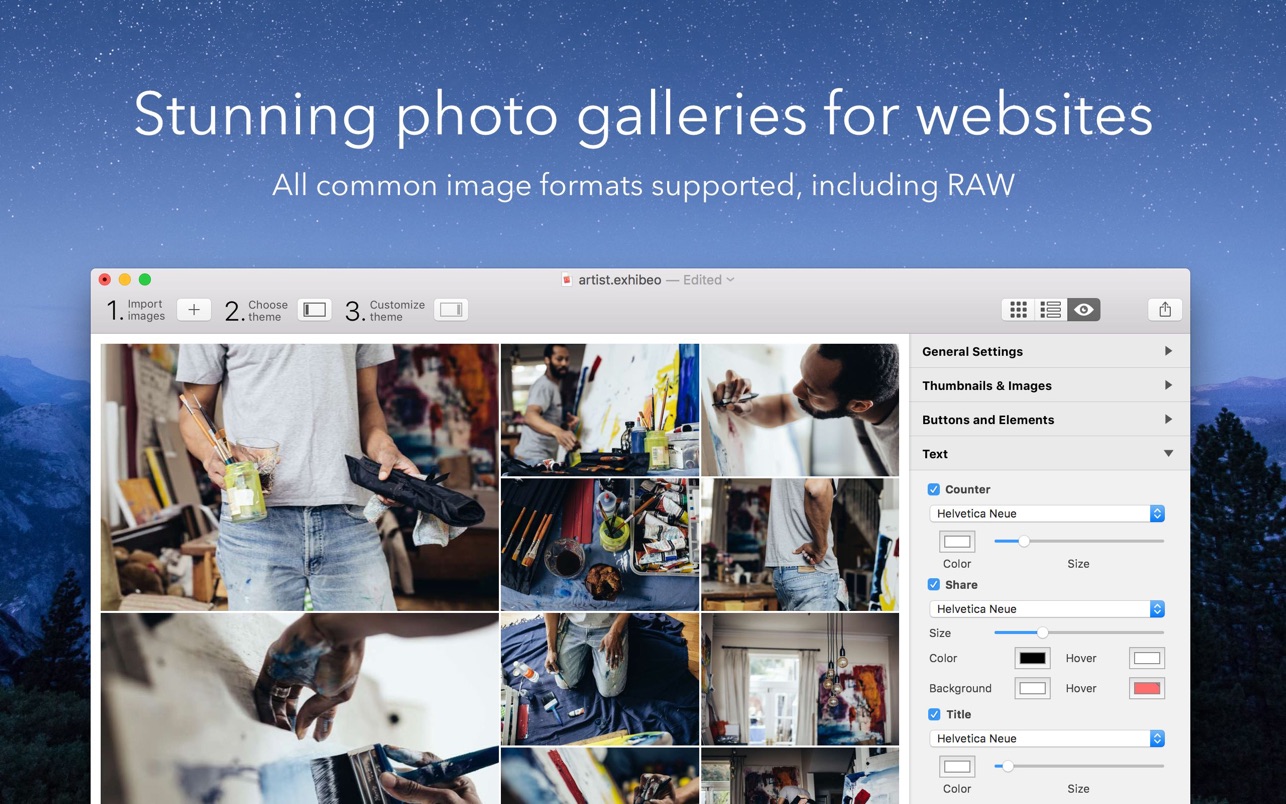
Exhibeo creates stunning, modern, and responsive HTML5 image presentations for the web. And fast! It’s a Mac app for web designers, developers, and creatives to build HTML5 web galleries and slideshows. Just add your images, change some settings (if you want to), and out they pop!
Exhibeo supports regular web graphics (PNG, JPEG, and GIF), as well as Photoshop, TIFF, RAW, and a whole bunch of other file types. Exhibeo comes with a bunch of themes for all kinds of purposes. Some are fixed, but most are responsive, meaning they look great wherever they’re viewed” on a smartphone, tablet, or desktop.
You know that moment when you swipe an image on your iPad, only to find nothing happens? Well, that doesn’t happen here. If you see back or forward buttons, you can swipe it!
It doesn’t matter whether you’re building your site in a text editor, Freeway, or any other web design application. Just export as HTML, copy/paste the resulting code into your web page, and place the files on your server. Of course, Freeway users get it easy. The provided Freeway Action will do all the work for them.
WHAT’S NEW
Version 2.0.14:
• Updated age ratings
REQUIREMENTS
• Intel, 64-bit processor
• macOS 10.13 or later
ScreenShots
If you are using Adblocker!! Please support this website by adding us to your whitelist. Ads are what helps us bring you premium content! Or read this to know how you can support us. Thank you!
•
Size
– 12.4MB
Previous Versions
Editor-checked details
Recommended for photographers, illustrators, small businesses and groups with an existing static site, Xway/Freeway project or ordinary host who need a portfolio, product gallery, event album or lightweight story slideshow. Use: archive originals read-only; convert to sRGB, correct orientation and remove private metadata upstream; build a ten-image prototype; lock one theme/crop rule; write meaningful captions/alt; export to a versioned directory; test local HTTP and staging HTTPS on mobile, keyboard, slow network and console; run Lighthouse plus manual WCAG checks; deploy atomically with rollback; retain project/HTML/manifest. Compare RapidWeaver, Sparkle, EverWeb, Bootstrap Studio or Flux for full sites, and a professional DAM/dynamic gallery platform for living collections. Never overwrite the live directory directly—publish a versioned path, validate every embed, then switch links.
Pros
- Responsive web galleries can be built without writing JavaScript. Seven themes cover lightbox, thumbnails, slideshows and narrative displays for photography, illustration, products and groups. It imports common web media plus PSD, AI and RAW, exposes metadata, replacement and archives, with passthrough when originals are desired. Captions, animation and theme options live in a low-friction visual interface. Output is deployable static HTML/CSS/JavaScript with no database/runtime, suitable for ordinary hosting, CDN and offline use, or Xway/Freeway components. The official 2.0.14 includes native Intel and arm64 and reaches back to macOS 10.13, useful for maintaining legacy galleries. It is a purchase rather than a hosted-content lock-in.
Cons
- It is a focused gallery generator, not a full site/CMS, RAW developer, DAM, store or multi-author workflow. Navigation, forms, search, permissions, comments, dynamic data and deployment need a host tool or code. Seven themes offer less brand-system, component-framework, headless CMS and responsive control than modern builders/custom frontends. PSD/AI/RAW import does not preserve full layers/rendering; web delivery still needs rasterization, compression and sRGB checks. Static output leaves security, cache, CSP, CDN, paths, SEO, alt text, keyboard/screen-reader access and performance to the publisher; visual defaults do not prove WCAG compliance. Metadata can leak GPS/author/device details. No detailed 2.0.14 changelog is public, so lock project/export/theme versions and run visual regression. Aging theme JavaScript may conflict with future browsers/CSP; retain replaceable originals and a manifest.
Installation steps
- Exhibeo 2.0.14 officially requires macOS 10.13+; inspection of the official package shows a Universal Binary with x86_64 and arm64, so Intel and Apple silicon run natively. Put the app itself at `/Applications` before launch/activation to avoid macOS translocation from a download or wrapper folder. Build a copied 10–20 image test with landscape/portrait, transparent PNG, PSD/AI, RAW, long names and EXIF. Choose Focus, Bloxx, Photoswipe, Showtime, Slide or Thumblie and configure crop, animation, captions, thumbnails and passthrough. Export for Xway, Freeway or standalone HTML. Before publishing, test from a local web server and real HTTPS subdirectory for relative paths, case sensitivity, mobile touch, keyboard, slow network, no-JavaScript fallback and console errors. Finish color, orientation, private metadata and sizing upstream; Exhibeo is not a RAW developer.
Uninstallation steps
- Before uninstalling, retain the native Exhibeo project/archives, complete exported folder and every original image. HTML output is not a project backup: theme parameters, order, captions, metadata and replacements needed for editing may live only in the project. Create a manifest with theme, Exhibeo version, target, embed code, source/license, filenames, dimensions, alt/captions, hashes and publish date. Open an offline copy and verify HTML, CSS, JavaScript, thumbnails, originals and third-party resources are present; then copy to a second medium and version control. For galleries embedded in Xway/Freeway/a CMS, also save the host project and deployment path plus responsive reference images. Prove re-export on a new Mac/clean folder before deactivation/removal. An App Store receipt or serial restores software, not galleries.
Common errors and fixes
- Activation/update errors: place the app itself directly in `/Applications`, not Downloads or a wrapper folder; macOS translocation can run it from a randomized path. A gallery that works via double-click but 404s on hosting usually has case-sensitive filename, relative/base path, subdirectory or incomplete-upload errors; test over HTTP, not `file://`. Blank/static galleries require console checks for JavaScript, CSP, mixed content, CORS, missing resources and duplicate libraries from the host. Wrong orientation/color can come from RAW/EXIF orientation, ICC or browser decoding; prepare sRGB JPEG/PNG copies and remove private GPS. For slow mobile load, reduce pixels/quality, create thumbnails and never passthrough RAW/PSD/huge originals; throttle the network. Crop behavior varies by theme/aspect ratio, so inspect each breakpoint. After Xway/Freeway changes, re-export/replace the complete component and clear browser/CDN cache. Version 2.0.14 needs 10.13+; use the official legacy branch for 10.10–10.12.
What changed in this version
- The official Exhibeo 2.0.14 package matches the site version, but Softpress does not publish an itemized 2.0.14 changelog, so only verifiable Exhibeo 2 capabilities are recorded. The second generation redesigned the interface/output workflow, imports web graphics, PSD, AI and RAW, added Photoswipe, and updated most themes with customization and animation. Seven themes cover portfolio, product and group galleries. Other verified additions include passthrough images, improved image editing, archives, metadata import/view, image replacement and simpler output to standalone HTML or Xway/Freeway components. The official 2.0.14 binary is universal x86_64/arm64 and requires macOS 10.13; legacy 2.0.11 serves 10.10–10.12.






Alternatives





Screenshots