Bootstrap Studio
Bootstrap Studio is a desktop application that helps web developers and designers create responsive websites using the Bootstrap...
Description
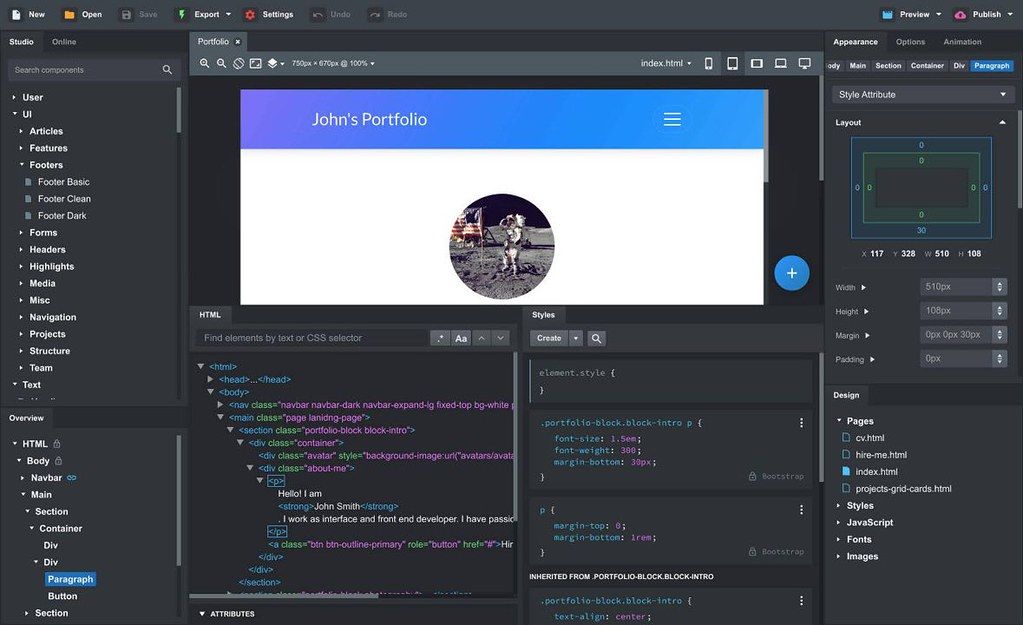
Bootstrap Studio is a desktop application that helps web developers and designers create responsive websites using the Bootstrap framework. It supports a wide range of components and advanced features that make you more productive. It has a clean and intuitive interface and makes it easy for anyone to create a beautiful web page only with drag-and-drop.
WHAT’S NEW
Version 6.4.1:
• Release notes are available here .
REQUIREMENTS
• Intel, 64-bit processor
• macOS 10.12 or later
ScreenShots
:
If you are using Adblocker!! Please support this website by adding us to your whitelist. Ads are what helps us bring you premium content! Or read this to know how you can support us. Thank you!
Size
– 300.8MB
Previous Versions
Editor-checked details
Recommended for designers/frontend developers rapidly building Bootstrap marketing sites, showcases and interactive prototypes while reviewing exported code. Lock the Bootstrap major; version .bsdesign/custom assets; establish semantics/accessibility/performance baselines; export to a clean directory; diff manifest/hashes; run lint, HTML validation, axe/Lighthouse, link and browser tests; let scripts touch only temporary output; verify forms/CSP/cache in staging; deploy atomically and retain the prior release. Compare VS Code+Vite for code freedom/frameworks, Webflow for hosted visual work, Astro/Hugo/Eleventy for static generation, and Figma for collaborative design handoff—define source ownership, deployment and accessibility first.
Pros
- A visual component tree, Bootstrap options and CSS/SASS/JS editors combine responsive prototyping and static export in one design. Exported HTML/CSS/JS/images deploy to ordinary hosting without Bootstrap Studio at runtime. Breakpoint preview, reusable components, HTML/asset import, issue/SEO checks, image optimisation and canonical/sitemap settings suit small marketing sites and prototypes. Local/CDN libraries, minification, asset hashes and export scripts integrate with build workflows.
Cons
- Visual generation still needs engineering review: drag-and-drop does not guarantee semantic HTML, keyboard/ARIA accessibility, performance, SEO or security. The HTML view is generally not directly editable; complex work uses Custom Code, which is unparsed and can break export. Major-framework conversion may change classes, behaviour and layout and should not be assumed reversible. Editing exported HTML creates a second source that a re-export can overwrite. CDN, Google Fonts, Reflow, forms and third-party scripts add privacy, availability and supply-chain dependencies. It is a static frontend tool, not a backend, database, identity system or full CMS; ecommerce/forms need separate security review.
Installation steps
- The site build is Bootstrap Studio 6.4.1, requiring macOS 10.12+ and a 64-bit processor. An Apple-silicon build existed by 6.3, so verify the actual package architecture on M1/M2/M3/M4. Back up .bsdesign files, exported sites, user components, CSS/SASS/JS, fonts, images, forms/Reflow configuration, publish targets and licence; record each design’s Bootstrap major version. Framework conversion is one major at a time and must be rehearsed on a copy. Verify provenance/SHA-256, place the app in Applications and start with a blank design and a copied project. When importing HTML, inspect discovered assets and deselect duplicate Bootstrap, jQuery or animation libraries; Custom Code is neither parsed nor validated. At every breakpoint test DOM order, heading semantics, keyboard focus, labels, alt text, contrast, navigation, Toast/Modal/Dropdown/Carousel and mobile layout. Test JS in Browser Preview because it does not run on the design canvas. Define local/CDN libraries, minification, absolute paths, asset versioning, SASS source, unused images, sitemap/Website URL and hidden pages. Export to a clean folder, then lint HTML/CSS/JS and test accessibility, links, performance and browsers before deployment. Run export scripts with least privilege, no interactive waits, and inspect error.log.
Uninstallation steps
- Before removal, preserve all source/read-only .bsdesign files, final export, Git commit, dependency/font/image licences, environment variables, form endpoints, publish settings, export scripts, domain/CDN/DNS data, user components and SHA-256. Open a representative design in a clean account or another Mac and re-export; compare manifest, hashes, page count, CSS/JS order and key renders, and prove the deployed site does not require the app. Quit and trash Bootstrap Studio. The official macOS reset path is `~/Library/Application Support/bstudio`: rename it as backup first and retain userPackages; delete only after designs/components/settings/licence are recoverable. Revoke file/network access and publishing credentials and rotate secrets embedded in scripts/configuration. Uninstallation does not retract deployed files, form services, CDN caches or DNS; handle those through release rollback.
Common errors and fixes
- For broken/duplicate exported CSS or JS, do not re-add Bootstrap JS or old-version jQuery that the app manages; inspect include order, page visibility, CDN reachability, relative/absolute paths and minification. JS does not run on the canvas—use Browser Preview and browser Console/Network. Custom Code is not parsed or validated, so check closing tags, CSS scope, execution timing and CSP. Version 6.4.1 fixes the wrong Toast appearing from a trigger; confirm the exact build and unique targets/ids. It also fixes missing context menus for hidden components. Failed image/CSS import requires valid CSS, supported format, permission and case-sensitive filenames. A hanging export script must not wait for input; destination is argument 1—check executable bit, shebang, quoting, exit code and error.log. For stale production assets, use asset versioning or purge CDN. Responsive defects require DOM/container/row/column/breakpoint/specificity review. For forms/publishing, inspect endpoint, CORS, HTTPS, SFTP permission/credentials and never export secrets client-side.
What changed in this version
- Bootstrap Studio 6.4.1 fixes a trigger button showing the wrong Bootstrap Toast and hidden components not showing context menus, plus minor fixes/improvements. The 6.4 baseline already includes ecommerce account/order/settings components, canonical-link export, HTML-import improvements and design issue checks. Later 6.4.2 colour modes and Bootstrap 5.3-series updates do not belong to 6.4.1.
File verification






Screenshots