Couverture
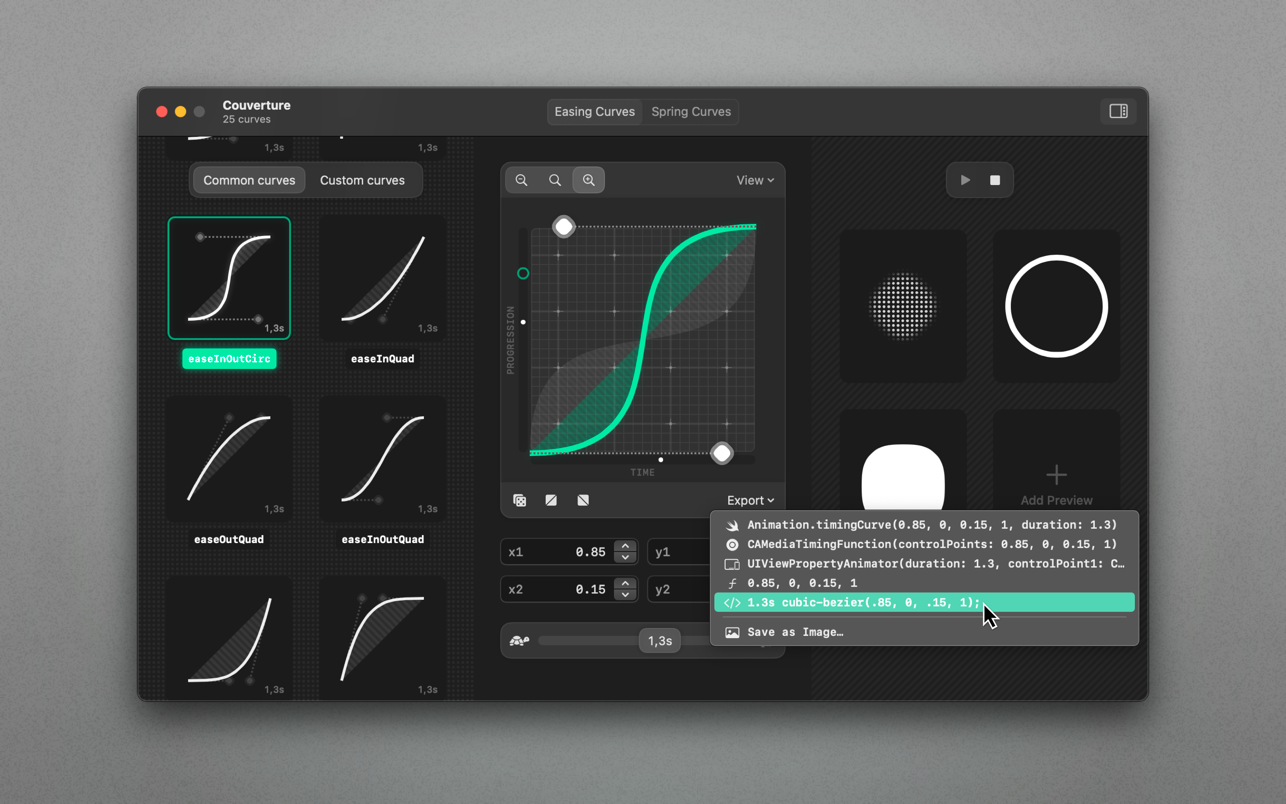
Couverture is a spring and easing curve editor that enables you to supercharge animations in apps, websites and prototypes. Spring...
Description
Couverture is a spring and easing curve editor that enables you to supercharge animations in apps, websites and prototypes.
Spring, Easing or Timing Curves are made to specify the rate of change in an animation over time. Couverture lets you manage, edit and preview those curves in realtime. It is a powerful way to create sophisticated animations for your creative projects.
Highlights :
• Top-notch spring and easing curve editor
• Store, manage and export curves
• Preview animations in realtime
• Ready-to-go: Ships with 24 easing curves and 13 spring curves
• Curve Export as: SwiftUI, CoreAnimation, UIKit, CSS, Image (PNG), float literals. Floats are compatible with most design tools that support timing curves (like Figma, After Effects, Motion)
• macOS Shortcuts support
• Optimized for macOS 12+
• Optimized for Mac with M1 (Apple Silicon)
Here’s Why You Need It :
Great animations are the couverture in the design of top-notch user interfaces, websites and apps. Couverture ships with a great collection of well-defined spring and easing curves. Store and manage your custom designed curves right within the app. Export them as code snippet for a variety of programming frameworks.
Generate curve-based CSS Keyframe Animations or save curves as Image files. Magic begins with the insanely playful animation preview. It pushes you to create never-seen-before, more interesting animation curves. They will set your creative work apart.
Privacy :
I, the developer, believe in privacy as a human right. Couverture does not collect analytics data. All of your data remains offline, on your device, where it belongs.
WHAT’S NEW
Version 1.1.6:
• Impressive new Spring Curve Editor
• Create, manage, export and preview Spring Curves
• Use sophisticated CSS spring animations on the web with the exciting new CSS Keyframe Generator
• Share Easing and Spring Curves as image to ease communication between designers and developers
• Previews are now resizable and even more enjoyable
•
Editor-checked details
Recommended for product designers, Apple-platform developers and frontend teams turning motion guidance into executable parameters. Define animation semantics (enter, exit, confirm, interrupt); duplicate a built-in curve; preview at realistic dimensions; record easing control points/duration or complete spring parameters/termination; export to a minimal target-framework project; test repeated input, cancellation, reversal and slower hardware; provide Reduce Motion behaviour; obtain joint design/development approval; preserve semantically named JSON, code, PNG, capture, test matrix and SHA-256. Store curves as design tokens in the repository, not only in one person’s app. Use After Effects, Motion or Lottie tooling for complex timelines/vector animation, Figma/ProtoPie for interaction prototypes, and easing.tools or browser developer tools for quick web comparison.
Pros
- It turns abstract easing and spring parameters into observable motion and exports SwiftUI, CoreAnimation, UIKit, CSS, PNG and generic floats, reducing vague designer–developer handoff. Twenty-four easing and thirteen spring curves provide baselines before saving team collections. The CSS Keyframe Generator approximates spring motion on the web; whole-collection JSON supports versioned archives and migration; PNG supports design review. Data remains offline and the developer states no analytics are collected. macOS Shortcuts can streamline personal exports, while M1/macOS 12+ optimisation suits modern Macs.
Cons
- Preview is not the runtime. Framework parameter semantics, solver, duration, refresh rate and layout load alter results, and the same floats are not guaranteed to match across Figma, After Effects, Motion, CSS and native APIs. CSS springs are discretised into keyframes, potentially increasing stylesheet size, with cancellation, reversal and interactive interruption less natural than a native solver. Attractive overshoot is not appropriate for every component; text, destructive actions, scrolling and motion-sensitive users may require restraint. The tool does not judge vestibular risk, Reduce Motion, touch feedback, business state or performance budget. PNG cannot restore exact parameters, while JSON and generated code still need version control and review. It is a curve editor, not a full prototype, timeline, Lottie or interaction-state system.
Installation steps
- The site build is Couverture 1.1.6. The channel minimum is macOS 10.12, while the product description separately says it is optimised for macOS 12+ and M1; validate older systems and each architecture. Duplicate built-in curves rather than editing the only baseline. Build a component matrix covering translation, scale, opacity, colour, list insertion, modal presentation and interrupted gestures; test at 60 Hz/high refresh, Reduce Motion, low power and on a slower device. For easing, record control points and duration. For springs, retain mass/stiffness/damping or the complete exported parameter set, initial velocity, tolerance and termination rule. Realtime preview is only a first pass: paste SwiftUI, CoreAnimation, UIKit, CSS or float output into a minimal project and run it. Inspect generated CSS keyframes, frame count, payload and browser behaviour. Test cancellation, reversal, repeated input, layout change and a Reduce Motion fallback. Export the whole collection as JSON and a PNG for design communication, re-import on another Mac, and record name, framework, parameters, devices, approval date, size and SHA-256.
Uninstallation steps
- Before uninstalling, use the 1.1.6 JSON feature to export every collection. For each production curve also preserve target-framework code, original control points/spring parameters, PNG reference and a capture of actual motion. Archive semantic name, duration, tested component, Reduce Motion fallback, design/development approval, browser/OS matrix, generator version and SHA-256. Re-import JSON on another Mac and rebuild key animations in minimal SwiftUI/UIKit/CoreAnimation/CSS projects to prove there is no container dependency. Quit and remove the app, but inspect its container, preferences, Shortcuts and caches for unique curves first. Removal does not erase values pasted into source, Figma, After Effects, Motion, documentation or repositories; retire those through design-system versioning and code review.
Common errors and fixes
- If preview is smooth but production differs, preview size, refresh rate and framework solver are different; reproduce identical duration, parameters, endpoints and real layout on the target device. For huge or janky CSS spring output, inspect keyframe count and decimal precision, reduce unnecessary sampling, and profile compositing/CPU in major browsers. If SwiftUI/UIKit/CoreAnimation outputs differ, do not copy merely similar-looking values; verify API semantics, units, initial velocity and duration. For lingering oscillation, increase damping or adjust termination tolerance and check overshoot bounds. Repeated input should cancel/retarget from the current presentation value rather than restart from a stale state. Under Reduce Motion, provide opacity, instant state or shorter travel. If JSON will not import, preserve it, confirm 1.1.6 provenance and unmodified structure, and isolate a single collection. PNG communicates shape but is not an implementation parameter.
What changed in this version
- Couverture 1.1.6 carries the official “1.1 — It’s spring time!” changes: a new Spring Curve Editor for creating, managing, exporting and previewing springs; a CSS Keyframe Generator for web spring animations; image sharing for easing and spring curves; resizable previews; JSON import/export of entire collections; and improved performance. This page is limited to those verifiable 1.1.6/1.1 items.
File verification






Alternatives

Screenshots