Adobe XD
Adobe XD (formerly known as Adobe Experience Design CC) aims to provide full support to UX designers that are trying to improve the way in which...
Description
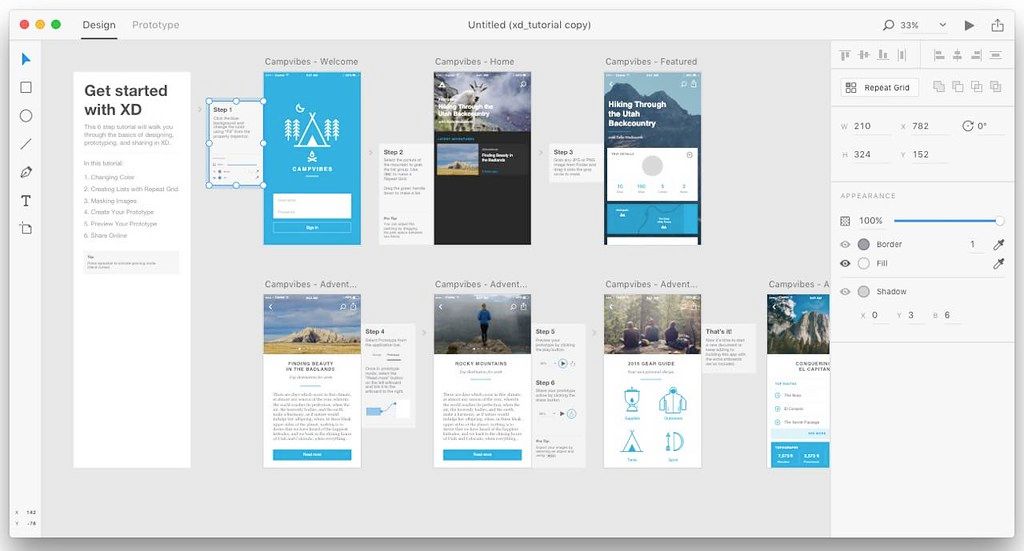
Adobe XD (formerly known as Adobe Experience Design CC) aims to provide full support to UX designers that are trying to improve the way in which users interact with their product. The app allows you to develop both websites and mobile apps and helps you test the outcome and generate prototypes.
UX design tool that can help you develop projects for specific devices
Right off the bat, Adobe XD CC makes you decide if you want to develop projects for iPhone, iPad or web. In addition, you can opt for custom
size
boards. However, within the designer area, you can add artboards of various
size
s.
The Adobe XD CC user interface is separated in two main tabs: one that allows you to deal with the design aspect of your project, and the other to help you configure the associated prototype.
Adobe XD CC permits you to test the outcome in a separate window, and you get to both interact with and record the activity and share the capture with your client or other team members.
Manage your design projects with intuitive drag and drop movements
Within the Adobe XD CC canvas area, you get to add new elements with the help of basic vector drawing tools, combine them any way you like, import images with simple drag and drop actions, create wireframes, and so on.
The same rules apply when adding interactions and animations to your project in the prototype area. Just establish connections between your artboards using the mouse, and employ the contextual menu to manage the animations.
Worth mentioning is that, since the Adobe XD CC project is still under heavy development, some of the editing functions one would expect are not yet included, but working with the application is quite intuitive.
Share your project’s prototype via the Adobe Creative Cloud
Adobe XD CC allows you to export your project’s design to a PNG image file, or you can record your interaction with the prototype to an MOV video file.
Nevertheless, you can also use your Creative Cloud account to share the pro
Editor-checked details
Recommended for maintaining existing `.xd` projects and Adobe-oriented teams doing UI design, interaction prototypes, client review and developer inspection. Before a new project, prove that every participant can install a compatible build, open cloud documents, access fonts/libraries and publish links. Compare Framer when collaboration and a modern design-system workflow are central, Axure RP for complex business flows/specifications, Principle for focused microinteraction demos, and MockFlow for wireframes. Use: requirements/user tasks → low-fidelity flow → naming/component library → accessibility review → prototype review → developer specs → coded implementation → device acceptance. At every milestone preserve a local `.xd`, exported assets, key-flow PDF/video and link inventory. Components should document states, spacing, breakpoints, empty/error/loading behavior and keyboard focus—not only ideal screens. After implementation, compare spacing, typography, color, responsiveness, touch targets, errors and accessibility page by page rather than treating a prototype link as acceptance.
Pros
- Vector design, artboards, components, states, prototype interactions, preview, review and developer specs share one lightweight interface; Repeat Grid, Stacks, padding, Responsive Resize and component states accelerate repeated UI maintenance; Auto-Animate, overlays, scrolling, drag, time, voice and gamepad triggers make expressive demos; cloud coediting, comments, version history and share links support remote teams; developer links expose dimensions, spacing, colors and fonts plus multi-scale asset downloads; natural Photoshop, Illustrator, After Effects, Creative Cloud Libraries and plug-in integration; native Apple-silicon execution.
Cons
- Version 44.0.12 is old enough that modern macOS, cloud services, browsers and newer plug-ins can differ in compatibility; collaboration, fonts, libraries, publishing and comments depend heavily on Adobe ID, networking and online services, limiting offline handoff; `.xd` files, cloud documents and share links need layered backups because history alone cannot cover ownership changes or dead links; prototypes simulate behavior but do not generate production semantic front-end code or validate performance, keyboard navigation, screen readers, live data and backend states; complex documents can sync slowly, break component links or shift fonts; auto-layout, variables, conditional logic and modern design-system governance are constrained by this generation; plug-in permissions and longevity require review.
Installation steps
- Adobe XD 44.0.12 supports Intel Macs. XD 42 and later run natively on Apple silicon, so M1/M2/M3/M4 should use the native path. For this generation, use macOS Big Sur 11.3.1 or a compatible environment, at least 4 GB RAM and a 1400×900 workspace; 8–16 GB is more practical for large cloud documents, many artboards and libraries. Install through Creative Cloud and sign in, then verify networking, cloud documents/Creative Cloud Files and font sync. Save a local `.xd` copy before opening a team file and enable only trusted plug-ins, one at a time. Define Web/iOS/Android artboards and export scales plus consistent color profile, grids, component/state/token naming. Before publishing, test Preview, Share for Review and Development links, then use a signed-out browser and real phone to inspect permissions, scrolling, overlays, Auto-Animate, fonts and downloadable assets.
Uninstallation steps
- Before uninstalling, save every important cloud document as a local `.xd` file and actually open it on another device or isolated folder. Also export SVG/PDF/PNG/JPG assets, design specs, font list, color/character styles, component states, interaction-flow screenshots, comment decisions and an inventory of published links. Cloud version history and shared links are not independent backups; preserve library source documents, linked components and external images separately. Record plug-in names/versions, UI kits, Creative Cloud Libraries, font licenses, permissions and collaborators. Before handoff, remove private comments, test credentials and sensitive copy, then transfer ownership/permissions. Uninstall through Creative Cloud without deleting `.xd` files, exports or backups. For troubleshooting, disable plug-ins, reset Preferences, pause font sync and duplicate the affected file; after reinstalling, validate local open/save, cloud sync, component update, Preview, Share and export before touching the sole original.
Common errors and fixes
- For Apple-silicon launch crashes or plug-in faults, confirm the native 44.0.12 build, remove forced Rosetta settings, disable old Intel/incompatible plug-ins and reset Preferences; XD 42+ is native. For cloud-document errors, stalled sync or error 2162 after going offline during an image upload, do not overwrite the original: Save As a local copy, restore connectivity, upload the image again and inspect version history. If components report “Library is missing” or appear unlinked, the 44 line fixed false missing-library messages and local copies that were still linked but looked unlinked; verify source-library permission, publish state, Adobe ID and network, then update in a copy. For 44:xx/55:xx sharing failures or dead links, check Adobe status, proxy/firewall, permissions and whether the link was deleted; avoid bitmap artboards over 64 million pixels and republish a new link if required. For missing fonts/layout shifts, preserve exact PostScript names/licenses and recheck every artboard after sync/replacement. Allow Auto-Play for xd.adobe.com in Safari when prototype sound does not play, and also test Chrome/mobile. Export in XD sRGB mode and verify color in Photoshop if PNG/JPG profile tags appear odd.
What changed in this version
- Adobe XD 44.0.12 is a stable 2021 build in the version-44 line. A notable change is progress feedback while assets download from development-spec links, after which inspection and artboard navigation can continue. It retains native Apple-silicon support, cloud documents, coediting, selected-artboard sharing, component states, Stacks, Scroll Groups, Responsive Resize, 3D Transform, Auto-Animate, voice/keyboard/gamepad triggers, design-system libraries and developer specs. Maintenance in the 44 line also fixed a bare “Library is missing” message for components from the same cloud library and local component copies that remained cloud-linked but appeared unlinked in Document Assets. Its value is a steadier design–prototype–review–developer-handoff workflow, not a substitute for production front-end implementation or real-device usability testing.






Alternatives




Screenshots