WidsMob Screen Recorder
WidsMob Screen Recorder is an easy and professional method to record videos, capture audio and take snapshots of onscreen activities on Mac. It is a...
軟體介紹
WidsMob Screen Recorder is an easy and professional method to record videos, capture audio and take snapshots of onscreen activities on Mac. It is a versatile game recorder, webcam capturer, YouTube video recording app, audio extractor, etc. Moreover, it also enables you screen selecting, mouse recording, panel drawing, video/photo editing, and other excellent features
Record Screen Video
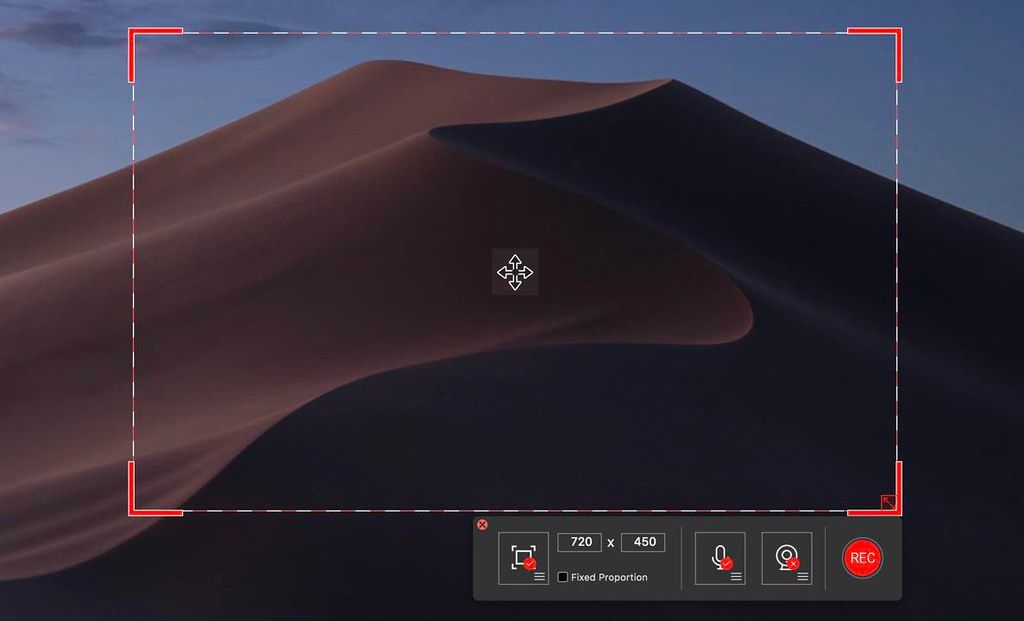
Record all onscreen activities on Mac, such as gameplay, YouTube video, podcasts, webinars, presentations, Skype calls, online meeting, webcam videos, etc. Capture screen in a custom screen
size
, in a full screen or other fixed regions. Set a fixed proportion to custom screen
size
. Follow mouse to record some specific windows. Set hot keys to record online screen videos with ease.
Audio Recorder
Record online streaming audio, system audio and microphone audio.It enables you to record music, presentation audio, game commentary, oral explanation and more other audio files. Moreover, it also helps you extract audio from vide. Access to recorded audio files within a simple method. Adjust the Sample rate to the desired quality with ease.
Take Snapshots
Custom screens to take snapshots with mouse cursor or manually adjust the screen
size
. Add lines, rectangle, circle, arrow, draw pencil and more other elements. Adjust the
size
and color of these elements. Moreover, it enables you take some important
screenshot
when recording the video files.
Make Annotation
Whether take a screen video or a
screenshot
, the program has multiple annotation tools to add line, circle, rectangle, callouts, arrow, pen, markpen and more. If there is any mistake, the program is able to undo or clear the action. It also enable you adjust the color and
size
of these elements to get a desired result.
Easy Interface
One click to record videos, capture audio files and take snapshots. Set up hotkeys to start recording, stop recording, pause/resume recording and capture screen. It has mouse recording features






截圖預覽