SuperDuper!
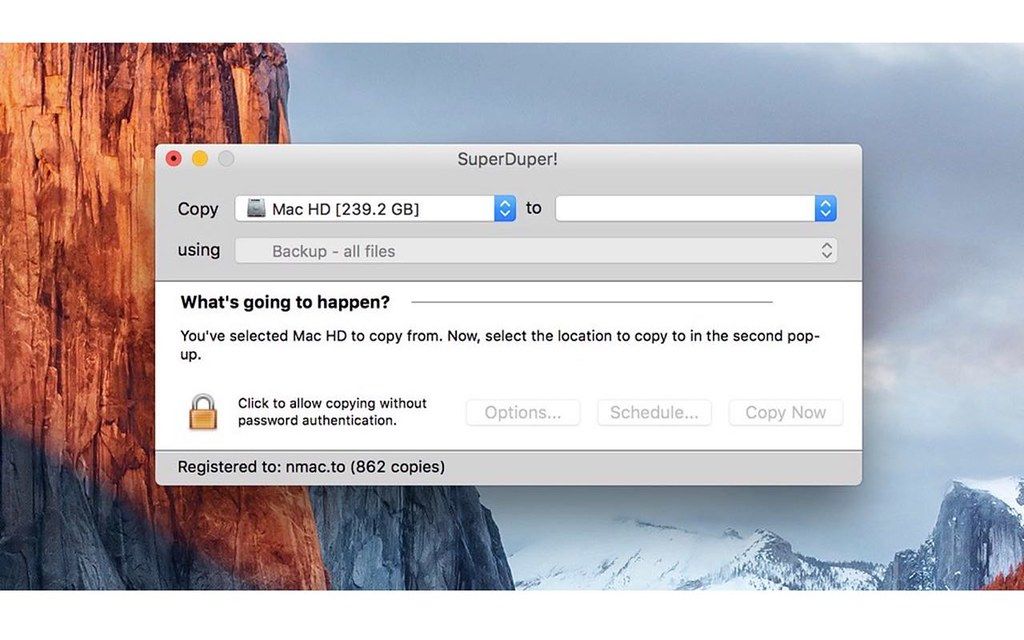
SuperDuper is an advanced, yet easy to use disk copying program. It can, of course, make a straight copy, or "clone" -- useful when...
- Intel, 64-bit processor
- macOS 14.0 or later
軟體介紹
SuperDuper is an advanced, yet easy to use disk copying program. It can, of course, make a straight copy, or “clone” — useful when you want to move all your data from one machine to another, or do a simple backup. In moments, you can completely duplicate your boot drive to another drive, partition, or image file.
Clones for safety. To ensure you can safely roll back a system after the unexpected occurs. With a few clicks, you can easily “checkpoint” your system, preserving your computer’s critical applications and files while you run on a working, bootable copy. If anything goes wrong, just reboot to the original.
When you do, your current Documents, Music, Pictures — even iSync data — are available! You can get back to work immediately.
Clones for industry! SuperDuper has enough features to satisfy the advanced user, too. Its simple-but-powerful Copy Script feature allows complete control of exactly what files get copied, ignored, even aliased (“soft linked” for the Unix inclined) from one drive to another.
WHAT’S NEW
Version 4.0.7:
• Release notes were unavailable when this listing was updated.
REQUIREMENTS
• Intel, 64-bit processor
• macOS 14.0 or later
ScreenShots
If you are using Adblocker!! Please support this website by adding us to your whitelist. Ads are what helps us bring you premium content! Or read this to know how you can support us. Thank you!
•
Size
– 35.3MB
Previous Versions






截圖預覽