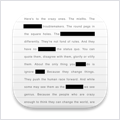
Black Out
Black Out 讓您能快速隱藏圖片中的敏感內容。當您想將含有某些不希望公開資訊的螢幕截圖或照片發布到網路上時,這項功能非常實用……
軟體介紹
Black Out 讓您能快速隱藏圖片中的敏感內容。當您想將含有某些不希望公開資訊的螢幕截圖或照片發布到網路上時,這項功能非常實用。此外,它還會移除所有中繼資料(例如照片拍攝的時間與地點)。Black Out 的設計刻意保持極簡:不具備調整或旋轉黑色遮罩方塊尺寸的功能。它的定位是協助您快速遮蔽敏感資訊的工具,而非用於精修圖片。若您需要更進階的功能,可使用 Preview 或其他圖形編輯軟體。
最新版本 2.3.1:本應用程式現需 macOS 13 或更新版本。macOS 12 相容的最後一版可從應用程式的官方網站下載。
系統需求:Intel 64 位元處理器;macOS 13.1 或更新版本。
螢幕截圖:若您正在使用廣告攔截器,請將本網站加入白名單以支持我們!廣告收入正是我們持續提供優質內容的關鍵來源!或閱讀相關說明,了解如何支持我們。謝謝您!
檔案大小:5.6MB;舊版下載
編輯核對資料
適合 screenshot/single photo/PDF first page 的 account、address、order、face、QR、location、notification。Minimum crop→original controlled copy→large solid box→corner/menu/sidebar/reflection/thumbnail/background 檢查→PNG 或 tested JPEG/HEIC→REDACTED name→metadata/OCR→Preview/Quick Look/destination preview→second review→isolated folder upload→SHA-256/reviewer/destination→original/clipboard/draft retention。Multipage/legal/bulk 改用支援 Apply Redactions/audit 的工具(如 Acrobat)。Advanced image 用 Preview/Acorn,automatic tool 仍需 human verify。
優點
- 專注 open-drag-export,降低忘記 overlay flatten/metadata removal 的機率。Solid cover 比 blur/pixelate 適合 privacy redaction,new file export 保留 original。EXIF/GPS stripping、PNG/JPEG/HEIC、Finder/Mail/Notes Quick Action/paste、Intel/Apple silicon、小容量都是優點。Developer 亦清楚說明 trade-off 與 older builds。
不足
- 只是 image redaction,不是 e-discovery/multipage PDF。PDF first page→PNG 會失去 searchable text、bookmark、form、signature、structure。無 OCR/batch/keyword/approval/audit/chain,漏遮是 human risk。Solid box 明顯且非 content-aware。Original、clipboard、cloud、mail/chat、backup 不會被刪,也不能 recall。Metadata 要 independent verify,Quick Action 受 Finder bug 影響,且要求 macOS 13。Medical/legal/financial 應用 audited true PDF tool 與 dual review。
安裝步驟
- 站內版本為 Black Out 2.3.1,官方要求 macOS 13;Sindre Sorhus 開發,支援 Intel/Apple silicon。它把敏感區以 solid black 覆寫到新 bitmap,並移除 metadata。用 fictitious data 測 window/Dock/Open/Open With/paste/Quick Action,完整遮住 text、QR、face、address、account、notification。輸出 PNG/JPEG/HEIC,original 隔離保存。以 Preview pixel zoom、exiftool/mdls 檢查 EXIF/GPS/camera/time,再做 OCR,確認 thumbnail/Quick Look/clipboard/share preview。PDF 只取 first page 並輸出 PNG,不是 multipage solution。分享前由第二人 full-image review。
解除安裝步驟
- 不需保存 editable project,應保存 audit evidence:final PNG/JPEG/HEIC、original hash、final SHA-256、date、reviewer、destination;original 放 encrypted/access-controlled storage,遠離公開同步。重做 metadata/OCR/thumbnail/Quick Look/full review。High sensitivity 時只 recapture 必要範圍,通常比大圖多個 box 安全。清 clipboard/share draft,確認 Mail/Notes/chat 未誤附 original。停用 Finder Quick Action 後移除 App。Uninstall 不會刪 shared file、original、mail、cloud、backup,需依 retention policy 處理。
常見錯誤及解決方法
- Box edge 要 pixel zoom 並留 margin,檢查 Retina、italic/underline、QR quiet zone、shadow。Blur/pixelate 可能可逆,不應取代 solid cover。Metadata 要查 new export 的 EXIF/GPS/XMP/IPTC,不要混淆 original/Photos version。PDF 是 first page only,需逐頁 rasterize/review 或用 true PDF redaction tool,不可只疊 removable overlay。Quick Action “Estimating” 是 Finder 問題,可改 main app/Mail/Notes 並確認完成;Tall image 亦用 main app。PNG=lossless、JPEG=compress、HEIC 要測相容。以 REDACTED 名和 isolated output folder 防止誤傳 original。
本次版本更新內容
- Official history 顯示 Black Out 2.3.1 於 2023-02-18 發布,明示變更只有 minimum macOS 13;website 保留 macOS 12 的 previous build。Core 是 solid black image cover、PNG/JPEG/HEIC export、metadata stripping、Finder/Mail/Notes Quick Action。Blur/pixelation 可能可逆而不支援。PDF 只用 first page 並輸出 PNG,不支援 reliable redacted PDF。本頁只對應 2.3.1。
檔案校驗與安全資訊






同類替代軟體


截圖預覽
